
The strongest Instagram post ideas for business combine useful education, visible proof, human moments, timely trends, and clear next actions. The ten ideas below turn that mix into a publishing system with formats, prompts, CTAs, cadence, industry examples, and repurposing paths.
Instagram passed 3 billion monthly active users in September 2025, while its advertising tools reached about 1.99 billion people worldwide by April 2026 (ProfileTree's Instagram business statistics). That reach makes Instagram valuable, but it also makes random posting expensive in time and attention. Businesses need a repeatable way to turn expertise, products, operations, and customer stories into content that earns discovery, saves, shares, DMs, bookings, or sales.
Every post should have a job: attract, teach, prove, convert, or build community.
The formats below pair each idea with a practical caption prompt, CTA, publishing rhythm, industry scenario, and route into TikTok, LinkedIn, Threads, or X. Trendy can support that workflow as a cross-format social media co-pilot, from Profile Audit and Trends & Ideas through Content Creation and Performance Analysis. Use the Trendy web app, or explore the Trendy iOS app and Trendy Android app to plan content around your niche, audience, and current performance.
1. Behind-the-Scenes Process Videos and Reels
People see the finished product. Show them the decisions, checks, tools, and people that make the result possible. A bakery can film dough moving from mixing to baking, a design studio can show the first sketch beside the approved concept, and a cleaning company can document the preparation that happens before a client arrives.
A useful process Reel usually follows a simple sequence:
- Open with the outcome: Show the finished object or service result in the first shot.
- Reveal the work: Cut through preparation, production, quality checks, or delivery.
- Explain one detail: Add text that answers why a step matters.
- Close with an action: Ask viewers to visit the profile, request a quote, or send a question.
Keep the footage natural, but don't confuse authenticity with poor communication. Clear framing, subtitles, clean audio, and a strong first visual matter. Instagram Reels can run for up to 3 minutes, with a minimum length of 3 seconds (Hootsuite's guide to Instagram Reels). That doesn't mean every process deserves a long edit. A concise sequence often works better when the task is visually obvious.
Caption and repurposing prompt
Try: “Here's what happens before your [product or service] is ready. Which step surprised you most?” End with “Save this for your next project” or “DM us if you want to see the full process.”
Batch several process clips during one filming session. Turn the same footage into a TikTok, a LinkedIn post about quality standards, and a Threads or X post explaining the operational lesson. For more angle ideas, use this guide to Instagram Reel ideas.
2. Carousel Posts with Step-by-Step Guides or Tips
Carousels earn attention by making the reader participate. Each swipe should answer a question, remove an objection, or move the viewer closer to a useful result. A tax adviser might explain how to prepare documents, a fitness studio can show a warm-up sequence, and a software company can compare two workflows.
Instagram benchmarks published for 2026 place carousel engagement at about 0.50% to 0.55%, ahead of Reels at roughly 0.48% to 0.50% and static images at about 0.33% to 0.37% (Creatorflow's Instagram content format guide). The figures vary by benchmark, but the editorial lesson is consistent. Carousels suit content people want to save, revisit, or share with a colleague.
Use a clear structure rather than cramming every detail into every slide:
- Slide one: Promise a specific outcome, such as “How to choose the right package.”
- Middle slides: Give one idea per slide, supported by a visual example.
- Second-to-last slide: Handle the most common mistake or objection.
- Final slide: Give one CTA, such as “Save this guide” or “DM us the word START.”
A good caption expands the post instead of repeating it: “Which step causes the most confusion for your customers?” Repurpose the carousel into a TikTok script, a LinkedIn document post, and a short Threads or X sequence.
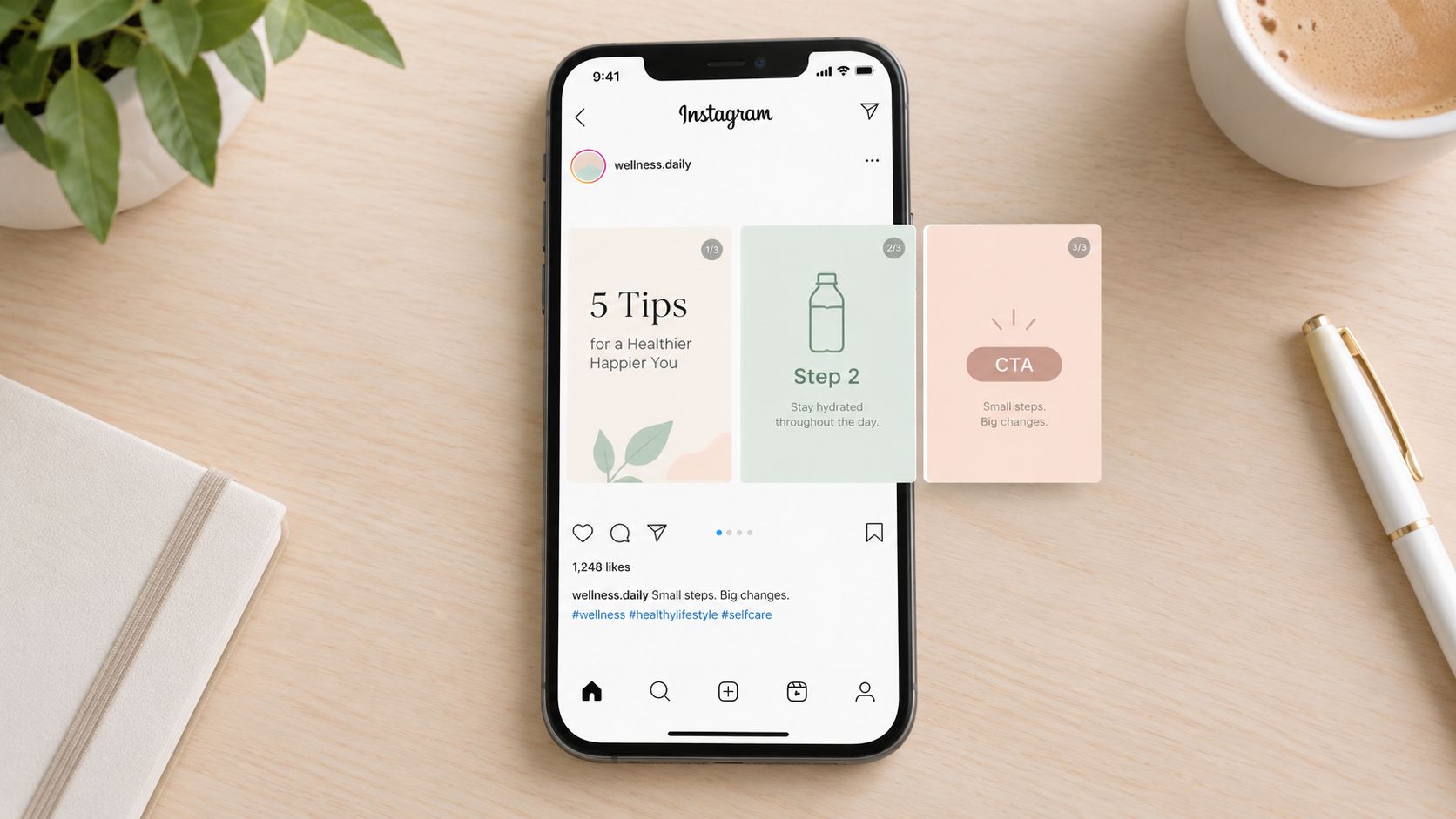
Build the first draft with this practical guide to making an Instagram carousel. Publish educational carousels whenever you have a question customers ask repeatedly, then review saves and shares in Performance Analysis.
3. Testimonial and Customer Success Story Videos
A testimonial works when it tells a specific story, rather than announcing that a customer is happy. Ask what problem existed before the purchase, what changed during the experience, and who would benefit from the product or service.
For a project-management platform, a customer might explain how their team moved from scattered updates to one shared process. A salon could film a client describing the consultation and final result. An online course provider can ask a learner which practical skill they applied first.
Make the proof credible
Give the customer prompts instead of a rigid script:
- Starting point: “What were you trying to solve?”
- Decision: “Why did you choose us?”
- Experience: “What part of the process helped most?”
- Outcome: “What would you tell someone considering it?”
Film in a quiet, naturally lit setting and add subtitles. Request written permission before publishing, especially if the video includes a person's workplace, health information, home, or identifiable results. Don't force polished language. A slightly imperfect sentence often sounds more believable than a memorized endorsement.
Use a caption such as: “Meet [name], who came to us with [problem]. Here's what changed.” The CTA can invite similar customers to DM “INFO,” book a consultation, or read the full case study. Turn the video into a TikTok, a LinkedIn customer story, and a Threads or X post built around the customer's central lesson. For permission and repurposing considerations, consult this user-generated content strategy.
4. Quick Tips and Industry Insights
Teach one useful thing in a format your audience can consume quickly. A florist can explain how to extend the life of cut flowers, an accountant can identify a common bookkeeping mistake, and a cybersecurity company can demonstrate a safer login habit.
Use a Reel when movement or demonstration makes the lesson clearer. Use a carousel when the idea needs steps, comparisons, or a reference point. Reels can be up to 3 minutes, but a practical tip doesn't need maximum length. The important choice is whether viewers can understand the benefit immediately.
Start with a specific tension:
- Correction: “Your landing page isn't unclear because it has too little text.”
- Shortcut: “Use this three-part test before you publish a product page.”
- Contrarian angle: “The cheapest option isn't always the easiest option to sell.”
- Question: “What should a first-time customer know before booking?”
A strong caption adds context and a response prompt: “Which of these mistakes do you see most often?” Ask people to save the post, share it with a teammate, or comment with the next question they want answered. Avoid unsupported claims. If you mention research, industry data, or regulation, link to the exact source in the same sentence.
Trendy can help turn a topic into a hook, a ready-to-shoot video script, a scene structure, a carousel outline, or a visual post concept. Use this resource on writing Instagram hooks, then adapt the finished idea for TikTok, LinkedIn, and Threads or X.
5. Product Launch and Feature Announcement Reels
A launch Reel shouldn't begin with a logo animation or a long list of specifications. Start with the customer's problem, demonstrate the change, and show the next step.
For example, a meal-delivery brand can open with a crowded evening schedule, then show the ordering flow and the finished meal. A SaaS company can demonstrate the moment a new feature removes a repetitive task. A furniture retailer can show how a modular product solves a small-space problem.
A launch sequence that earns attention
Use this scene structure:
- Pain point: Show the situation your audience already recognizes.
- Reveal: Introduce the product or feature as the response.
- Demonstration: Show it working in a real context.
- Benefit: Explain what becomes easier, faster, clearer, or more enjoyable.
- Action: Send viewers to the product page, sign-up flow, product tag, or DM.
The first 1 to 3 seconds are widely treated as the critical hook window in Reels guidance (Later's Reel creation guide). Use movement, a question, a visual interruption, or an immediate result instead of a slow introduction.
Write a caption that qualifies the audience: “Built for [specific customer] who needs [specific outcome].” Use one CTA, not several. If the launch matters, create a small series with different hooks, such as a problem demonstration, a customer scenario, and a feature walkthrough. Adapt the same message into a TikTok script, a LinkedIn product update, and a Threads or X post focused on the decision behind the launch.
6. Before and After Transformations and Results Showcase
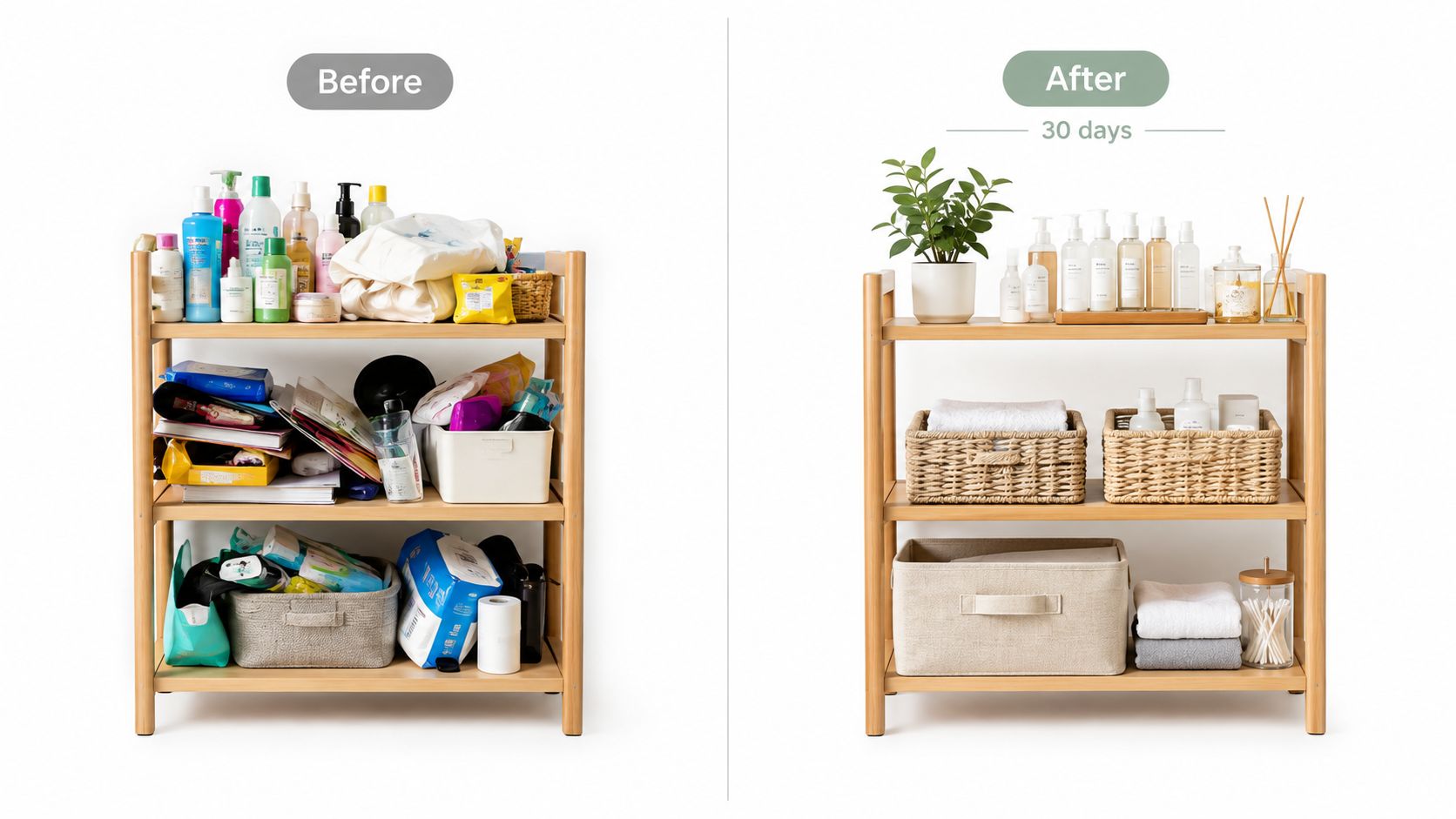
Before-and-after content gets attention because viewers understand the contrast instantly. It can work for a home organizer, a web designer, a language tutor, a groundskeeper, or a beauty professional, provided the comparison is honest and the customer has given permission.
Don't show only the final image. The missing middle is where credibility lives. A carousel can place the original state on slide one, the key process on the following slides, and the result at the end. A Reel can use a reveal transition, then explain the decisions that produced the change.
A useful caption answers three questions:
- Starting point: What was difficult or incomplete?
- Method: What did the business do?
- Result: What changed, and what should the viewer learn?
If you include a measurable result, use only information you can verify and have permission to publish. Don't imply that one customer's outcome is guaranteed for everyone. For sensitive categories, avoid framing the “before” as shameful. Describe the situation respectfully, focus on the desired outcome, and explain the conditions that shaped the result.
A CTA such as “Save this if you're planning a similar project” suits discovery and consideration. “DM us a photo of your space” can generate qualified conversations. Repurpose the visual comparison into a TikTok reveal, a LinkedIn case study, and a Threads or X post about the process trade-off.
7. Trending Audio Challenges and Participatory Reels
Trends help a business feel current, but copying a sound without adding a business angle produces disposable content. The stronger play is to connect the audio to a recognizable customer situation, team habit, product use, or industry joke.
A restaurant could use a popular sound to dramatize the moment a table asks for “just one more side.” A recruitment agency might use a trend to contrast a vague job description with a clear one. A local retailer can invite customers to show how they style or use a product in their own way.
Protect the brand while moving quickly
Use a simple decision filter before publishing:
- Audience fit: Would your customers understand and enjoy the reference?
- Brand fit: Does the tone match your voice?
- Product fit: Can the product or service appear naturally?
- Participation: Can viewers respond, remix, duet, tag, or create their own version?
The trend itself should be the wrapper, not the entire idea. Add a branded prompt, ask for a response, or invite followers to tag the business. Repost participant content only after securing the necessary permission.
Trendy's trend and sound discovery workflow can help you find a relevant direction, then turn it into an original hook and scene structure. For a practical discovery process, see how to find trending audio on Instagram. Repurpose the concept for TikTok first when the trend is native there, then write a LinkedIn or Threads/X version that explains the customer behavior behind the joke.
8. Customer Spotlight and Team Highlight Posts
A business becomes easier to trust when people can see who participates in it. A spotlight post can feature a team member, a long-term customer, a local partner, or a community contributor. It doesn't need a dramatic story. A specific role, preference, habit, or reason for caring about the work gives the audience something real to remember.
Try a weekly “Meet the Maker,” “Customer Corner,” or “Inside the Team” series. A coffee shop can feature the barista who develops seasonal drinks. A consulting firm can introduce the strategist behind a recurring service. A retailer can ask a customer how they use a product in daily life.
Keep the interview focused:
- Role: What does this person do?
- Perspective: What do they notice that customers might not?
- Preference: What product, service, or feature do they recommend?
- Story: What brought them to the business?
Use a portrait carousel for thoughtful answers and a Reel for a more conversational introduction. The caption can say, “Meet [name]. They help with [role], and their favorite part of the work is [detail].” Invite followers to leave a question for the featured person.
Schedule the series consistently, but don't turn people into content props. Let them approve names, quotes, images, and context. Repurpose the post into a LinkedIn culture story, a TikTok day-in-the-life video, and a Threads or X conversation prompt.

9. Limited-Time Offer and Flash Sale Announcements
Urgency works when the offer is clear and believable. It fails when every post claims to be the final chance, the price is hidden, or the audience can't understand what they receive.
A strong offer post answers the practical questions immediately:
- What: Name the product, service, bundle, or access included.
- Who: Explain who the offer suits.
- When: State the start and end time clearly.
- How: Show whether customers should click, DM, book, or use a code.
- Limit: Mention any genuine stock, appointment, or eligibility restriction.
Use a Reel to demonstrate the offer in context, or use a carousel to explain the bundle and terms. A local salon might promote a quieter midweek appointment slot. A software company could announce an onboarding bonus for new accounts. An online retailer can pair a product demo with a Story countdown and a direct product link.
Keep the CTA singular: “Use code WELCOME,” “Book through the link in bio,” or “DM FLASH.” Add tracking details where your business uses them, and review the result after the promotion. If your account publishes urgency constantly, people learn to ignore it. Balance offers with education, customer proof, and process content so promotional posts retain meaning.
Turn the announcement into TikTok content, a LinkedIn post for a professional audience, and a Threads or X reminder that focuses on the customer problem the offer solves.
10. Educational Series and Content Pillars
A recurring series turns content planning from a daily decision into a set of repeatable appointments. Choose themes your business can sustain, such as “Tool Tuesday,” “Customer Question Friday,” “One-Minute Marketing,” or “What We'd Recommend.”
Your pillars should cover different jobs:
- Education: Teach a method, answer a question, or clarify a choice.
- Proof: Share testimonials, transformations, reviews, or results.
- Process: Show how the work happens behind the scenes.
- Product: Demonstrate an offer, feature, service, or use case.
- Community: Highlight people, partners, values, or local moments.
A weekly cadence might include a process Reel, an educational carousel, a customer story, and a product or offer post. Stories can collect questions and reactions between feed posts. TikTok can carry the most conversational video version, LinkedIn can receive the professional lesson, and Threads or X can turn the idea into a short discussion.
Use a repeatable caption pattern: “Question,” “answer,” “example,” then “next step.” Invite participation with prompts such as “Send us the question you want answered next Friday” or “Reply with the part you'd like us to demonstrate.”
Trendy can help organize the calendar, generate ready-to-shoot scripts and carousel concepts, and compare performance by theme. The system becomes more useful when you review which series earns saves, shares, replies, profile visits, or qualified DMs, then improve the next episode instead of abandoning the format after one post.
10 Instagram Post Ideas Comparison
| Content Type | 🔄 Implementation Complexity | ⚡ Resources & Speed | 📊 Expected Outcomes & Key Advantages | Ideal Use Cases | 💡 Tip |
| Behind-the-Scenes Process Videos and Reels | Medium, regular filming + editing workflow | Low equipment (smartphone) but moderate editing time; batchable | High engagement (5–15%), builds credibility and authenticity ⭐⭐⭐⭐ | Product creation, operations, team culture, small brands | Film 3–5 Reels per session; hook in first 1s |
| Carousel Posts with Step-by-Step Guides or Tips | Medium, design + sequencing required | Requires design tools/templates and attention to mobile layout; batchable | Longer dwell time, 3x engagement vs single posts, high saves for educational content ⭐⭐⭐ | Tutorials, pricing breakdowns, complex topics, B2B education | Lead with a strong hook on slide 1; limit text per slide |
| Testimonial and Customer Success Story Videos | Medium–High, coordinate, film, consent | Moderate production (customer coordination, lighting, releases); not always fast | Strongest trust signal; converts ~2.7x better than written reviews ⭐⭐⭐⭐ | Service businesses, SaaS, e‑commerce targeting decision-makers | Ask focused questions and secure written release forms |
| Quick Tips and Industry Insights (Carousel or Reel) | Low–Medium, idea quality matters more than production | Low production time; highly batchable and fast to publish | Highest save/share rates; establishes authority and evergreen value ⭐⭐⭐⭐ | Coaches, consultants, agencies, thought leadership | Open with a curiosity gap; cite data to boost credibility |
| Product Launch and Feature Announcement Reels | High, strategic messaging + polished execution | Higher production and coordination; rapid impact but planning-heavy | Drives immediate sales/pre-orders; creates urgency; measurable ROI if tracked ⭐⭐⭐⭐ | New product launches, feature rollouts, ecommerce pushes | Show the problem in first 3s; use UTM-tracked CTAs |
| Before/After Transformations and Results Showcase | Medium, need authentic before/after assets and consent | Moderate resources to collect visuals and metrics; can be repurposed | Very high saves and shares; visually persuasive social proof ⭐⭐⭐⭐ | Fitness, beauty, home services, design, education | Include timeline and quantifiable results on the after slide |
| Trending Audio Challenges and Participatory Reels | Low, fast to produce but time-sensitive | Minimal production; must act within 24–48 hrs of trend peak | Algorithm boost and viral reach if timely; high community engagement ⭐⭐⭐ | Brand awareness, culture, UGC campaigns, playful product moments | Use trend detection early and post multiple variations quickly |
| Customer Spotlight and Team Highlight Posts | Low–Medium, scheduling and interviews needed | Modest resources; repeatable weekly cadence | Humanizes brand, earns shares from featured people, builds loyalty ⭐⭐⭐ | Employer branding, community engagement, loyalty programs | Feature one person weekly and ask 3–5 prepared questions |
| Limited-Time Offer and Flash Sale Announcements | Medium, creative + logistics coordination | Requires coordination with inventory, tracking links; fast results | Immediate traffic and conversions (3–5x), but overuse erodes margins ⭐⭐⭐ | Inventory clearance, seasonal promos, limited offers | Limit frequency; include countdown and track with promo codes |
| Educational Series and Content Pillars (Recurring Themed Posts) | Medium–High, strategic planning and consistency | Upfront planning heavy but highly batchable; ongoing commitment | Predictable engagement, authority building, better retention ⭐⭐⭐⭐ | Brands seeking consistency, audience retention, thought leadership | Define 3–5 pillars, schedule monthly batches and monitor performance |
Turn Ten Ideas Into a Repeatable Content Engine
The ten ideas work best as a portfolio, not as ten disconnected prompts. Process videos and participatory trends help people discover the business. Quick tips and carousels give them a reason to save and share. Testimonials and transformations reduce uncertainty. Launches and limited-time offers create a path to action. Spotlights and recurring series make the account feel active, human, and worth returning to.
A practical week could look like this:
- Monday: Publish a short educational Reel or carousel and invite saves.
- Tuesday: Share Stories with a question box, poll, or process clip.
- Wednesday: Publish a customer spotlight, testimonial, or transformation.
- Thursday: Adapt a relevant trend into a participatory Reel or TikTok.
- Friday: Publish a product demonstration, launch update, or clear offer.
- Weekend: Review comments, DMs, profile visits, saves, shares, and conversions.
Treat that cadence as a starting point, not a universal schedule. Your audience's behavior should guide adjustments. A local service business may need more booking instructions and customer proof, while a software company may need more tutorials, comparisons, and feature demonstrations.
Instagram is crowded. In 2025, marketers reported Instagram adoption at about 78% to 79%, while business posts averaged roughly 0.43% to 0.52% engagement in industry reporting (Sci-Tech Today's Instagram marketing statistics). The point isn't to chase a benchmark. It's to make every post easier to evaluate by assigning it a job before you create it.
Practical rule: Don't ask whether a post “performed.” Ask whether it attracted, taught, proved, converted, or built community, then measure the signal that matches that job.
Start with Profile Audit. Check whether your bio, pinned posts, link destination, visual identity, and CTA explain what the business does and who it helps. Move into Trends & Ideas to find a relevant format, sound, question, or customer tension. In Content Creation, turn the chosen angle into a ready-to-shoot video script, hook, scene structure, carousel, visual post concept, Instagram caption, TikTok adaptation, LinkedIn post, or Threads/X version. Schedule the content, then use Performance Analysis to see what resonated and why.
Trendy is designed to support that cross-format workflow rather than act only as a video tool or generic AI writer. Its web app at heytrendy.app can sit alongside your content calendar, while the iOS application and Android application give you mobile access to planning and profile insights. You can also use this approach to build a repeatable reach system around the formats your audience already responds to.
Take one hour this week and choose three ideas from the list. Batch one week of assets, assign one CTA to each post, and record the intended job in your calendar. After publishing, review the results before expanding the schedule. That small loop will teach you more about your business audience than collecting another hundred unused prompts.
Trendy helps you turn Instagram and TikTok ideas into ready-to-shoot scripts, hooks, captions, carousels, visual concepts, and cross-platform posts while connecting profile audits, trend discovery, scheduling, and performance analysis. Visit Trendy to build your next week of business content around a clear, measurable publishing system.