Learn how to find trending audio on Instagram in 2026 with proven tactics for in-app discovery, niche scouting, and Trendy-powered workflows that boost Reels
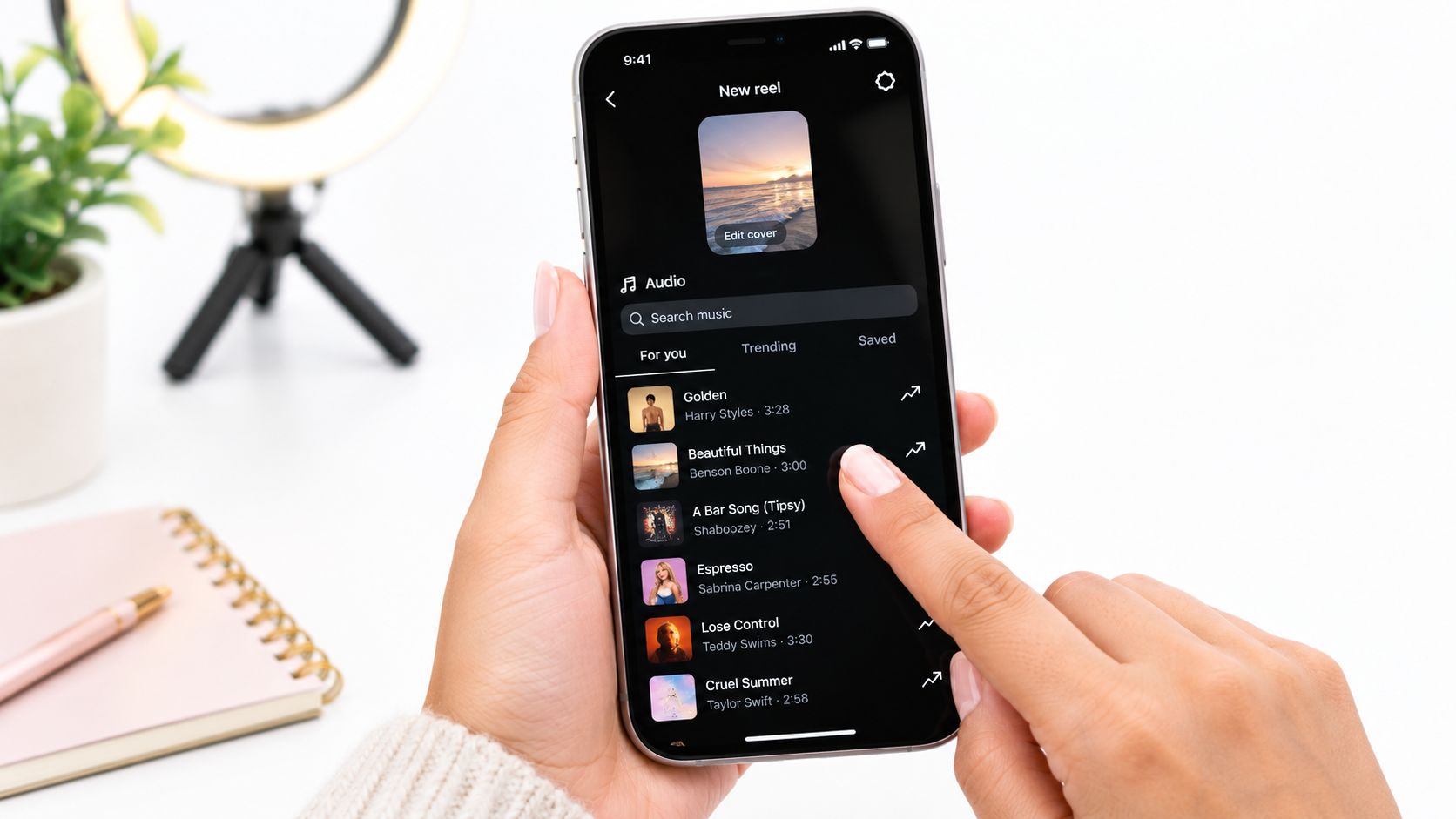
You're halfway through a Reel, the hook is ready, and then Instagram gives you a familiar problem: the audio picker is full of sounds that were popular last week. The practical answer to how to find trending audio on Instagram is to combine Instagram's own momentum signals with a quick saturation check. Open the Reel composer, tap the music note, choose Trending, shortlist sounds marked with an upward arrow, and then confirm that fresh Reels are still appearing on the audio page before you film.
That last check matters. A popular sound can be crowded, while a smaller sound with visible momentum may still give your niche room to stand out. In 2026, I'd treat audio discovery as a four-part workflow: Profile Audit, Trends & Ideas, Content Creation, and Performance Analysis.
Where to Find Trending Audio Right Inside Instagram
You're editing a Reel when the audio picker appears. Start there, rather than searching random sounds from the Explore page.
Tap the + button, select Reel, open the music or audio picker, and choose the Trending tab. Instagram's in-app discovery flow includes a leaderboard of the top 50 songs, and that list is refreshed every few days, according to Instagram Reels trend guidance. The refresh is useful because you're seeing a moving recommendation set, not a permanent list of popular tracks.
Follow the rising-arrow signal
Look for the upward arrow beside a sound name. It indicates momentum inside Instagram's recommendation system, which is more useful than assuming a track's popularity elsewhere will carry over to your account.
You can also discover audio while watching Reels:
Reels feed: Notice recurring sounds, then tap the audio name at the bottom of a Reel to open its sound page.
Explore: When a Reel catches your attention, open its audio page instead of saving only the video.
Audio search: Use the search bar and compare the Popular and For You results. Popular shows broad demand, while For You can surface sounds more closely connected to your viewing and niche signals.
Saved audio: Bookmark promising sounds immediately. A good discovery moment is easy to lose once you return to editing.
The small Reels indicator beside a sound name can provide an initial saturation clue because it shows how many Reels already use that clip. Don't treat the count as a verdict. A high count may mean the sound has strong demand, but it may also mean the obvious opportunity has passed.
Instagram also surfaces audio differently by account and region. Professional accounts in the United States may find a dedicated Trending Audio panel under Professional Dashboard > Trending Audio, while other accounts may rely mainly on the Reel composer and sound pages. For a deeper niche-focused workflow, keep this guide to trending audio for Instagram Reels beside your weekly content planning notes.
Using the Professional Dashboard and Search Signals
The basic Trending tab tells you what Instagram is surfacing. The Professional Dashboard helps you judge whether a sound makes sense for your account.
If your account has access to Trending Audio, open the Professional Dashboard and review the sounds Instagram has curated for professional creators. Pay attention to the surrounding context, not just the track title. A sound that fits beauty tutorials may be a poor choice for a local service business, even when both accounts can see it.
Compare the sound page with your account signals
Before recording, open the sound details page and inspect the Reels using that audio. Check whether new posts are appearing recently and whether the creator mix is broadening. A page filled with the same large accounts suggests a different opportunity from one where smaller creators in your category are appearing consistently.
The audio search workflow is simple:
Shortlist two sounds that fit the same Reel concept.
Open both audio pages and compare recent activity.
Review the Reels using each sound, especially posts from accounts similar to yours.
Choose the sound with stronger current activity and clearer niche fit, not automatically the one with the larger total count.
Some dashboard views may show performance context such as reach from a sound and follower versus non-follower distribution. Treat those figures as account-specific evidence, not universal benchmarks. Instagram's available analytics can vary by account type, region, and rollout, so use the dashboard to compare your own tests rather than copying someone else's targets.
Don't confuse exposure with fit
A sound may generate reach for dance accounts but distract viewers from a technical tutorial. Ask whether the audio supports your first frame, your spoken explanation, and the action you want viewers to take.
Dashboard rule: Use Instagram's metrics to compare candidates against each other, not to invent a universal definition of a “viral” sound.
A well-organized social media dashboard workflow makes this comparison easier because it keeps trend discovery and performance review in the same planning habit. The useful question is never only “Is this audio popular?” It's “Can this sound help my audience understand and share this specific idea?”
Reading Momentum, Not Just Popularity
The sound with the biggest usage count is often the one I reject first. Popularity proves that a sound has been used. It doesn't prove that a new Reel can still earn attention with it.
Use two filters:
Velocity: how quickly new Reels are appearing with the sound now.
Saturation: how crowded the sound already is across the platform and within your niche.
A sound with high popularity and low velocity is usually late-stage inventory. A less familiar sound with rising activity may offer more creative space, especially when its format fits your audience.
Run a quick sound check
Give each candidate a focused review before you save it for production.
First, check the total usage. A sound with fewer than roughly 10,000 total Reels can be worth testing when it also shows consistent growth across two to three days, as described in Buffer's Instagram audio workflow. That figure is a screening guide, not a guarantee. A small count without recent activity is just a small count.
Next, inspect recency. Open the audio page and look for Reels published within the last 24 to 72 hours. Recent posts show that creators are still adopting the sound. If the newest examples are old, the trend may be cooling even when the total usage looks impressive.
Then, scan the creator mix. If the same creators occupy the prominent slots, your version may struggle to add anything new. Look for variations in niche, framing, hook, and audience. A sound becomes more useful when multiple formats are developing around it.
Finally, check mainstream crossover. Once the sound appears everywhere, originality becomes harder. You can still use it when the audio perfectly supports your idea, but don't expect the label “trending” to do the creative work for you.
My decision is usually one of three choices: use now, save and monitor, or skip. That discipline prevents a crowded sound from taking up filming time that belongs to a fresher idea. Trendy's Instagram analytics workflow can support the review stage by connecting performance analysis with the content decisions that follow.
Scouting TikTok and Shorts Before the Sound Hits Reels
Instagram is often where creators publish the Reel, not where every trend begins. TikTok and YouTube Shorts can act as useful early-warning channels, especially when you're watching how a sound travels between formats.
Start with a short weekly scouting session. On TikTok, use the Creative Center to review trends by region and look for sounds that are gaining activity without appearing fully exhausted. Save a small watchlist, then revisit it after 48 hours to see whether the curve is still moving.
YouTube Shorts gives you a second perspective. Search the Shorts feed for the same audio fingerprint and note whether creators are adapting the same hook, joke, transition, or visual structure. When a format begins appearing across platforms, it may be entering a crossover phase. That doesn't mean it's automatically right for Instagram, but it gives you more context than an isolated Reels search.
Keep a compact tracking table
A tracker stops scouting from becoming an endless scroll. Keep no more than ten candidates per week, then record what you know before production starts.
Sound / Audio ID
Origin Platform
First Spotted Date
Velocity Score
Predicted Reels Peak
Sound A
TikTok
Monday
Rising
Watch for crossover
Sound B
Shorts
Monday
Steady
Recheck before filming
Sound C
TikTok
Tuesday
Cooling
Skip unless highly relevant
Use your own qualitative score, such as rising, steady, or cooling, rather than pretending that a platform provides a universal velocity number. The tracker is for prioritization, not scientific forecasting.
The timing between platforms isn't fixed. A sound can move quickly, stall, or arrive on Instagram after creators have already exhausted the obvious concept. Current coverage increasingly emphasizes cross-platform scouting because sounds often appear on TikTok or Shorts before they reach Instagram, as discussed in this cross-platform Instagram audio guide.
A sound spotted early is only useful if you can turn it into a relevant idea before the next review.
Avoid importing a sound that has already flattened on TikTok just because it remains visible there. Your Instagram audience may still respond, but the advantage will come from your angle, not from the sound's novelty. For TikTok-specific research, this guide to finding trending sounds on TikTok provides a useful companion workflow.
Turning a Trending Sound into a Ready-to-Shoot Reel
A saved sound can lose its value before you open the camera. The gap between discovery and production is where many Reels miss their timing. Choose the concept while the audio still has room to rise, then make the first draft quickly enough to test it.
Match the sound's native structure to the footage:
Beat drop: Build around a transition, reveal, outfit change, or before-and-after.
Narrative audio: Shape a short story around a problem, mistake, confession, or result.
Dialogue or skit sound: Establish the situation in the first frame and give the clip a clear point of view.
Music loop: Pair it with a product sequence, tutorial, visual process, or satisfying transformation.
Instagram allows creators to record and edit one or multiple clips totaling 3 minutes, according to Instagram's official Reels feature page. A trending sound still may work best as a short excerpt. Use only the opening if it delivers the hook, and keep more of the audio when the idea needs room for explanation.
Build the brief before you record
Write three beats before filming:
Hook: What appears or gets said immediately?
Payoff: What changes at the sound's key moment?
Action: Should viewers save, comment, share, visit your profile, or try the process?
Treat the audio as a pacing map. Place on-screen text where viewers have time to read it, and cut visual changes around natural accents. Instagram recommends 1080 × 1920 pixels in a 9:16 aspect ratio for Reels, a specification also covered in Hootsuite's Reels guide. Keep important text clear of interface areas so the opening remains readable.
Trendy can turn a saved trend into a niche-specific brief with hooks, scene structure, and shot suggestions. Use that brief to move from audio discovery to a ready-to-film Reel before the sound becomes saturated.
A text to video generator can provide a rough visual sequence from the written concept. Treat it as a planning aid, then refine the footage in your usual editor.
This walkthrough shows how content tools fit after discovery, rather than replacing the audio decision:
Record no more than two useful takes before moving on. Speed protects the trend window, while a clear brief prevents rushed footage from lowering publish quality.
Saving, Testing, and Scheduling Sounds That Actually Move Reach
The most productive audio library I've used wasn't the largest. It was divided clearly enough that I knew what to film next.
Create three Instagram collections:
Test this week: Sounds that passed the momentum and relevance check.
Past winners: Audio attached to formats that already worked for your account.
Evergreen: Sounds that support your content even when they aren't part of a current trend.
That structure turns saved audio into a production queue. It also prevents the common mistake of saving every interesting sound and then reopening the same crowded list when you need an idea quickly.
A batch-production example
Suppose Monday's review leaves three candidates. One has rising activity and fits a tutorial, another has strong popularity but little recent movement, and the third is fresh but doesn't match your audience. The first earns a filming slot. The second goes into monitoring. The third gets skipped, even though it looks exciting, because relevance protects the Reel from feeling forced.
After publishing, judge the result using more than views. Look for shares, saves, comments, follower quality, and non-follower reach. A Reel that attracts the right people can be more valuable than one that produces a larger but disconnected spike.
If the first test performs above your account's normal reach, create a related variant while the concept remains recognizable. Change the first frame, example, or payoff so you're testing a new creative angle rather than reposting the same Reel. For a release-related campaign, a practical step-by-step release guide can help connect short-form discovery with the broader launch plan.
Keep the calendar honest
Instagram's native scheduling supports Reels, photos, and carousel posts, but Stories need Meta Business Suite or another external tool, according to this Instagram scheduling guide. Separate those workflows in your calendar so a scheduled Reel doesn't create the false impression that the entire week is automated.
Use this guide to scheduling Reels on Instagram when you're assigning audio tests to specific publishing slots. Each Sunday, prune the test collection. Keep sounds that generated meaningful saves or shares, move proven concepts into the replay collection, and remove candidates that no longer show momentum.
The result is a repeatable loop: audit your profile, scout trends, create with a clear hook, publish, analyze, and feed the evidence back into the next week's ideas. Trending audio becomes a production input, not a lottery ticket.
Trendy combines profile audits, emerging sound and format discovery, ready-to-shoot scripts, hooks, cross-platform content ideas, and performance analysis in one social media co-pilot. Visit Trendy to turn your next audio shortlist into a focused Instagram and TikTok publishing plan.