How to Manage Multiple Social Media Accounts Like a Pro
Tired of the chaos? Learn how to manage multiple social media accounts with our pro guide on strategy, scheduling, and smart tools for creators.
Juggling a dozen social media profiles can feel like you've signed up to be a plate-spinner in a circus... without any training. One minute you're crafting a thoughtful, professional update for LinkedIn, and the next you're frantically trying to sync up a trending audio on TikTok. The constant context-switching is a recipe for burnout, and the fear of accidentally posting a cat meme to a major client's corporate account? It's all too real.
This playbook is your ticket out of that chaos. We're going to ditch the overwhelm and build a bulletproof system for managing all your accounts, starting with the absolute fundamentals. It’s all about creating a sense of calm in the storm so you can get back to what you actually love doing: creating amazing content.
Taming the Social Media Beast
Before you can even think about scheduling posts or geeking out over analytics, you need to get your digital house in order. This initial setup is what prevents those simple, silly mistakes from snowballing into massive, brand-damaging headaches. The goal is to build a system so clean and intuitive that you never have to second-guess where a file is or which account you're logged into.
Nail Your Setup From Day One
Getting organized upfront is a non-negotiable first step. Think of it as setting up your kitchen before you start cooking a big meal—it makes everything that follows a million times easier.
This little checklist will get you started on the right foot, saving you from future "Where did I save that?!" moments.
Your Initial Account Organization Checklist
Action Item
Why It Matters
Pro Tip
Use Logical Naming Conventions
Prevents asset chaos and makes finding files instant.
Try a Client_Platform_ContentType_Date format. For example: Nike_Instagram_Reel_2024-10-26.
Secure Your Logins
Protects you and your clients from security breaches.
A password manager is your best friend. Seriously. Use one for unique, strong passwords on every account.
Create a Central Asset Library
Ensures brand consistency and saves you from hunting down logos or hex codes.
Use a cloud-based folder (like Google Drive or Dropbox) for all approved brand assets: logos, fonts, templates, etc.
Taking these small steps now will pay huge dividends in efficiency and peace of mind down the road. Trust me.
It's All About a Unified Strategy
Here’s the thing: managing accounts isn't just about pushing content out the door. It's about weaving a cohesive brand story across every platform you touch. This is where so many creators and social media managers drop the ball. Without a single, unified strategy, your efforts feel random, your message gets muddled, and your audience gets confused.
The need for this multi-platform presence isn’t just a hunch; it's driven by cold, hard data. The average person now juggles 6.83 different social networks every single month. That means your brand has to show up consistently in a lot of different places to stay relevant.
A great social media strategy is like a great band. Each instrument (or platform) plays a unique part, but they all work together to create one killer, cohesive sound.
To really get a handle on the chaos, exploring how to leverage AI content creation for social media can be a total game-changer, helping you scale content while keeping that consistent brand voice. By focusing on organization and strategy from the very beginning, you're not just managing accounts—you're building a powerful, multi-channel brand that people remember.
For creators looking to get a leg up with deep analytics, an amazing tool is the Trendy iOS app. It's designed to give you the profile reports and data-driven insights you need to really crush it. You can grab it right from the App Store: Trendy - Profile Insight Report.
Let's Talk Cross-Platform Content Strategy
Alright, let's get real for a second. If you're just creating one post and blasting it across every single one of your social accounts, you're doing it wrong. Dead wrong. That's like shouting the same sentence in a library, a rock concert, and a stuffy business meeting. The message gets lost because the context is all off.
A killer cross-platform strategy isn't about being everywhere; it's about being effective everywhere. It’s about weaving a consistent brand story that still feels completely natural and at home on each channel. Think of it as the art of taking one brilliant idea and spinning it into a dozen different, engaging pieces of content.
One Big Idea, Many Perfect Pieces
Picture your core content idea as a big block of clay. You can shape that same clay into a sleek, professional vase for LinkedIn, a fun and quirky sculpture for TikTok, and a set of beautifully painted mugs for Instagram. The raw material is the same, but the final product is built perfectly for its environment.
Let's say your big idea for the week is a deep dive into "The Future of Remote Work." Instead of a lazy copy-paste, you could repurpose it like this:
LinkedIn: This is where you go deep. Publish a thoughtful, long-form article or a sharp-looking carousel post breaking down the key stats and what they mean for business leaders. Keep the tone professional and data-heavy.
Instagram: It's all about the visuals here. Create a stunning infographic for your feed that highlights the top three trends. Then, for your Stories, get interactive with polls and Q&A stickers asking your audience about their own remote work setups.
TikTok/Reels: Time to have some fun. Film a short, snappy video with quick cuts and trending audio that debunks a common remote work myth in under 30 seconds. The vibe is all about high energy and entertainment.
X (formerly Twitter): This is your rapid-fire conversation starter. Kick off a thread pulling out the most surprising stats from your research. Each tweet becomes a bite-sized insight designed to get people talking.
This way, your message actually lands, no matter where people find you. You're not just posting; you're communicating in the native language of each platform. For a more detailed look at building out this kind of plan, this guide on mastering social media and content strategy is a great resource.
Your Command Center: The Master Content Calendar
A master content calendar is your single source of truth. It's where you map out everything—your themes, formats, and platform-specific angles—to keep the whole operation from descending into chaos. This isn't just a to-do list; it's a strategic blueprint for your entire social presence.
Start by nailing down your core content pillars. These are the 3-5 big topics or themes your brand will own. If you're a fitness coach, your pillars might be something like Workouts, Nutrition, Mindset, and Client Wins.
From there, you translate these pillars into a weekly or monthly schedule. Maybe Mondays are for Mindset, Wednesdays for Workouts, and Fridays for Client Wins. This simple act ensures you have a balanced content mix and prevents you from accidentally posting ten nutrition tips in a row.
Your content calendar shouldn't be a rigid prison. Think of it as a flexible framework that provides structure while leaving room for spontaneous, trend-driven content that keeps your brand relevant and exciting.
Understanding what actually works on each platform is the secret sauce. Engagement can be wildly different from one network to the next. For instance, the average engagement rate on a Facebook page is a pretty slim 0.07 percent, with image posts doing just a tiny bit better. That number alone shows why a one-size-fits-all approach is doomed and why you absolutely need a platform-specific game plan.
Let Data Be Your Guide
Guesswork is the enemy of growth. To really dial in your cross-platform strategy, you need to know what’s working, what's bombing, and why. This is where data-driven insights become your secret weapon.
Instead of just throwing content at the wall and hoping something sticks, what if you had a tool that could analyze your performance and tell you exactly what your audience wants to see on each platform?
That’s precisely what the Trendy iOS app was built for.
Trendy’s AI-powered profile reports dig deep into your analytics, showing you which of your content pillars are crushing it on Instagram versus TikTok. It’ll pinpoint the specific formats, topics, and styles that your unique audience on each channel responds to, taking all the guesswork out of the equation. Just connect your accounts, and you get a clear, data-backed roadmap showing you what to create for maximum impact.
Picture this: It's Monday morning. You've got your coffee, and your entire week of social media content is already locked, loaded, and set to go live. This isn't some mythical creator fantasy; it's what happens when you nail your workflow with scheduling and batching. This is how you go from a frantic, daily scramble to a calm, controlled process, even when juggling a dozen accounts.
The big idea here is simple but incredibly effective. Instead of trying to do a little bit of everything every single day, you carve out dedicated blocks of time for specific tasks. When you group similar activities together, you hit that magical state of flow, work way faster, and honestly, the quality of your content goes way up. It frees up the rest of your week for the fun stuff—actually talking to your community in real-time.
The Magic of Batching Your Content
Content batching is the ultimate antidote to creative burnout. Trust me, trying to write, film, edit, and design all at the same time is a one-way ticket to chaos. A much saner approach is to dedicate different days, or even just a few hours, to one specific type of task.
Here’s a little peek at what a batching week can look like:
Monday (Strategy & Ideation): Carve out two hours to brainstorm content ideas for the whole week or month. Think about your content pillars and map out which ideas go on which platform.
Tuesday (Visuals Day): Production day! This is when you film all your Reels or TikToks, shoot all your photos, and bang out all your graphics in one go. Get it all done.
Wednesday (Copywriting): With all your visuals prepped, now you can just sit down and write. Every caption, every tweet, every LinkedIn thought-leader post. You’re already in the writing zone, so the words will just pour out.
Thursday (Scheduling): The final piece of the puzzle. Take all your finished assets and plug them into your scheduling tool for the week ahead. Done.
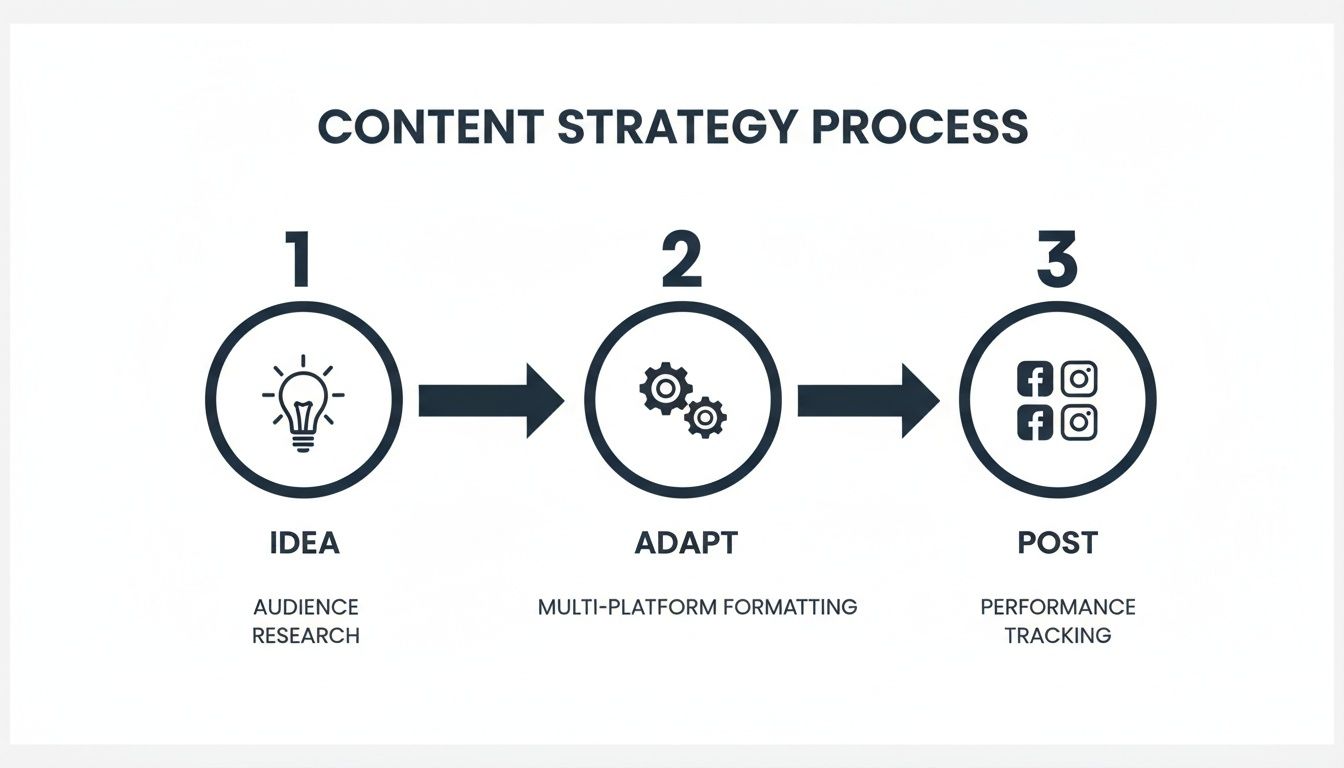
This simple flow—idea, adapt, post—is the core of any solid content strategy.
As you can see, it’s a pretty straightforward, repeatable process. You come up with a great idea, tweak it for each platform's unique flavor, and then get it out there consistently.
Scheduling Like a Pro
Once your content is batched, a good scheduling tool is your new best friend. It’s the only way to maintain a consistent presence without being glued to your phone 24/7. Scheduling your posts in advance means you're always hitting those optimal times to reach your audience, even if you’re stuck in a meeting or, you know, sleeping.
The point of scheduling isn't to "set it and forget it." It's to "set it and be present." Automating the posting frees up your mental energy to focus on genuine, real-time engagement when your content actually goes live.
But let's be real, knowing when to post is a huge headache when you’re managing multiple accounts. The best time to post on Instagram for a fashion brand is worlds away from the peak time for a B2B tech account on LinkedIn. For a great starting point on structuring your calendar, you can check out this helpful social media posting schedule template.
Using Data to Perfect Your Timing
This is where a lot of people go wrong. You can create the most amazing, perfectly batched content in the world, but if you post it when your audience is offline, it's just going to flop. This is exactly the problem the Trendy iOS app was built to solve.
Instead of just guessing or relying on some generic "best time to post" article, Trendy's AI actually analyzes your specific audience's activity on each profile you connect. It spits out a personalized AI report that shows you the exact days and times your followers are most active and ready to engage.
Using insights from Trendy means your beautifully batched content lands with the biggest possible splash, every single time. It turns scheduling from a guessing game into a data-driven strategy, making sure all your hard work gets the eyeballs it deserves. You can grab the Trendy - Profile Insight Report from the App Store and start making smarter scheduling decisions today.
Your Guide to Engagement and Community Building That Doesn't Drive You Crazy
Let's be real: creating killer content is only half the job. If you just post it and walk away, you’re missing the entire point of social media. The real magic, the stuff that turns casual followers into die-hard fans, happens in the DMs, the comments, and the back-and-forth conversations.
But when notifications are pinging from five different apps at once, it's incredibly easy to get overwhelmed and let important interactions slip through the cracks. The secret isn't to work harder; it's to work smarter.
Stop letting notifications dictate your day. It’s time to build a deliberate, structured system for engagement that puts you back in control of your time and lets you focus on building genuine connections that actually move the needle.
Carve Out Dedicated Time for Engagement
One of the fastest ways to burn out is trying to respond to every single comment the second it pops up. Don’t do it. Instead, treat community management like any other non-negotiable task on your calendar and block out specific times for it. This simple shift keeps you focused and prevents the dreaded "endless scroll" from hijacking your entire day.
Here's a simple schedule I’ve seen work wonders:
Morning Check-in (15-20 minutes): Right after your first post of the day goes live, hop in and reply to the first wave of comments. This little burst of early interaction can give your post a nice nudge with the algorithm.
Midday Power Hour (30 minutes): This is your main event. Dive deep into your inboxes, mentions, and comments across all platforms. Focus on giving thoughtful replies and look for interesting conversations to join.
End-of-Day Sweep (15 minutes): Before you log off, do one last check to catch any lingering questions or messages. It’s a small thing, but it makes your community feel heard and ensures no one is left hanging overnight.
This approach transforms engagement from a chaotic, reactive mess into a manageable, intentional part of your workflow. Your audience will absolutely notice and appreciate the thoughtful attention.
Build a "Saved Replies" Library That Still Sounds Like You
You know the drill. You get asked the exact same questions day in and day out. "What are your prices?" "Where's that sweater from?" "What editing app do you use?" Typing out the same answer for the tenth time is a soul-crushing waste of your creative energy.
Enter the saved response library. It’s exactly what it sounds like: a document where you keep pre-written, thoughtful answers to your most frequently asked questions. The trick is to make them sound like they came from a human, not a customer service bot.
Pro-Tip: Don't just write generic, cookie-cutter replies. Infuse them with your personality. Use the same emojis, slang, and tone of voice that you'd use in a caption. The goal is to maintain authenticity while saving a massive amount of time.
Organize your library by topic—Pricing, Favorite Tools, Affiliate Links, Company Policies, you name it. This way, you can grab the perfect response in seconds and get back to the more creative parts of your job.
Use Data to Find Your Engagement Hotspots
To make your engagement time as effective as possible, you need to know where to focus. It's frustrating to waste energy trying to spark a conversation on a post that's a total dud. The smarter move is to double down on the content that naturally gets people fired up and talking.
This is where your analytics become your secret weapon for community management. You need a clear picture of which posts are racking up the most comments, shares, and saves. By zeroing in on these "engagement hotspots," you learn exactly what makes your audience tick—and you can create more of it.
This is a perfect job for an app like Trendy. Its AI-powered reports go way beyond vanity metrics to show you what's really working. Trendy analyzes your profile to pinpoint the specific posts generating the most buzz and genuine conversation. This insight lets you stop guessing and focus your precious engagement time where it will have the biggest impact.
Once you see which topics and formats cause an engagement spike, you can make much smarter decisions about your entire content plan. If you're ready to see what truly connects with your followers, grab the Trendy - Profile Insight Report from the App Store and start building a more engaged community today.
Put Your Process on Autopilot (and Keep It Secure)
When you're juggling multiple social media accounts, you're also juggling a mountain of passwords, permissions, and the low-grade, ever-present fear of a security breach. Putting parts of your social media game on autopilot isn't just a time-saver. It's about building a smarter, safer system that frees you up to do what you do best—create amazing content, not put out fires.
We're not just talking about scheduling posts here. Real automation is about finding clever ways to handle the repetitive, behind-the-scenes work that drains your energy. But with all that beautiful efficiency comes a very real need for airtight security. Let's strike that perfect balance between letting the robots do the heavy lifting and keeping your digital kingdom on lockdown.
Smart Automation That Goes Way Beyond Scheduling
Think bigger than your content calendar. Smart automation tackles the truly boring stuff that eats into your creative time, letting you work smarter, not harder. You can set up simple "recipes" that connect your different apps and make your digital life a whole lot easier.
For instance, you could use a tool like IFTTT (If This Then That) to create automated workflows. A classic recipe I love is: "If I publish a new blog post, automatically create a draft tweet with the title and link." This one little trick saves you from the soul-crushing cycle of copy-pasting.
Here are a few other ideas to get the wheels turning:
Automated Content Curation: Set up feeds that pull in top articles from your favorite industry blogs. This turns you into a content-sharing machine with minimal effort.
Comment Filtering: Some management tools can automatically hide comments with spammy keywords, cleaning up your comment section before you even have to see it. It’s a game-changer for your sanity.
Performance Reporting: Get a weekly report with all your key metrics automatically dropped into your inbox. This way, you always have a pulse on what's working without spending hours digging through analytics.
Putting these simple systems in place turns your workflow into an efficient machine. If you're ready to dive deeper, you can find a solid breakdown of the best social media automation tools to find the right fit for your process.
Your Non-Negotiable Security Checklist
As you add more tools and team members to the mix, security can't be an afterthought. Every new account or user is another potential door for someone to walk through. Trust me, one simple mistake can compromise not just your accounts, but your clients' as well.
Security isn't a one-and-done setup; it's a daily habit. The best defense is a proactive one, making strong security practices a core part of how you operate.
Let’s keep it simple. Here are the absolute must-dos to keep everything locked down:
Use a Password Manager: Seriously, stop trying to remember dozens of "P@ssword123!" variations. A good password manager like 1Password or LastPass will create and store ridiculously strong, unique passwords for every single login. This is the single most important security step you will ever take.
Enable Two-Factor Authentication (2FA) Everywhere: 2FA adds a crucial second layer of defense. Even if a hacker nabs your password, they can't get in without the code from your phone. Turn it on for every social account, every email, every tool. No exceptions.
Define Clear Access Levels: If you're working with a team, never share your main login. Ever. Use the built-in team management features on each platform to grant specific roles. Your content scheduler doesn't need access to billing info, and your community manager doesn't need to change the password.
Delegate Tasks Without Giving Away the Keys to the Kingdom
Bringing on help is a massive step forward, but it doesn't have to be a security nightmare. The golden rule of delegation is the principle of least privilege: grant just enough access for someone to do their job, and absolutely nothing more.
For example, a virtual assistant helping with engagement only needs the ability to reply to comments and DMs. They don't need access to your ad account or security settings. The Trendy iOS app actually helps with this by flagging engagement spikes in its AI report, so you can point your assistant directly to the posts that need the most attention. With the Trendy - Profile Insight Report, you can make smarter, data-driven decisions about where to focus your team's energy—all while keeping your core accounts safe and sound.
Measure Your Performance and Optimize Everything
So, are your social media efforts actually working? If you can't answer that with hard data, you're basically just throwing content spaghetti at the wall and hoping something sticks. Measuring performance is the only way to know what’s driving real growth versus what’s just eating up your precious time.
This gets a thousand times more important when you’re juggling multiple accounts. You absolutely need a system to track what matters across every platform without drowning in a sea of confusing charts and vanity metrics. Let's get real: 1,000 engaged followers are worth so much more than 10,000 who just scroll on by.
From Vanity Metrics to Actionable Insights
First things first: stop obsessing over numbers that look good but don't actually move the needle on business goals. It's time to focus on Key Performance Indicators (KPIs) that tell you the real story. A simple dashboard is your best friend here, letting you see all the crucial stuff in one spot.
For every account you manage, zero in on these core KPIs:
Engagement Rate: This is your holy grail. It’s the raw pulse of your content, measuring likes, comments, and shares relative to your follower count. It tells you if people actually care.
Click-Through Rate (CTR): This number shows how many people are actually taking action and clicking the links you share. It's the bridge between your social content and your website or landing pages.
Conversion Rate: This is the bottom line. It tracks how many of those clicks result in a sale, a newsletter signup, or whatever your ultimate goal is.
Your analytics aren't just a report card; they're a roadmap. Every data point is a clue telling you exactly what your audience wants more of.
Check these metrics regularly, and you'll start to see trends pop up. Did that behind-the-scenes Reel get triple the usual engagement? That's not luck; that's a signal to make more just like it. Building a dashboard from scratch can feel like a beast, but you can get a huge head start with this social media reporting template to make life easier.
Your Secret Weapon for Smarter Decisions
Let's be honest, manually digging through the native analytics of five different social platforms is a special kind of nightmare. You need a tool that does the heavy lifting, pulling all your performance data together and spitting out clear, actionable advice.
This is exactly what the Trendy iOS app was built for. Its AI-driven reports don't just dump numbers on you; they tell you the story behind them. Trendy automatically pulls your data, flags your top-performing content across every profile you've connected, and gives you insights that spell out what to do next. It shows you which content pillars are crushing it and which ones are flopping, so you can finally stop guessing and start making strategic moves that lead to real growth.
Answering the Big Questions About Managing Social Media Accounts
Alright, let's get right into it. When you're juggling a bunch of social profiles, a few questions always seem to bubble up. Let's clear the air and give you some real-talk answers so you can get back to creating.
How Many Accounts Is Too Many to Handle?
Everyone wants to know the magic number, but here’s the honest truth: it doesn't exist. One creator might absolutely kill it on 3-4 platforms, while a fully-staffed social team could easily be running 6-8 without breaking a sweat.
The real question isn't about a number; it's about your bandwidth. Are you creating great content that feels native to each platform? Are you actually talking to your community? If you're just phoning it in and copy-pasting posts everywhere just to "be present," you've already got too many accounts. Your results will tank.
The goal isn't to be on every platform. It's to win on the platforms that actually matter for your brand.
It's way smarter to dominate the channels where your audience hangs out and where you see a real return.
This is where a tool like the Trendy app becomes your best friend. Its AI-powered reports can show you in black and white which profiles are actually moving the needle. It gives you the hard data you need to confidently double down on what’s working and maybe—just maybe—give yourself permission to ditch the duds.
Should I Post the Exact Same Thing Everywhere?
Let me make this easy for you: Nope. Never.
Sure, you should absolutely be repurposing your core ideas—that's just working smart. But each individual post needs to be tweaked for the platform it’s living on. You have to respect the format, the audience's expectations, and the unwritten rules of each space. A vertical video that goes viral on TikTok will feel a bit off on Instagram Reels without a few subtle edits.
Mindlessly cross-posting is the fastest way to tell your audience you're just checking a box. It completely ignores why people are on that platform in the first place, and your engagement will suffer because of it.
Ready to stop guessing and start making moves based on solid data? The AI-powered reports from Trendy deliver the kind of deep profile insights that let you fine-tune your strategy, perfect your timing, and see some serious growth. Download the Trendy - Profile Insight Report from the App Store and start using your analytics as your secret weapon.
How to Manage Multiple Social Media Accounts Like a Pro | Trendy