
Juggling a dozen social media tasks feels like being a one-person circus, right? You're the content creator, the scheduler, the analyst, and the community manager, all before your first coffee. But what if you could trade that chaos for clarity and replace guesswork with actual growth? The secret isn't cloning yourself; it's finding the right digital sidekick. This guide cuts through the noise to reveal the absolute best social media management tools for small business owners and creators like you.
We're ditching the fluffy marketing jargon and getting straight to the point. Inside, you'll find an honest, in-depth breakdown of the top platforms, complete with screenshots and direct links. We'll explore what makes each one tick, from established giants like Buffer and Hootsuite to rising stars like Trendy, an iOS app packed with AI-powered features for next-level profile insights. We’re focused on the features that actually save you time and drive real results. You'll learn which tools are best for scheduling a month's worth of content, which ones provide analytics that actually make sense, and which can help you manage customer conversations without losing your mind.
Of course, a great tool is only half the battle; you also need killer content. To consistently capture your audience's attention, explore these top social media content ideas to boost engagement and keep your feed fresh. This listicle is your roadmap to finding the perfect platform for your specific needs, budget, and goals. Get ready to find your perfect match, streamline your workflow, and finally reclaim your sanity. Let's dive in.
1. Trendy
Best for: AI-Powered Content Strategy for TikTok & Instagram
If you’ve ever stared at your phone, completely stumped on what to post next to please the TikTok or Instagram algorithm gods, meet your new best friend. Trendy isn't another glorified scheduler; it's an AI-powered content strategist designed to eliminate the guesswork that plagues so many small businesses and content creators on social media. It analyzes your specific niche and audience to deliver a personalized weekly game plan, making it one of the best social media management tools for small businesses focused on explosive vertical video growth.
Instead of just giving you a calendar, Trendy surfaces hyper-relevant post ideas, viral hooks, and emerging trends tailored to your brand. For content creators, this means identifying the exact sounds, hashtags, and video formats that are currently gaining traction in your category, so you're not just creating content, you're creating content with a high probability of success. This proactive approach saves countless hours of doom-scrolling for inspiration.
Why It Stands Out: Trendy's strength lies in its ability to blend AI-driven insights with creative empowerment. It provides the strategic framework (what to post and when) while leaving the creative execution in your hands, ensuring your brand's unique voice isn't lost in a sea of automated content.
Key Features & How to Use Them
- Personalized Weekly Strategy: After securely connecting your account, the platform generates a weekly posting plan with specific video ideas, hooks, and optimal posting times. Think of it as having a dedicated social media strategist on your team, minus the hefty price tag.
- Real-Time Trend Matching: This is the secret sauce for creators. The AI constantly scans for emerging trends relevant to your niche, from viral audio clips to new video formats, giving you a crucial first-mover advantage.
- Actionable Analytics: Trendy goes beyond vanity metrics. Its reports tell you why a post performed well, explaining what resonated with your audience so you can replicate that success and refine your strategy over time.
- Time-Saving Templates: The intuitive interface and easy-to-follow templates help you plan and execute your content quickly, preserving your unique brand aesthetic without the burnout. For those looking to optimize every part of their workflow, Trendy even offers resources like their guide on how to schedule Instagram Stories.
Getting Started: Access to Trendy is currently available by joining the beta via its website or by downloading the Trendy iOS app directly from the App Store. While public pricing isn't listed, this setup allows for a more hands-on, user-focused experience as the platform evolves. The main limitation is that Android or full web-app support isn't clearly specified, making it an ideal choice primarily for iOS users right now.
Website: https://heytrendy.app
2. Buffer
If you're a small business owner who breaks into a cold sweat just thinking about complex software, Buffer is your new best friend. It’s the social media equivalent of a comfy hoodie: simple, reliable, and it just works. Buffer strips away the overwhelming complexity found in enterprise-level tools, focusing on the core essentials: scheduling content, engaging with your audience, and understanding what’s working.
Its interface is famously clean and intuitive, making it one of the best social media management tools for small business owners who are just dipping their toes into scheduling. The drag-and-drop visual calendar is a dream for visualizing your content plan. And if you’re ever staring at a blank screen, their AI Assistant can whip up caption ideas faster than you can say "creator's block."
Why It’s a Great Starting Point
Buffer’s real magic lies in its transparent, “pay-per-channel” pricing. You aren't forced into an expensive plan just to add one more social profile. This modular approach is perfect for businesses that are growing deliberately.
- Key Features: Visual calendar, AI Assistant for captions, a simple "Community" inbox for engagement, and a free plan that's actually useful.
- Best For: Solo founders, small teams, and anyone who values simplicity and a low learning curve.
- Limitation: The analytics and social listening features are quite basic. If you need deep competitive analysis or complex approval workflows, you might outgrow it quickly.
Pro-Tip: Use Buffer to nail down your scheduling consistency, which is a crucial first step. If you're looking for more advanced strategies, you can learn how to plan social media content to maximize your impact before you even schedule a single post. For even more powerful analytics and trend-spotting, pair Buffer's scheduling with the insights from the Trendy iOS app.
Website: https://buffer.com/pricing
3. Hootsuite
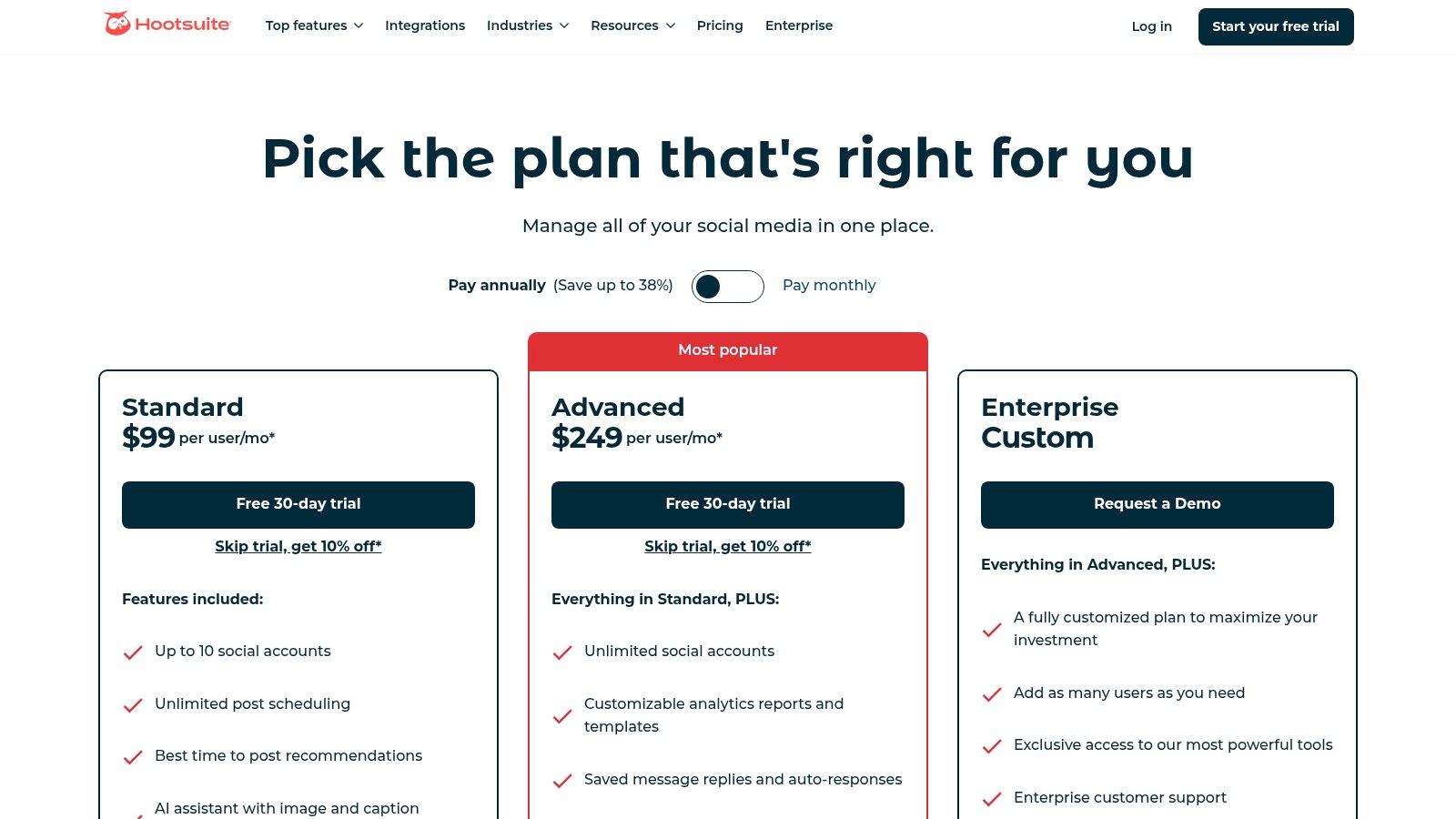
If Buffer is the comfy hoodie, Hootsuite is the versatile, all-weather jacket of the social media world. It's a comprehensive platform designed for small businesses that have big ambitions. While many tools focus on doing one or two things well, Hootsuite aims to do everything, consolidating scheduling, engagement, analytics, and social listening into a single, powerful dashboard. It's built to be the central command center for your entire social media strategy.
The platform allows you to manage multiple social streams side-by-side, making it easy to monitor keywords, mentions, and hashtags across channels without constantly switching tabs. With built-in Canva integration, creating and scheduling eye-catching visuals is a seamless part of the workflow. This all-in-one approach makes it one of the best social media management tools for small business teams looking to scale without switching platforms later on.
Why It’s a Scalable Powerhouse
Hootsuite's true strength lies in its ability to grow with you. What starts as a simple scheduler can evolve into a robust tool with team assignments, advanced analytics, and competitor benchmarking. This prevents the operational headache of migrating to a new system once your social media needs become more complex.
- Key Features: All-in-one composer with Canva integration, AI tools for captions and hashtags, unlimited post scheduling, and a unified inbox for managing messages and comments.
- Best For: Growing teams, agencies, and businesses that need a broad feature set and a platform they won't outgrow.
- Limitation: The entry-level price point is higher than simpler tools, and the sheer number of features can feel overwhelming for a solo entrepreneur just starting out.
Pro-Tip: Use Hootsuite’s "Best Time to Post" recommendations to get your content seen, but supercharge your strategy by finding breakout topics first. Before you even open the scheduler, use the Trendy iOS app to identify emerging trends and viral sounds, ensuring the content you schedule is what your audience actually wants to see.
Website: https://www.hootsuite.com/plans
4. Sprout Social
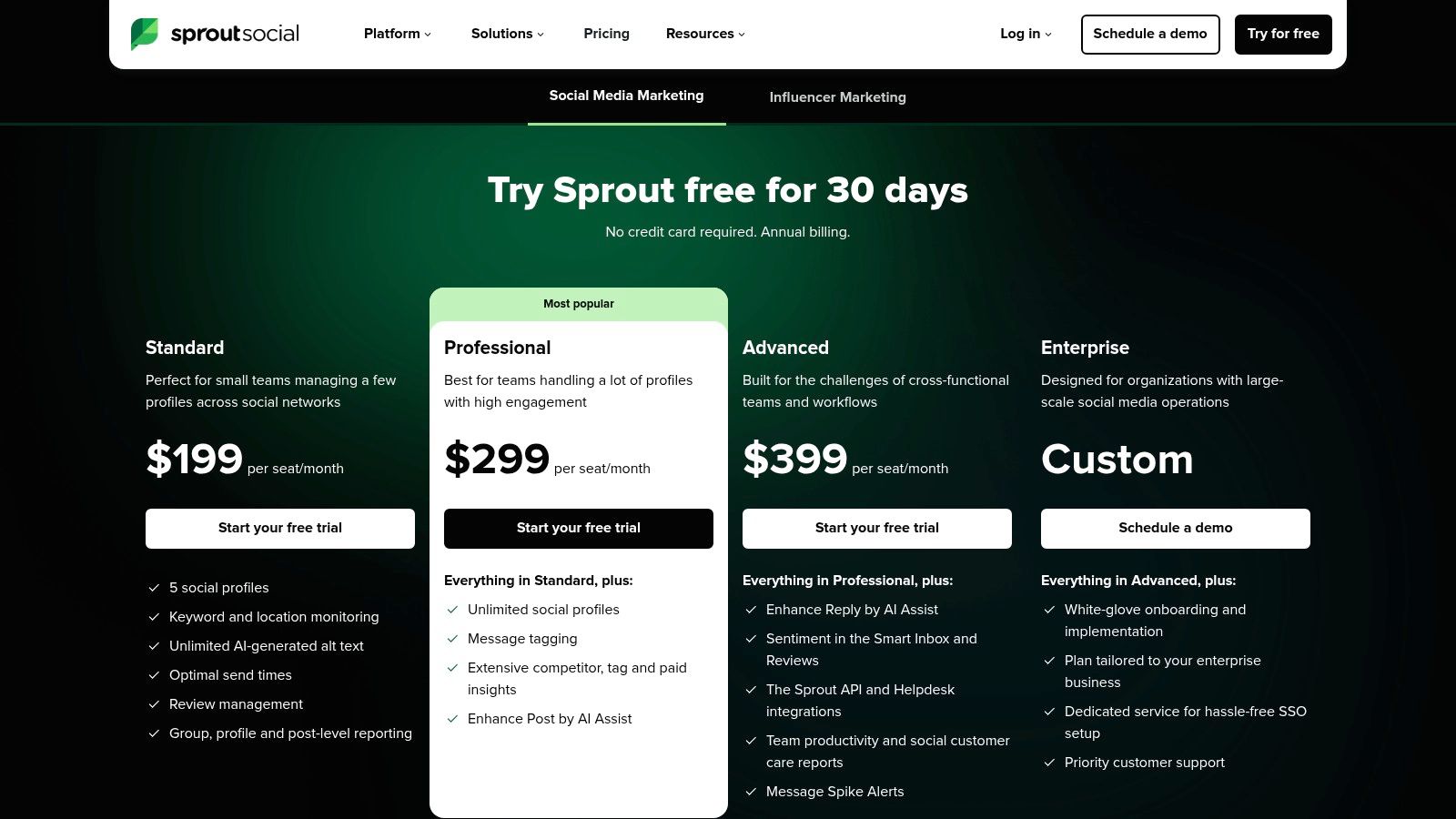
When your small business starts acting like a big one, Sprout Social is the tool you graduate to. This isn't just a scheduler; it’s a full-blown social command center. Sprout Social is built for teams that are serious about turning social media into a measurable business channel, focusing on deep analytics, robust collaboration, and sophisticated customer care.
If you’re managing client accounts or have a dedicated support team answering DMs, this is one of the best social media management tools for small business growth. Its unified Smart Inbox brings every message and mention into one stream, while its reporting features are so polished they look like they were made by a design agency. The platform is powerful, professional, and built for performance.
Why It's a Powerhouse for Growing Teams
Sprout Social shines brightest when reporting and governance are non-negotiable. Its advanced analytics and competitor tracking provide the kind of data that justifies marketing spend and informs strategy, making it a favorite for agencies and data-driven brands.
- Key Features: All-in-one Smart Inbox, advanced analytics and competitor reporting, AI-assisted publishing tools, review management, and strong team collaboration workflows.
- Best For: Growing teams, marketing agencies, and businesses where social media is a key customer service and revenue channel.
- Limitation: Its per-user pricing model can become expensive quickly as your team expands. For solo creators or those needing basic scheduling, it might be overkill.
Pro-Tip: Leverage Sprout’s detailed reports to impress stakeholders. Before you even build a report, get inspired by using a great social media reporting template to understand what metrics truly matter. To get a head start on the trends you'll report on, use the Trendy iOS app to spot viral content and audio before they peak.
Website: https://sproutsocial.com/pricing/
5. Later
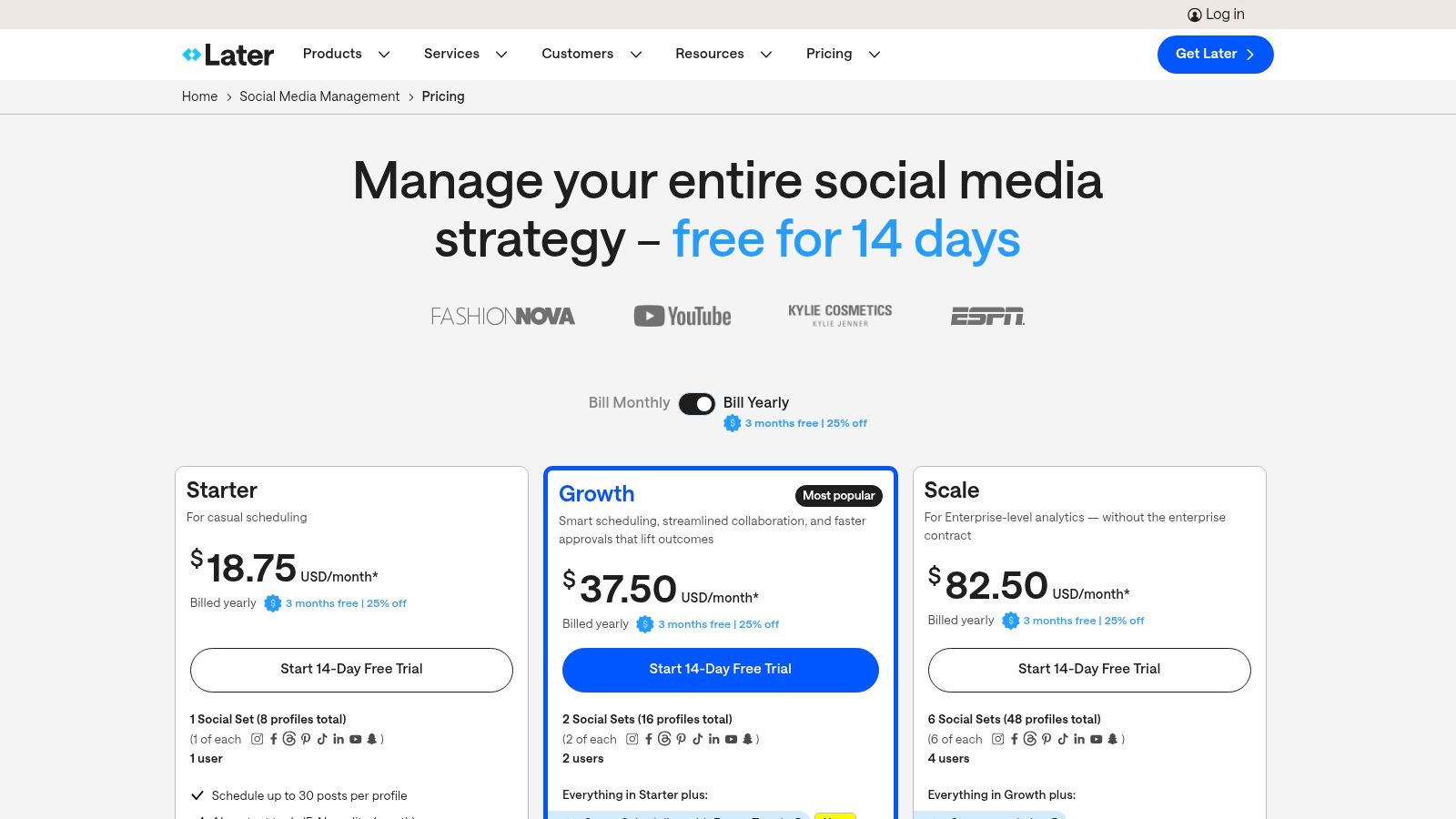
If your brand lives and breathes on Instagram and TikTok, Later is the tool that speaks your language. Originally built as an Instagram-first scheduler, it has evolved into a visual powerhouse designed for brands where aesthetics are everything. It’s less of an all-in-one corporate suite and more of a creative studio for planning your visual content, making it one of the best social media management tools for small business owners with a strong visual identity.
Later’s drag-and-drop Visual Planner is its crown jewel, allowing you to see exactly how your grid will look before you post. It’s built from the ground up for a mobile-first workflow, now including robust support for TikTok, YouTube Shorts, and even Threads. The platform also offers smart scheduling cues based on when your audience is most active, taking the guesswork out of timing.
Why It’s a Visual-First Powerhouse
Later truly shines for businesses that prioritize visual storytelling. Its focus on planning the look and feel of your feed, combined with practical tools like a Link-in-Bio feature and user-generated content (UGC) collection, makes it an end-to-end solution for visually driven brands.
- Key Features: Visual Planner for Instagram, Best Time to Post suggestions, a comprehensive Link-in-Bio tool, and UGC collection features.
- Best For: E-commerce brands, influencers, creators, and businesses in industries like fashion, beauty, food, and travel.
- Limitation: Its social listening and deep analytics capabilities aren't as robust as enterprise-level platforms. The post limits on lower-priced tiers can also be restrictive for high-volume publishers.
Pro-Tip: Use Later to perfect your visual grid and schedule posts at optimal times. To ensure the content you're scheduling is actually what your audience wants to see, use the Trendy iOS app to analyze viral trends and audience interests before you even start planning. This combination turns your beautiful feed into a high-performing one.
Website: https://later.com/pricing/
6. Agorapulse
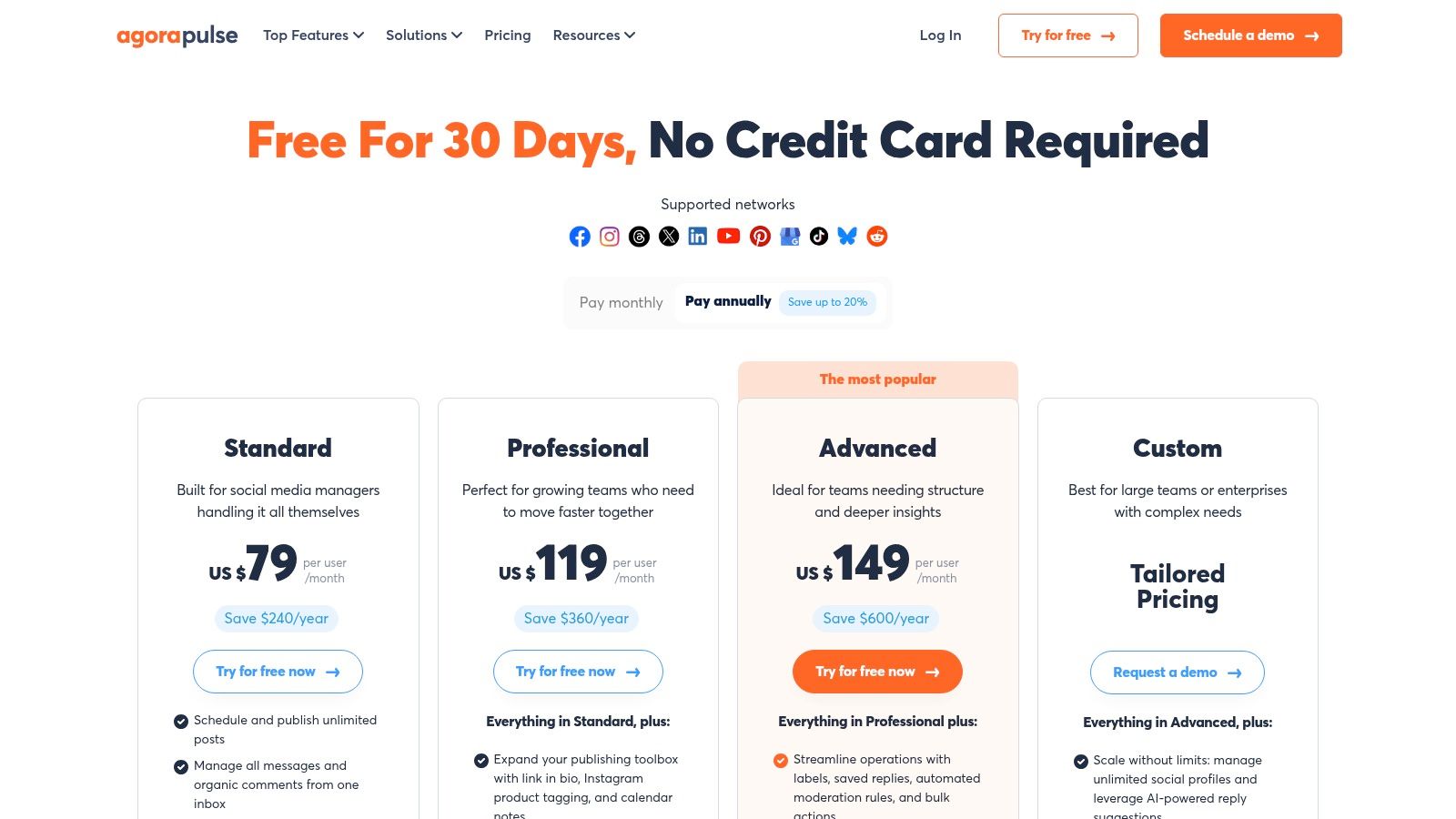
If your social media inbox feels like a chaotic monster you can’t tame, Agorapulse is the hero you've been waiting for. It excels at turning a flood of comments, DMs, and mentions into a neatly organized, manageable workflow. This platform is less about flashy extras and more about providing a rock-solid foundation for publishing, engaging, and reporting, making it a powerful ally for businesses that are serious about community management.
Agorapulse’s unified inbox is its crown jewel, complete with automated moderation rules and translation features that save you countless hours. You can finally stop juggling multiple apps to reply to comments on your Meta ads, TikToks, and LinkedIn posts. It's one of the best social media management tools for small business teams who need to collaborate on customer interactions without stepping on each other's toes.
Why It’s a Community Management Powerhouse
Agorapulse shines with its clear, per-user pricing and practical features designed for teams and agencies. The reporting is robust, offering easy-to-export and white-label options that make client updates a breeze. Plus, their customer support is famously fast and helpful.
- Key Features: Advanced unified inbox with ad comment monitoring, automated moderation rules, robust reporting with PDF/PPTX exports, and shared team calendars.
- Best For: Small agencies, businesses with high-engagement communities, and teams that need strong reporting and collaboration tools.
- Limitation: Some of the more advanced features, especially for ad comment management and full X (Twitter) integration, are gated behind higher-tier plans or require paid add-ons.
Pro-Tip: Use Agorapulse’s inbox to identify your most frequently asked questions. You can then use those insights to create a content pillar based on what your audience truly wants to know. To discover what topics are trending before the questions even hit your inbox, use the trend-spotting features in the Trendy iOS app to stay ahead of the curve.
Website: https://www.agorapulse.com/pricing/
7. SocialPilot
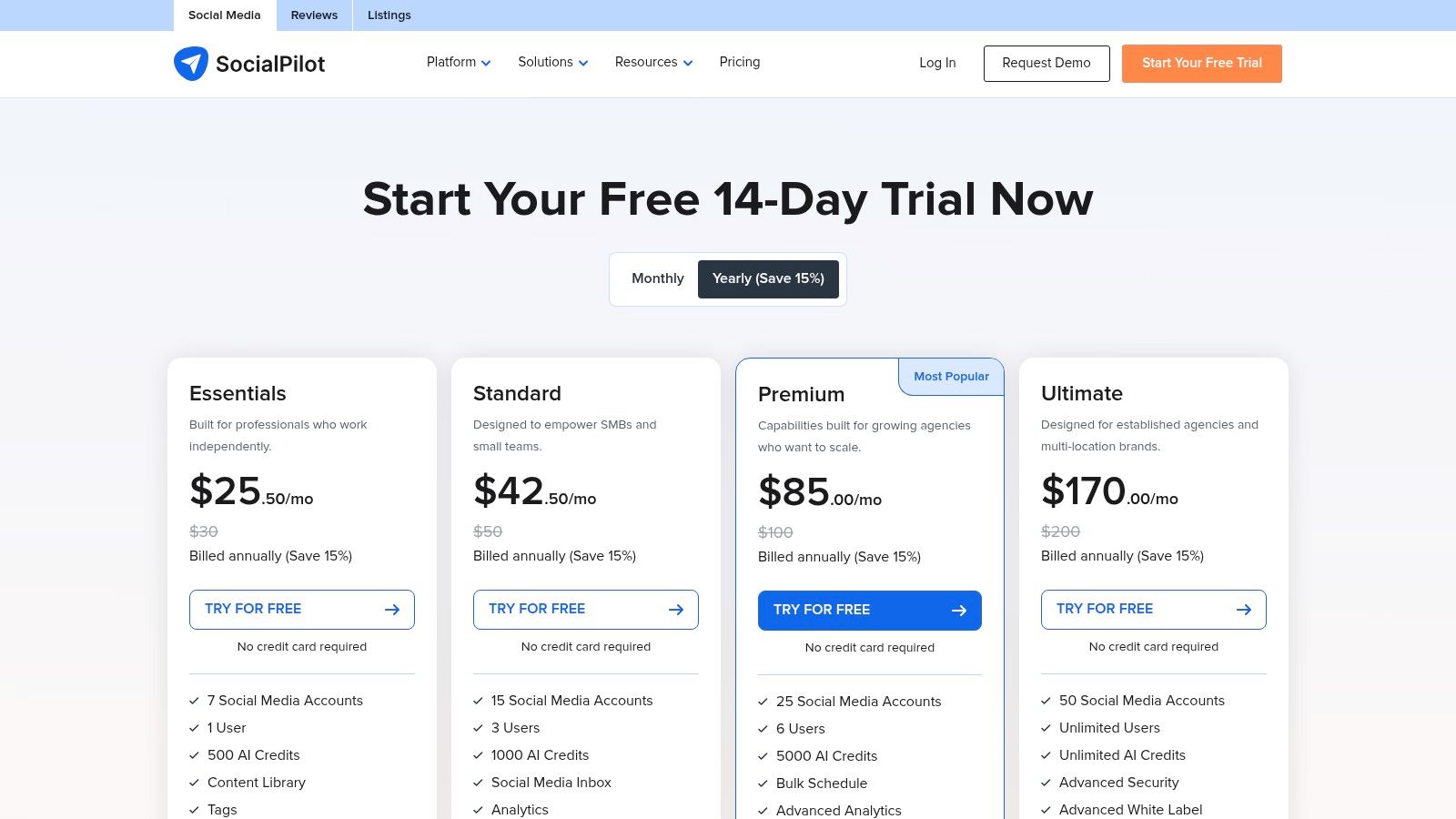
If you’re running a small agency or a business that needs to manage a surprising number of social media profiles without a heart-stopping price tag, say hello to SocialPilot. It's the practical, no-nonsense workhorse of the social media world. While other tools focus on flashy design, SocialPilot doubles down on pure, unadulterated value, giving you more accounts, more users, and more posts for your money.
It’s built for efficiency, especially for teams. The platform makes it easy to schedule content in bulk, curate posts from RSS feeds, and manage client accounts with dedicated approval workflows. It may not have the sleekest, most modern interface on the block, but its utilitarian design gets the job done without a fuss, making it one of the best social media management tools for small business teams focused on output and ROI.
Why It’s a Value Powerhouse
SocialPilot’s superpower is its generous account and user limits, even on lower-tier plans. Where competitors make you pay dearly for every new profile or team member, SocialPilot bundles them in, making it a scalable and budget-friendly choice for growing teams and agencies.
- Key Features: Generous account and user limits, bulk scheduling, client management workflows, content curation tools, and white-label reporting options.
- Best For: Small agencies, marketing teams, and businesses managing multiple brands or locations on a tight budget.
- Limitation: The user interface is more functional than beautiful, and it lacks the sophisticated social listening or advanced analytics features of more expensive enterprise platforms.
Pro-Tip: Use SocialPilot's bulk scheduling to create a foundational content calendar for all your clients or brands. Before you schedule, identify top-performing content ideas and trending topics with the powerful Trendy iOS app to ensure your high-volume posting strategy is also a high-impact one.
Website: https://www.socialpilot.co/plans
8. Sendible
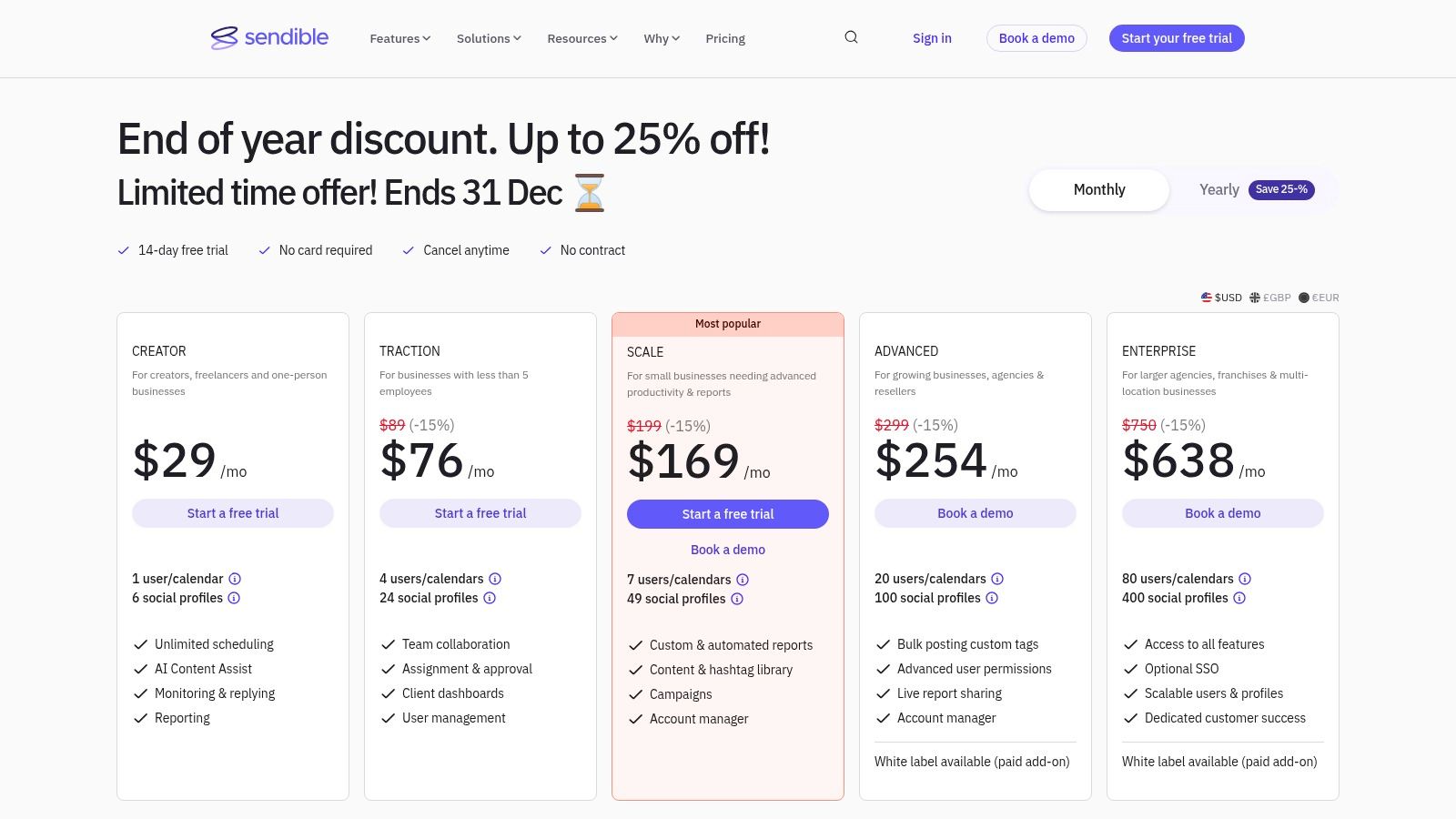
If your small business is more of a small team or an agency handling client accounts, Sendible is built for you. Think of it as the mission control center for collaborative social media. It moves beyond simple scheduling to offer robust features designed to keep teams and clients on the same page, eliminating endless email chains and spreadsheet approvals.
Sendible is crafted for efficiency at scale. Its standout features include client dashboards, content approval workflows, and automated reporting, making it one of the best social media management tools for small business agencies or marketing teams that need to juggle multiple brands without losing their minds. The interface can feel a bit dense at first, but it’s packed with power once you get the hang of it.
Why It’s Built for Collaboration
Sendible's real strength is in its team and client management architecture. You can create custom user permissions, set up approval gates for posts, and even provide clients with a branded portal to view reports and sign off on content. This level of control is a lifesaver for maintaining brand consistency and streamlining communication.
- Key Features: Client-facing dashboards, automated PDF reports, content approval workflows, AI content and hashtag generators, and white-label options on higher-tier plans.
- Best For: Small agencies, marketing teams, and businesses managing social media for multiple clients or internal departments.
- Limitation: The most powerful client-facing features, like white-labeling, are reserved for more expensive plans. The interface can have a steeper learning curve for solo users compared to simpler tools.
Pro-Tip: Use Sendible’s reporting to automate your monthly client updates, saving you hours of manual work. To make those reports even more impressive, leverage the data from the Trendy iOS app to spot viral trends and content opportunities before they happen, proving your strategic value to clients.
Website: https://www.sendible.com/pricing
9. Loomly
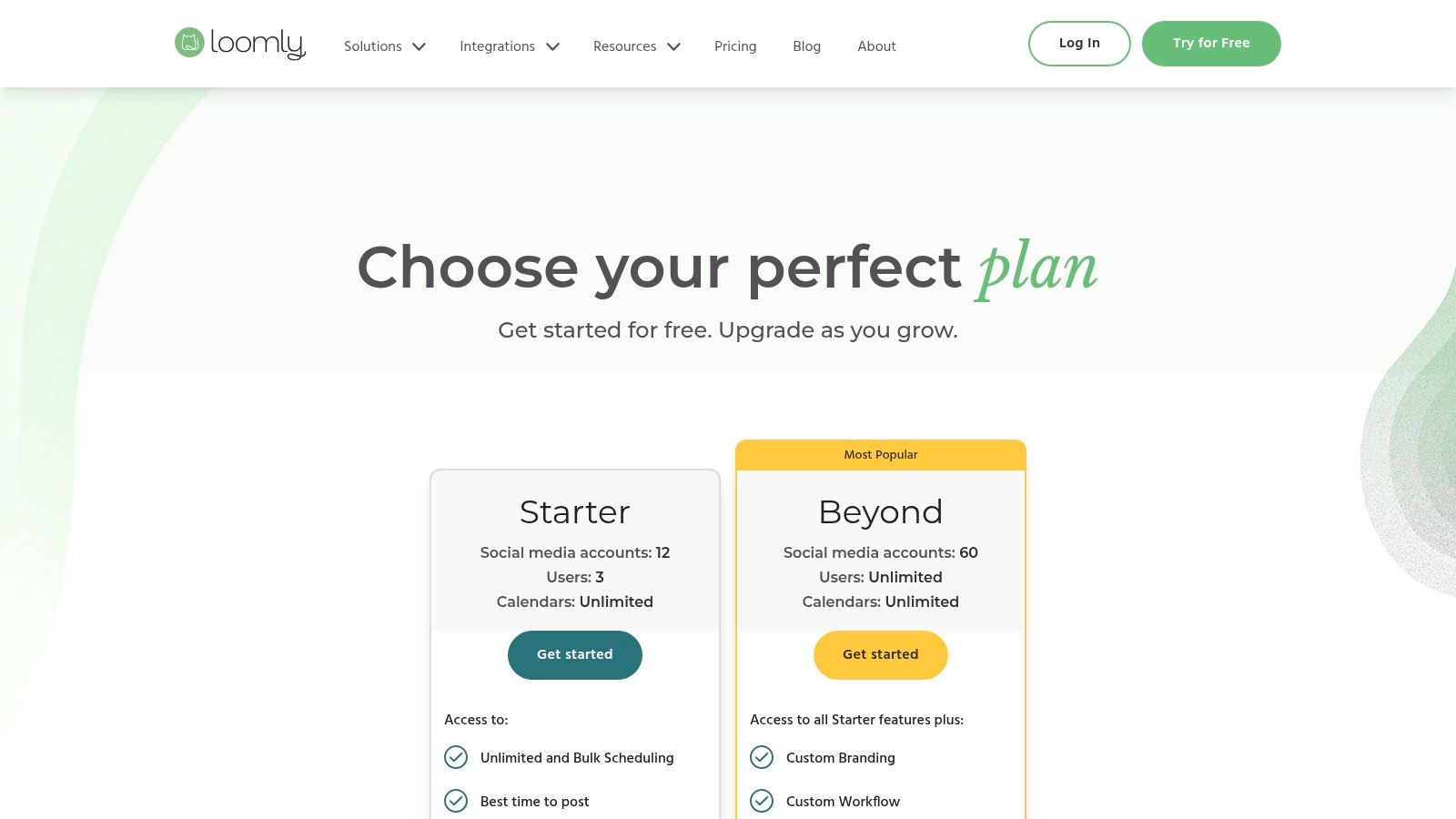
If your social media process feels like a chaotic scramble of random ideas and last-minute posts, Loomly is the organized librarian who gently shushes the chaos. It's built for teams that prioritize planning and collaboration over complex analytics. This platform turns content creation into a structured, step-by-step workflow, from brainstorming ideas to getting that final green light from the boss.
Loomly shines by providing a clear path for every piece of content. It offers post ideas based on trends and holidays, a shared asset library to keep your visuals in order, and a straightforward approval system. This makes it one of the best social media management tools for small business agencies or teams where multiple people need to touch a post before it goes live.
Why It’s Great for Collaborative Teams
Loomly's strength is its team-centric workflow. The platform ensures everyone is on the same page with clear roles, notifications, and post-optimization tips that guide you toward creating better content for each specific network. It’s less about raw data and more about refining your creative process.
- Key Features: Post ideas and inspiration, a central asset library, version control, platform-specific post previews, and clear approval workflows.
- Best For: Small agencies, marketing teams, and businesses that need a structured content approval process without enterprise-level complexity.
- Limitation: Its social listening and deep engagement features are less robust than more expensive platforms. You'll want to look elsewhere for in-depth competitor tracking.
Pro-Tip: Use Loomly’s post idea generator to fill your calendar, but supercharge those ideas with real-time data. Before you even start drafting in Loomly, use the Trendy iOS app to discover trending audio and hashtags to ensure your planned content actually resonates with current conversations.
Website: https://www.loomly.com/pricing
10. Zoho Social
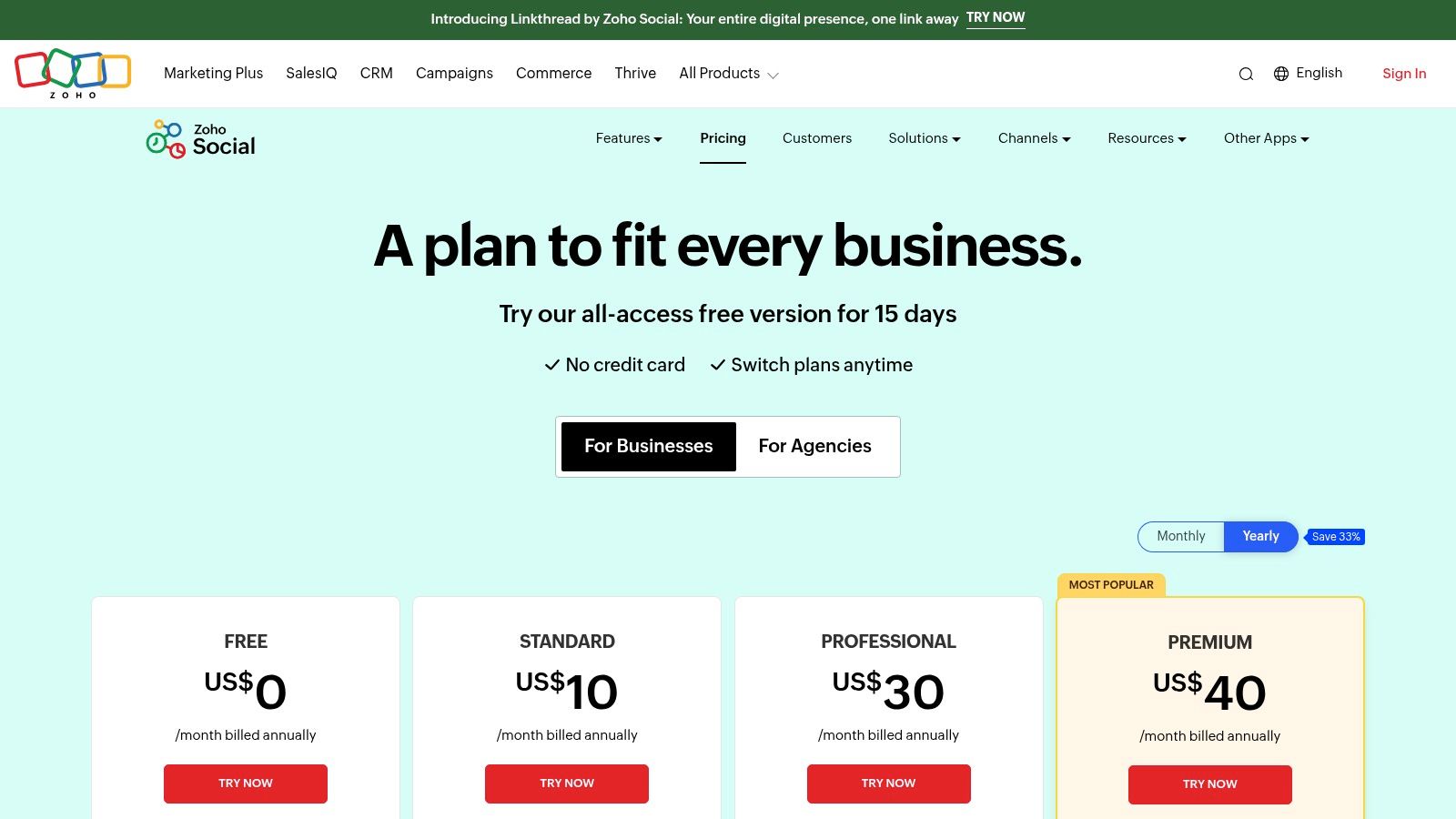
For small businesses already running on the Zoho ecosystem, adding Zoho Social to the mix is a no-brainer. It’s the missing puzzle piece that connects your social media efforts directly to your sales, marketing, and customer support. This isn’t just another scheduler; it’s a deeply integrated tool designed to make social media a seamless part of your entire business operation, not an isolated island.
It moves beyond basic posting by offering robust monitoring dashboards and team collaboration features that feel like they belong in a much more expensive package. Features like bulk scheduling and repeat posting are huge time-savers, while the zShare browser extension makes curating content on the fly incredibly simple. For businesses looking for a tool that grows with them, Zoho Social is one of the best social media management tools for small business owners who think long-term.
Why It’s an Ecosystem Powerhouse
The real advantage of Zoho Social is its native connection to other Zoho apps like Zoho CRM. Imagine seeing a lead from a social media comment appear directly in your sales pipeline, or turning a complaint from a direct message into a support ticket in Zoho Desk. This end-to-end workflow visibility is where Zoho truly shines.
- Key Features: SmartQ predictions for optimal posting times, content approvals, CRM integrations, a monitoring dashboard, and a useful free plan.
- Best For: Businesses already using other Zoho products, B2B companies, and teams that need integrated social media and customer service workflows.
- Limitation: The interface can feel a bit corporate and may require some initial setup to tailor it to your specific role. Also, costs can add up if you manage multiple brands, as each often requires an add-on.
Pro-Tip: Leverage the Zoho CRM integration to track how your social media efforts directly contribute to leads and sales. Before you schedule content, use an external tool to find out what's currently trending. For real-time topic and trend discovery, check out the analytics inside the Trendy iOS app to ensure your Zoho-scheduled posts are relevant and timely.
Website: https://www.zoho.com/social/pricing.html
11. Meta Business Suite (Facebook & Instagram)
For the small business that lives and breathes on Facebook and Instagram, jumping straight to a paid tool might be overkill. Meta Business Suite is the free, built-in command center for your Meta-centric world. It’s like getting the official user manual and a set of keys directly from the source, designed to handle the basics of scheduling, messaging, and analytics without costing a dime.
It strips away the need for a third-party app if your audience is primarily on these two platforms. You get a unified inbox for DMs and comments, a content calendar for scheduling posts and Reels, and access to native features like A/B testing for posts. While it’s not the most feature-rich platform on this list, it’s undeniably one of the best social media management tools for small business owners on a tight budget.
Why It’s a Great Starting Point
Its greatest strength is its native integration. You're using Facebook's and Instagram's own tool, which means you get instant access to new features and guaranteed compliance with their API rules. It’s the baseline against which all other tools are measured for Meta management.
- Key Features: Unified inbox for FB/IG, post and Reel scheduling with recommended posting times, a visual content planner, and basic performance analytics.
- Best For: Businesses focused exclusively on Facebook and Instagram, anyone needing a completely free solution, and those who want direct, native functionality.
- Limitation: It’s a walled garden. There’s no support for TikTok, LinkedIn, or any other platform. Users also occasionally report scheduling glitches or posts failing to publish, which can be frustrating.
Pro-Tip: Use the Business Suite for your day-to-day scheduling on Meta platforms. To ensure the content you're scheduling will actually perform, leverage a tool like the Trendy iOS app to discover trending audio and hashtags before you create your Reels and posts.
Website: https://business.facebook.com/
12. Capterra (Social Media Management category)
Feeling like you're lost in a jungle of software options? Capterra is the map and compass you need. It’s not a social media management tool itself, but rather a massive, vendor-neutral directory where you can compare hundreds of them. Think of it as the ultimate window-shopping destination before you commit, allowing you to filter the contenders and avoid buyer's remorse.
Instead of endlessly Googling, Capterra lets you sift through the noise with powerful filters. You can zero in on tools that offer a free plan, specific features like content calendars or analytics, and see real user reviews side-by-side. This approach saves you from the tedious task of visiting dozens of different pricing pages, helping you find the best social media management tools for your small business with surgical precision.
Why It’s a Great Research Hub
Capterra's power lies in its ability to turn a daunting decision into a manageable process. By creating a shortlist based on features, price, and user ratings, you can approach vendor websites with a clear idea of what you need and what the market offers.
- Key Features: Advanced filters for pricing models and specific features, verified user reviews, side-by-side comparison charts, and a "Shortlist" feature to save your top picks.
- Best For: Business owners who want to conduct thorough due diligence, compare multiple options efficiently, and find niche tools that fit specific needs.
- Limitation: Sponsored listings often appear at the top, so be sure to scroll past them. The quality of user reviews can vary, so always cross-reference claims on the vendor's actual website.
Pro-Tip: Use Capterra to build a shortlist of 3-5 tools that meet your core needs. Before making a final decision, use the insights from the Trendy iOS app to understand what kind of content trends are dominating your niche. This will help you choose a tool with features that align with the content you should be creating.
Website: https://www.capterra.com/social-media-management-software/
Top 12 Social Media Management Tools — Side-by-Side Comparison
| Product | Core features ✨ | Quality ★ | Price & value 💰 | Target 👥 | Notes / USP 🏆 |
| 🏆 Trendy | ✨ AI-driven post ideas, trend detection, weekly posting plan | 4.5★ | 💰 Beta / pricing TBA | 👥 Creators, brands, agencies | 🏆 Personalized AI content strategist; trend signals & engagement predictions |
| Buffer | ✨ Visual calendar, scheduler, AI captions, community inbox | 4.0★ | 💰 Low / per-channel pricing + Free plan | 👥 Solo founders & small teams | Simple, predictable scheduling and modular pricing |
| Hootsuite | ✨ Full-stack publishing, listening, Canva & team assignments | 4.0★ | 💰 Mid — higher entry | 👥 Growing SMBs | Broad feature coverage with strong upgrade path |
| Sprout Social | ✨ Deep analytics, robust inbox, collaboration & reporting | 4.5★ | 💰 High / per-seat | 👥 Teams needing governance & reporting | Award-winning reporting depth and team workflows |
| Later | ✨ Visual planner, smart scheduling, link-in-bio, Shorts support | 4.0★ | 💰 Low–Mid | 👥 Visual brands & creators | Creator-first UX for short-form and Instagram planning |
| Agorapulse | ✨ Unified inbox, moderation, exports & white‑label reports | 4.0★ | 💰 Mid | 👥 Agencies & SMBs | Strong inbox management and agency reporting features |
| SocialPilot | ✨ Bulk scheduling, content library, many accounts/users | 3.5★ | 💰 Low — best for many profiles | 👥 Small agencies & budget-conscious teams | High account/user allowances for tight budgets |
| Sendible | ✨ Client dashboards, approvals, AI assist, white‑label | 3.5★ | 💰 Mid (promos common) | 👥 Agencies & client-facing teams | Client-facing workflows and scalable user bundles |
| Loomly | ✨ Post ideas, calendars, asset versioning, approvals | 4.0★ | 💰 Mid | 👥 Small creative teams | Approachable planning UX with platform-specific optimization |
| Zoho Social | ✨ Bulk publishing, monitoring, Zoho ecosystem integrations | 3.5★ | 💰 Low / free tier available | 👥 Small businesses in Zoho ecosystem | Cost-effective with CRM/help‑desk integrations |
| Meta Business Suite | ✨ Native post/Reel scheduling, unified messaging | 3.5★ | 💰 Free (with Meta accounts) | 👥 Facebook & Instagram businesses | Native, no‑cost scheduling and platform alignment |
| Capterra (directory) | ✨ Filters, reviews, side‑by‑side comparisons | 4.0★ | 💰 Free | 👥 Buyers shortlisting tools | Large vendor directory to compare features, pricing, and reviews |
Choosing Your Co-Pilot for Social Media Success
And there you have it, the ultimate mission briefing for selecting your social media sidekick. We've navigated the vast galaxy of platforms, from the enterprise-level command centers like Sprout Social and Hootsuite to the streamlined, budget-friendly cruisers like Buffer and SocialPilot. Each one offers a unique cockpit, equipped with tools designed to make your journey through the chaotic cosmos of social media a whole lot smoother.
Choosing the right platform feels a lot like picking a co-pilot. You need one you can trust, one that understands your mission, and one that won’t fall asleep at the wheel when you’re flying through a meteor shower of trending topics. The key takeaway is this: there is no single "best" tool, only the tool that is best for you. Your perfect match hinges entirely on your unique business DNA.
Decoding Your Needs: The Final Checklist
Before you sign up for that free trial, let's distill this entire 4,000-word deep dive into a few critical questions. Think of this as your pre-flight checklist. Grab a coffee, be brutally honest with yourself, and map out your flight plan.
- What's Your Budget's Fuel Level? Are you operating on a startup's shoestring budget, making free tools like Meta Business Suite a godsend? Or do you have the resources to invest in a premium powerhouse like Agorapulse for its robust CRM and reporting features?
- Which Planets Are You Visiting? If your universe revolves around the visual-first worlds of Instagram and Pinterest, a specialist like Later is your best bet. If you're a B2B brand navigating the professional nebula of LinkedIn, a tool with stronger analytics like Zoho Social might be a better fit.
- Who is on Your Flight Crew? Are you a solo creator juggling everything yourself? A simple, intuitive interface from a tool like Loomly might be perfect. Or are you managing a small team that requires collaboration, approval workflows, and tiered permissions, pointing you toward Sendible or SocialPilot?
- What's the Primary Mission? Is your goal pure efficiency through scheduling and automation? Buffer has that down to a science. Or is your mission to engage, monitor conversations, and build a community? A tool with a top-tier social inbox, like the one offered by Agorapulse, should be your priority.
Beyond Scheduling: The New Frontier of Content Strategy
Here’s the thing: the old way of thinking is dead. The best social media management tools for small business in today's landscape aren't just about scheduling posts into the void. The real challenge, especially for creators on TikTok and Instagram, isn't just when to post, but what to post. True growth comes from creating content that resonates, captures trends, and builds a genuine connection with your audience.
This is where a new class of tool emerges, one that acts less like a scheduler and more like an AI-powered strategist. While traditional platforms help you manage your output, a tool like Trendy provides the crucial input. It analyzes the digital landscape, deciphers trends, and hands you a personalized content roadmap based on data, not guesswork. It’s the difference between flying blind and having a state-of-the-art navigation system guiding you to your destination. Combining a powerful scheduling tool with an intelligent content strategy engine is the ultimate power-up for any small business or creator looking to not just participate in the conversation, but to lead it.
So, review your goals, test drive a few options, and choose the co-pilot that will help you confidently navigate your brand to social media stardom.
Ready to stop guessing what content will work and start creating with confidence? While the tools in this list help you manage your social media, Trendy tells you what to post for maximum growth. Get your personalized, AI-driven content strategy by downloading the app today at Trendy and turn your insights into influence.