
An AI content planner is software that turns audience signals, trends, and past performance into topic ideas, drafts, schedules, and predictions across social platforms. With approximately 5.24 billion active social-media user identities in January 2025, growing 4.1% year over year, planning now means coordinating several platforms rather than filling one calendar (DataReportal).
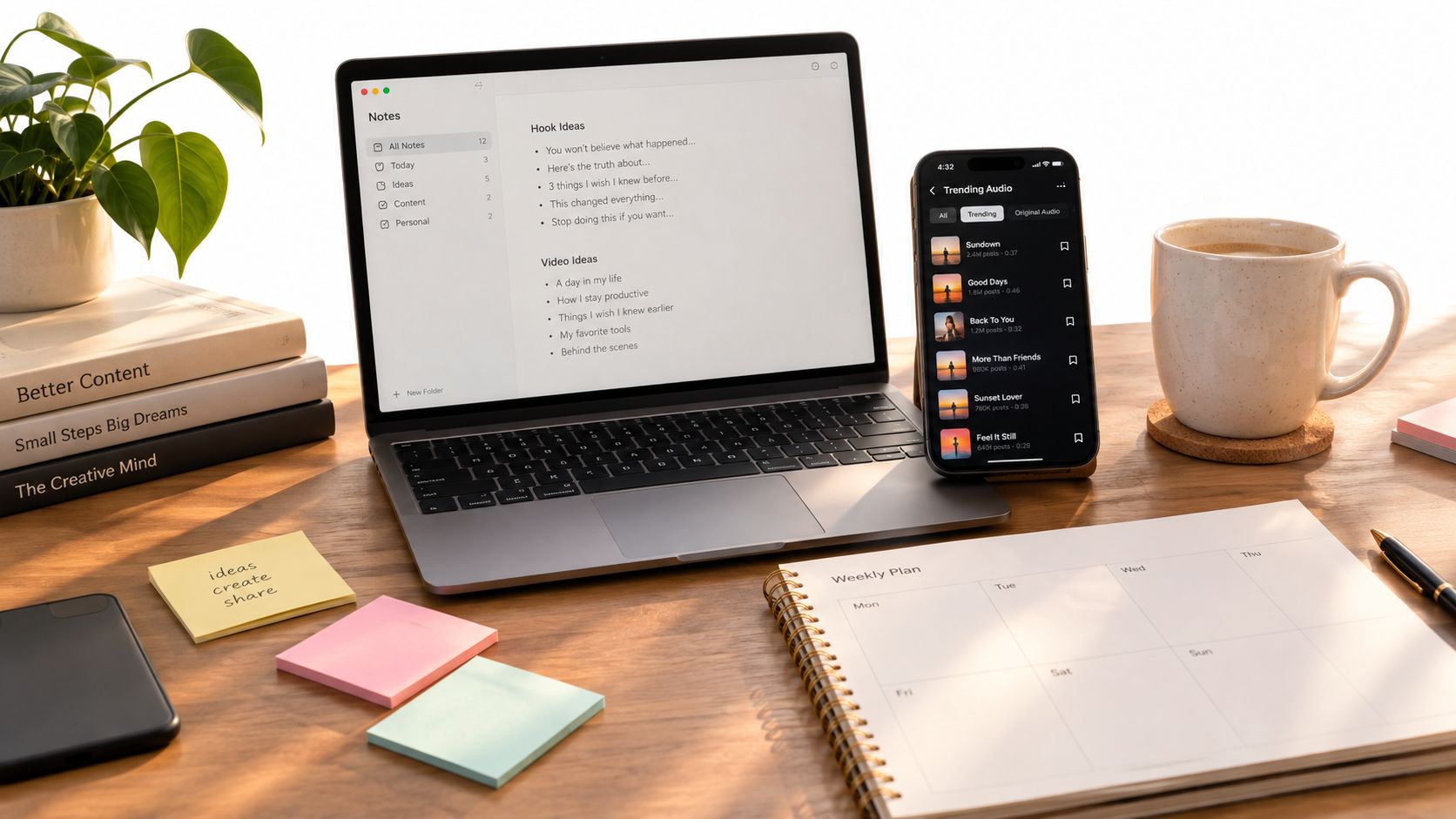
You may already have the ingredients: half-written hooks in your notes app, saved TikTok sounds, screenshots of Instagram posts, and a publishing schedule that mostly lives in your head. The problem isn't a shortage of ideas. It's deciding which idea belongs on Reels, which needs a TikTok script, which can become a carousel, and which should wait until you have something original to say.
What an AI Content Planner Actually Does
An AI content planner is a software layer between your raw marketing signals and your publishing routine. It studies information such as your audience, niche, trends, previous posts, and performance, then suggests topics, hooks, formats, drafts, publishing times, and follow-up actions for Instagram, TikTok, LinkedIn, Threads, and X.
That distinction matters. A generic AI writer gives you text after you provide a prompt. A planner helps answer the harder question: what should I publish next, where should it go, and why does it fit my audience?
The need exists because social media has become a coordination problem. DataReportal reports that social platforms reached 97.3% of connected adults using at least one social network or messaging service monthly, and the average internet user used 6.83 different social platforms per month (DataReportal). One idea may need a vertical video, a carousel, a short LinkedIn post, and a Threads or X adaptation, each with a different opening and call to action.
The four jobs it should help you do
- Diagnose your starting point: A profile audit identifies weak formats, unclear positioning, missing content pillars, and posts that attracted meaningful attention.
- Choose useful opportunities: Trend discovery combines emerging sounds, hashtags, formats, and audience questions with your niche instead of handing you a random list of viral topics.
- Turn ideas into assets: A useful planner produces ready-to-shoot video scripts, hooks, scene structures, carousel outlines, visual post concepts, and text drafts.
- Learn from the result: Performance analysis should explain what happened and guide the next decision, not merely display views in a dashboard.
AI adoption has also moved beyond isolated experiments. Stanford's 2025 AI Index reported that 78% of surveyed organizations used AI in at least one business function in 2024, compared with 55% in 2023 (Stanford AI Index). For creators and small businesses, that makes an AI planner less like a novelty and more like a practical coordination assistant.
The Building Blocks Behind the Tool
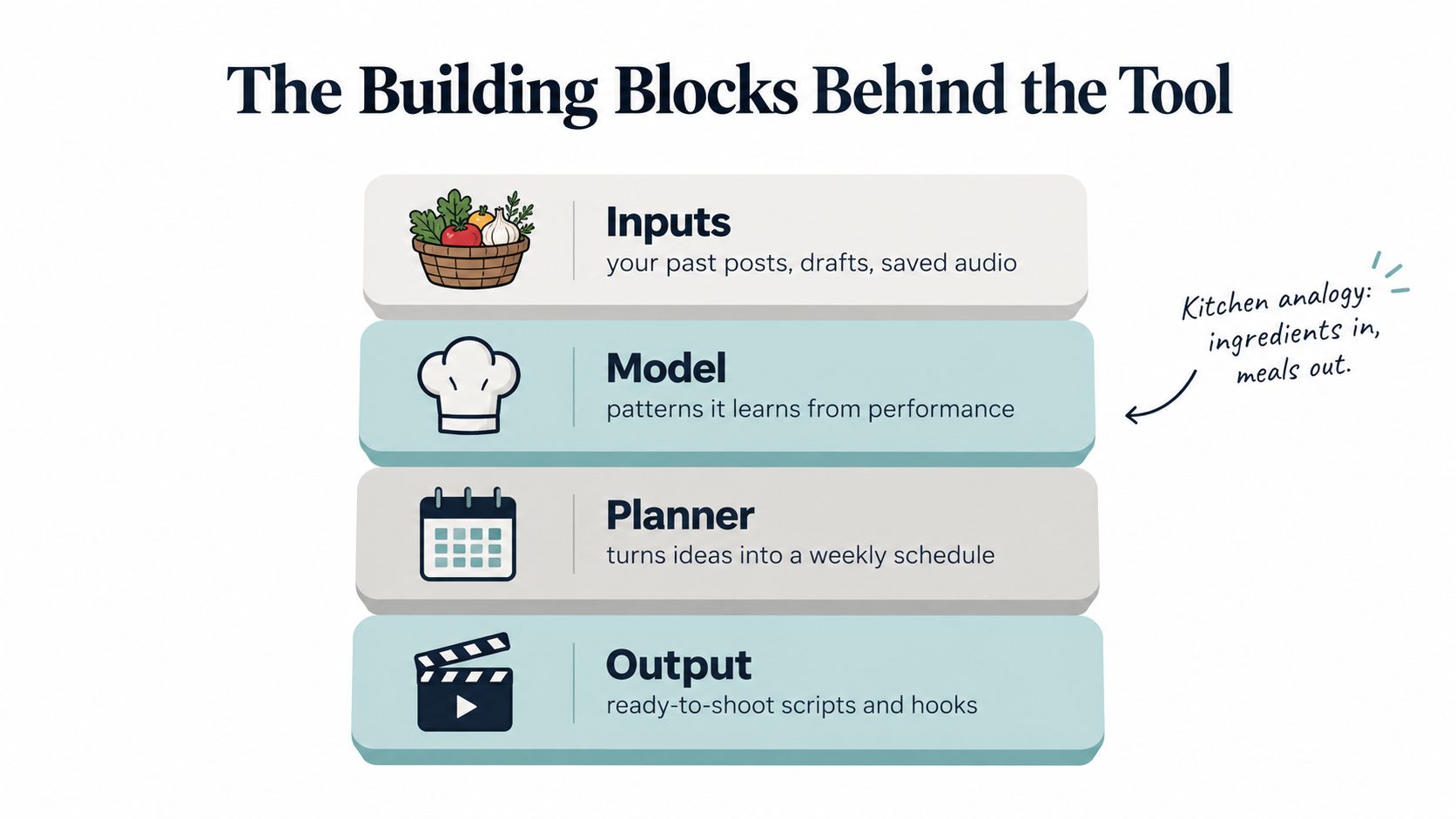
An AI content planner works like a control room for your content, not a magic publish button. The useful part is coordination. It pulls signals from your accounts, connects them to patterns, turns those patterns into platform-specific options, then uses results to improve the next round.
Inputs are the ingredients
The first layer gathers what the system can learn from. Depending on the product and the permissions you grant, that can include past posts, drafts, audience details, niche patterns, saved audio, hashtags, publishing history, and platform updates.
This part is easy to underestimate. If the tool only sees “fitness coach” or “small business owner,” it tends to produce generic ideas that could fit almost anyone. If it can see that your audience responds to practical tutorials, ignores vague motivation, and saves short explainers, the recommendations get narrower in a good way. The planner starts acting less like a random idea spinner and more like an assistant that understands the room.
Permissions matter here. Check what the product can access, whether you can disconnect an account, and how your content and performance data are handled. Personalization should improve relevance, while your privacy settings stay clear and under your control.
The model finds patterns
The model is the pattern spotter. It does not know your voice the way a strategist, editor, or long-term collaborator would. What it can do well is compare repeated signals at scale and surface relationships you might miss during a busy week.
For example, it may detect that one style of opening works better for tutorials than for opinion posts, or that the same topic needs a different framing on TikTok and Instagram. That is why adoption has spread so widely. The 2025 report from the Stanford AI Index found that 78% of surveyed organizations used AI in at least one business function in 2024, up from 55% in 2023.
Pattern recognition still needs supervision. A model can notice what repeats. It cannot decide which tradeoff fits your brand, your filming capacity, or the tone your audience trusts.
The planner turns patterns into choices
The next layer translates analysis into decisions you can use. That might mean a Tuesday Reel hook, a carousel topic for the weekend, a TikTok script with a stronger opening, a LinkedIn post that reframes the same idea for a different audience, or a Story prompt that supports the main post.
Many tools either help or create more noise. A useful planner gives options that fit your week, your channels, and your format mix. If you want a wider market comparison, top content planning tools for agencies offers a helpful reference point. For a broader view of how these systems support distribution across channels, see this breakdown of AI used in social media.
Feedback completes the loop
The last block is feedback. Results from published content should flow back into the system so future suggestions improve. Otherwise, you have an idea generator with a nicer interface.
A better planner separates empty reach from useful response. It helps you see which topics, hooks, formats, and posting choices earned saves, shares, comments, profile visits, or another business-relevant action. That feedback loop is what turns AI planning into a coordination system, while you still keep the final say on voice, judgment, and what gets published.
How It Fits Into a Real Weekly Workflow
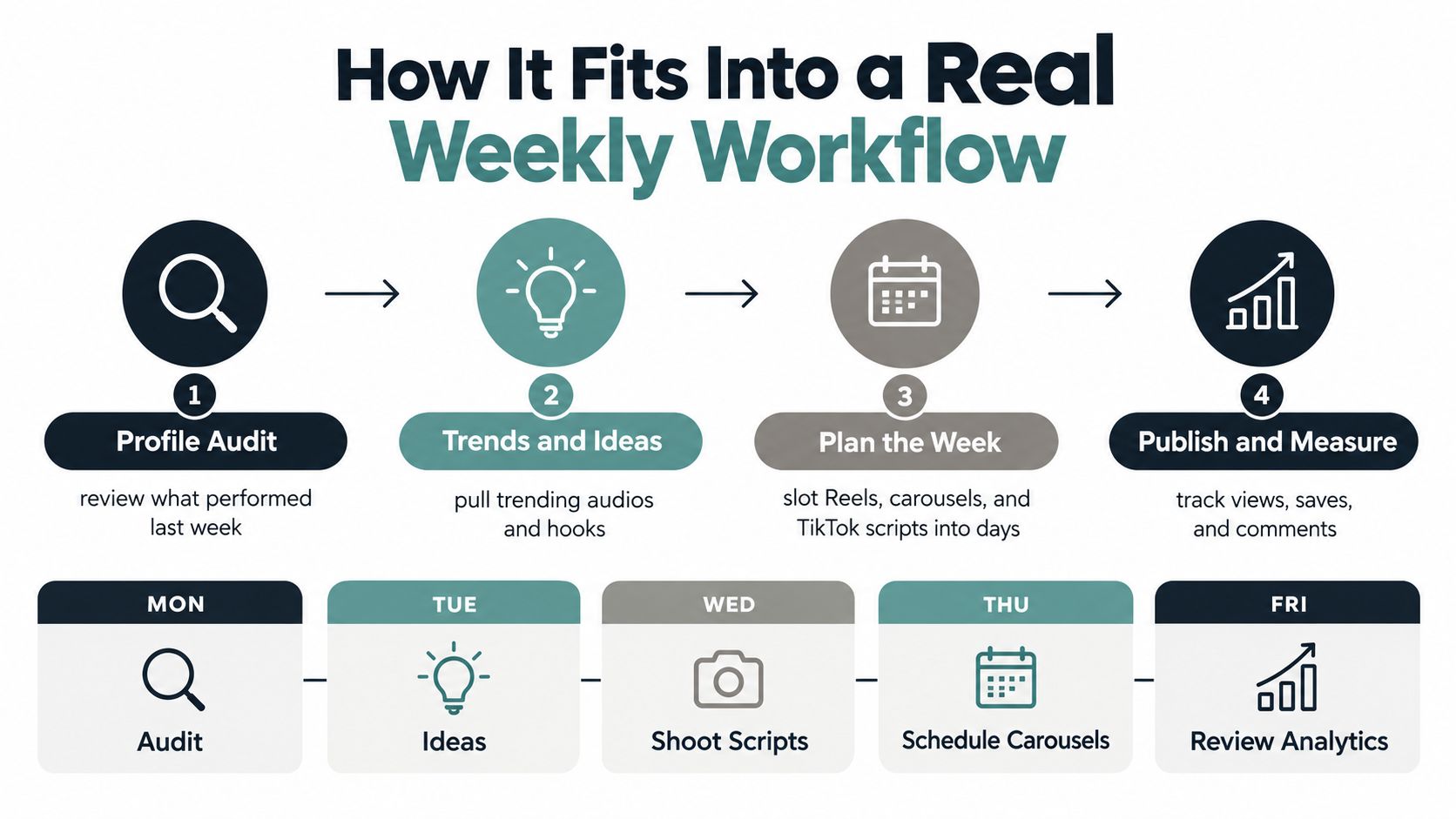
A realistic workflow doesn't ask AI to create your entire presence while you disappear. It gives each stage a defined job, then leaves room for your experience, filming, editing, and final approval.
Monday starts with a Profile Audit
Begin by reviewing the account, not by asking for more ideas. A profile audit can reveal that your recent Reels explain the topic well but use weak openings, or that your carousels attract saves while your broad opinion posts receive little response.
In Trendy's workflow, Profile Audit is the diagnostic stage. You might identify two Reel formats that aren't earning useful engagement and one carousel structure worth repeating. The output isn't a verdict on your creativity. It's a short list of decisions for the week.
Tuesday turns signals into Trends and Ideas
Next, scan for opportunities that fit your niche. A useful trend scan doesn't tell a financial coach to copy a dance trend without context. It might suggest adapting a rising audio into a “three mistakes” explanation, or using a relevant hashtag for a practical answer your audience already wants.
An AI content planner can connect audience questions with platform-specific formats. Ask for a list of hooks, then narrow it to ideas you can support with experience, footage, or a clear point of view.
For a broader framework around planning themes, publishing rhythms, and channel roles, master plan for online content is a useful companion resource.
Wednesday builds the actual assets
Planning becomes valuable when it produces something you can use. For one idea, the planner might create:
- Instagram Reel: A hook, scene structure, spoken lines, on-screen text, and a closing prompt.
- TikTok version: A faster opening, a platform-appropriate script, and editing notes.
- Carousel: A slide-by-slide outline with a visual concept and final save prompt.
- Text adaptations: A LinkedIn post plus shorter Threads or X versions.
- Story support: A behind-the-scenes clip, poll, reminder, or follow-up question.
Instagram says Reels can contain one or multiple clips totaling up to 3 minutes, with editing features such as text, augmented-reality filters, and audio (Instagram Reels). Instagram also recommends high-resolution vertical video in a 9:16 format, without borders, and cautions against placing text over most of the screen. Those details belong in the shooting checklist, not buried in a generic content idea.
Thursday schedules the week
Schedule the assets only after checking that each platform version feels native. Instagram Stories require selecting the media, choosing “Story” as the post type, selecting automatic publishing or notification-based publishing, and setting the date and time (Later's Instagram Stories scheduling guide). Video assets in Stories must be trimmed to 60 seconds or less, so longer clips need editing or splitting before scheduling.
A Story reminder can support a Reel, while a follow-up poll can collect a useful audience signal. TikTok LIVE promotion needs separate planning. TikTok says creators must be at least 18 to go LIVE and generally need 1,000 followers, although the follower requirement may vary by region (TikTok LIVE support). An account that doesn't meet the applicable requirements should focus on audience-building videos rather than scheduling a livestream it can't access.
Friday reviews Performance Analysis
End the week by asking what changed. A carousel that outperformed may have earned more saves because its steps were easier to reference. A Reel may have gained views but few profile visits because the subject was broad or the next action wasn't clear.
Trendy connects Profile Audit, Trends and Ideas, Content Creation, and Performance Analysis into one cross-format social media co-pilot. The point isn't to publish more for its own sake. It's to make the next planning decision better informed.
A Feature Checklist for Evaluating Any AI Content Planner
A free trial can tell you more than a polished feature page. Give the tool your actual platform mix, a real niche, and a recent content problem. Then check whether the output helps you make decisions or just creates more material to sort through.
| Capability | What it does | Why it matters |
| Cross-platform planning | Adapts ideas for Instagram, TikTok, LinkedIn, Threads, and X | Prevents one caption from being pasted everywhere |
| Trend discovery | Finds relevant sounds, hashtags, hooks, and formats | Connects timely opportunities with your niche |
| Format-specific creation | Produces Reel scripts, TikTok scripts, carousels, Stories, and visual concepts | Gives each asset a usable production brief |
| Scheduling support | Organizes publishing days and suggests suitable times | Turns ideas into a workable weekly rhythm |
| Predictions with context | Estimates likely engagement and explains the recommendation | Helps you prioritize without treating predictions as promises |
| Performance analysis | Connects results to topics, formats, hooks, and actions | Shows what to improve rather than only what happened |
| Voice controls | Uses examples, tone guidance, and human review points | Reduces generic wording and protects trust |
Five questions to ask before choosing
- Does it support your real platform mix? If you publish on Instagram and TikTok but the tool mainly drafts blog copy, it isn't solving your coordination problem.
- Can it distinguish formats? A Reel needs a hook and scene structure. A carousel needs slide logic. A LinkedIn post needs a different reading experience.
- Does it explain why? “Post this topic” is weaker than a recommendation tied to your audience, past performance, or current trend.
- Can you edit before publishing? Human approval should be part of the workflow, not an obstacle to automation.
- Does it measure outcomes? Look for qualified reach, saves, shares, profile visits, comments, and downstream actions, not only content volume.
Trendy offers profile analysis, niche-specific ideas, hooks, trend recommendations, weekly planning, content drafts, and performance guidance for platforms including Instagram, TikTok, LinkedIn, X, and Threads. It belongs on a shortlist when you want one planning layer across formats rather than a video-only generator.
Keeping Your Voice Human When AI Plans the Work
After comparing features, this is the guardrail that decides whether an AI content planner helps your brand or flattens it. The common failure is not a wildly bad post. It is a polished, usable post that could have come from any account in your category.
That matters because audience trust is tied to whether the voice feels real. A 2025 study found that AI-generated influencers reduced perceived brand trust and authenticity compared with human influencers, and that explicitly labeling the content as AI increased those negative perceptions (Journal of Marketing and Social Research). If you want a useful outside reference on how different teams talk about originality and voice, you can also read the Secta Labs articles.

Give the tool evidence of your voice
A planner cannot infer your voice from one label like “friendly” or “professional.” It needs examples. Show it phrases you repeat, words you avoid, how direct your sentences are, whether you teach with stories or with steps, and how much personal context belongs in each format.
Specific guidance gives better output because it works like handing a new team member your playbook instead of just telling them to “sound like us.” A fitness creator might say, “I teach one exercise, point out one common mistake, then add a short story from coaching.” A small business owner might set a different pattern: calm language, concrete recommendations, and answers rooted in real customer questions. The brand voice guidelines and examples are a good starting point for turning those habits into something repeatable.
Keep the meaningful parts human
AI can coordinate the work. You should still own the meaning.
- Personal stories: add the memory, lesson, or customer moment yourself.
- Original footage: choose what you filmed, tested, or observed firsthand.
- Final wording: cut phrases you would never say out loud and add the detail only you know.
- On-camera delivery: use drafts as support, not as a replacement for your natural rhythm.
- Strong opinions: review claims, disagreements, and sensitive topics yourself before publishing.
A simple rule helps here. Let AI organize the calendar, draft structures, and suggest hooks. Keep your lived experience, judgment, and phrasing in human hands.
Explanations inside the workflow also protect authenticity. If a planner recommends a hook because it matches a pattern that often performs well, you can decide whether that pattern fits your voice. If a trend feels forced, skip it and keep the rest of the plan. That is the value of AI planning. It handles coordination across platforms and formats while you remain responsible for what the content means and how it sounds.
Measuring Whether AI Planning Actually Worked
More ideas and faster drafts don't prove that an AI content planner improved your marketing. They prove that the tool reduced friction. Those are useful outcomes, but they're different outcomes.
A 2026 survey of more than 700 social-media professionals found that 54% measured AI's impact through time saved, while only 6% measured content quality and 4% tracked post performance (Metricool's State of AI in Social Media study). The same survey found that 86% used AI for writing and 84% for idea generation. The gap is clear: teams are using AI broadly, but many aren't testing whether the resulting content performs better.
Separate efficiency from audience impact
Track two scoreboards.
The operating scoreboard records how much work the system removes. You might monitor planning time, draft preparation, editing effort, and the number of usable ideas produced. These measures matter if your bottleneck is consistency or a small team's limited capacity.
The audience scoreboard records whether people respond differently. Choose measures connected to your goal:
- Qualified reach: Did the content reach the people you want?
- Saves and shares: Did the idea feel useful enough to keep or pass along?
- Profile visits: Did viewers show interest beyond the individual post?
- Comments and replies: Did the topic create a meaningful response?
- Business actions: Did people take the next step that matters to your work?
Use KPIs for social media to keep the measurement set connected to your objective rather than collecting every available number.
Run a fair comparison
Choose one content type, such as Instagram Reels or TikTok educational videos. Keep the subject area and publishing rhythm reasonably consistent, then run the AI-supported process alongside your normal process for two to four weeks. Compare the chosen audience measures with your baseline, while recording production time separately.
Don't treat one unusually strong post as proof. A fair test looks for a pattern across comparable posts and asks what changed: the hook, topic, format, timing, visual treatment, or call to action.
Demand explanations, not just predictions
Engagement predictions can help you prioritize, but they aren't guarantees. A useful planner should show what influenced the recommendation and communicate uncertainty rather than presenting a score as a fact.
Performance analysis should also answer practical questions: Did the hook retain attention? Did the format make the idea easier to save? Did the Story reminder support profile visits? Did the TikTok adaptation need a different opening?
Measurement principle: If the planner saves time but weakens audience response, change the workflow. If it saves time and improves useful actions, keep the parts that earned that result.
Trendy brings planning and analysis into the same workflow, so you can move from profile audit and trend discovery to scripts, carousels, scheduling, and post-level review without treating content volume as the final goal.
Use Trendy to audit your profile, find niche-relevant trends, create ready-to-shoot scripts and cross-format ideas, and review which recommendations helped your content. Visit the web app, or try the Trendy iOS app and Android app to build a more measurable weekly content workflow.