
The popular advice says to post Instagram Reels at one magic hour, usually morning, lunch, or evening. Ignore it. The right Instagram Reels post time is the window when your own audience is active, your content matches its intent, and you can respond while early signals are forming. Global studies are useful for choosing test slots, but your account's Insights should decide what you publish tonight.
This guide gives you a practical routine: pull your analytics, run a controlled 14-day test, lock a repeatable cadence, and schedule the result with Trendy. It also covers Reel duration, formats, hooks, algorithm signals, Reels versus feed posts, and the workflow that turns timing data into better content.
Why a Universal Best Time Does Not Exist
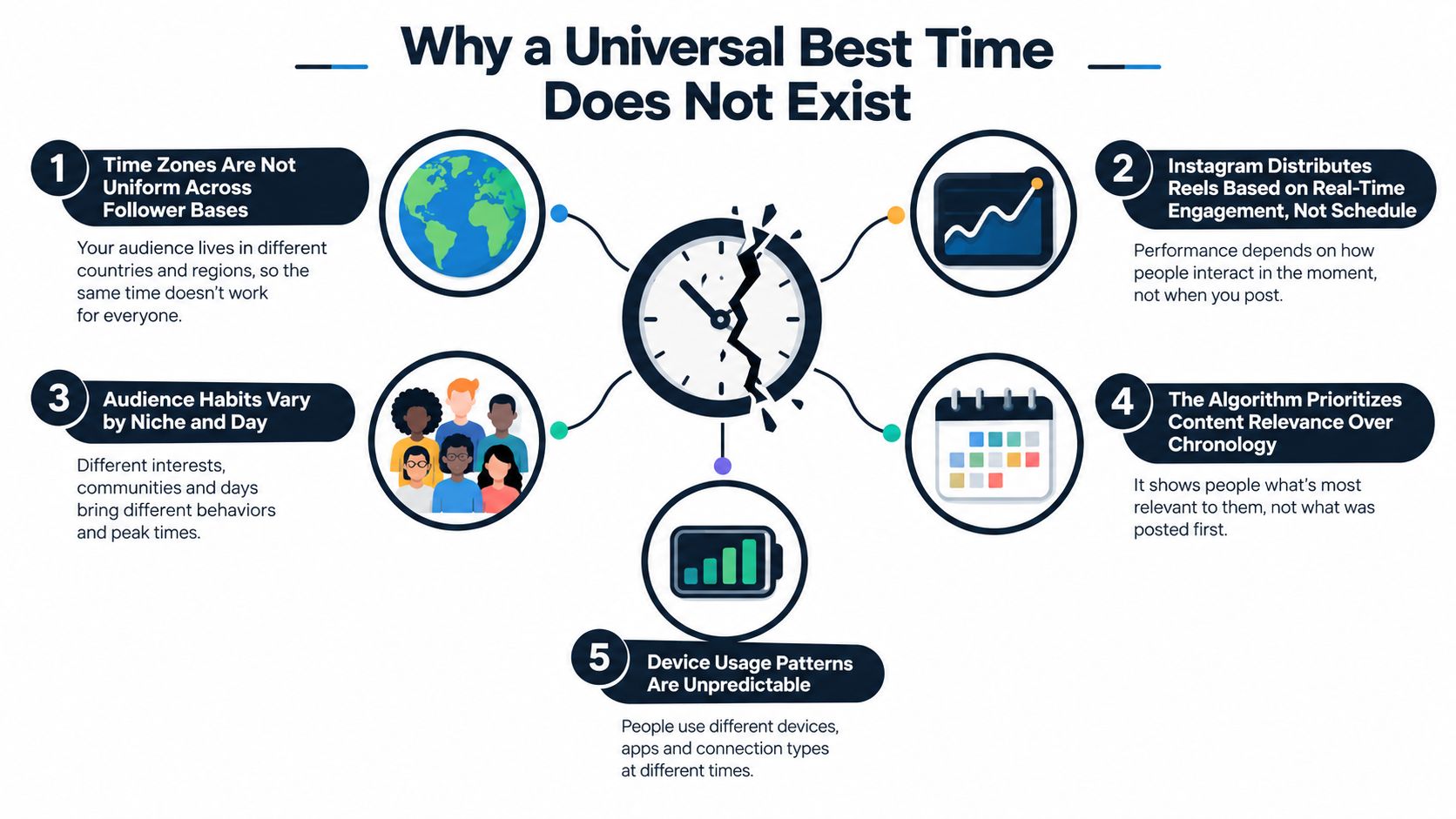
A single universal posting time is a neat answer to the wrong question. Your followers may live across several time zones, use Instagram around different work or school schedules, and respond to different formats. A fitness audience can scroll before training, a parent audience may appear during school hours, and a business audience may check content around work breaks. Treating those people as one audience turns a useful benchmark into a bad publishing rule.
Instagram also doesn't run as a simple chronological feed. Reels can reach followers and non-followers through discovery surfaces such as the Reels experience and Explore, so a post may continue collecting views after its first appearance. Shares, saves, rewatches, and conversations can build gradually rather than arrive in one burst. That means the upload time matters, but it isn't the only variable deciding reach.
Why broad charts still help
Global timing reports disagree because they measure different audiences, regions, formats, and success metrics. One dataset may reward views, another may emphasize likes, and a third may reflect the behavior of a different creator mix. Use those reports to establish a shortlist, not to outsource your judgment.
Your real job is to identify the window that gives your content the strongest start without relying on guesswork. The workflow is simple:
- Pull account data: Review Reels-specific reach, plays, retention, saves, and audience activity.
- Run a 14-day test: Alternate between two plausible windows while keeping the content mix reasonably consistent.
- Lock a cadence: Keep the stronger window for the content goal it serves, while leaving room to test again.
- Schedule with Trendy: Queue Instagram and TikTok content, prepare hooks and scripts, and use performance analysis to adjust the next batch.
For a deeper account-first approach, use this guide to find your personalized best time to post. The principle is straightforward: your audience analytics beat a generic chart.
What the 2026 Timing Data Actually Says
The 2026 evidence doesn't produce one winner. Adobe's analysis found that noon ET is the most crowded upload hour, with nearly one in ten Reels posted then. It also found quieter weekend activity, with Saturday accounting for 11.3% of posts and Sunday 11.6%, while Monday posts received the highest average views at 16.7 million. Posts published at 3 a.m. ET reached an average of 22.2 million views, and Friday posts plus 6 a.m. ET uploads led average likes at 1,030K and 1,237K respectively. See the full Adobe Reels timing analysis for the dataset context.
Buffer analyzed 9.6 million Instagram posts and found that Reels performed best in the evening, particularly between 6 p.m. and 11 p.m., with Wednesday and Thursday standing out. Later analyzed more than 975,000 Reels and identified 12 a.m. as the strongest single time and Monday as the strongest day. Those conclusions don't cancel each other out. They show why dataset, audience location, content type, and chosen metric matter.
A separate 2026 analysis of 2.5 lakh Instagram Reels favored 8 a.m. to 12 p.m. from Monday through Thursday, suggesting that morning and midday scrolling can offer a useful opening before later congestion. Its operational recommendation is better than its headline: test late morning against evening, localize by time zone, and compare 24-hour reach and engagement by weekday. The Trendy engagement timing guide is useful for turning those broad windows into a working test plan.
| Source | Top Weekday Window | Top Weekend Window | Peak Hour Range |
| Adobe, 2026 | Monday for average views | Saturday and Sunday are comparatively quiet | 3 a.m. ET for average views, noon ET for posting congestion |
| Buffer, 2026 | Wednesday and Thursday | Not stated in the verified data | 6 p.m. to 11 p.m. |
| Later, 2026 | Monday | Not stated in the verified data | 12 a.m. |
| SocialPilot dataset, 2026 | Monday through Thursday | Not stated in the verified data | 8 a.m. to 12 p.m. |
The practical conclusion is firm: start with morning, midday, and evening candidates, then let your own Insights choose. Don't confuse a high average across millions of posts with a guaranteed result for your niche.
Reading Your Own Instagram Insights for Reels
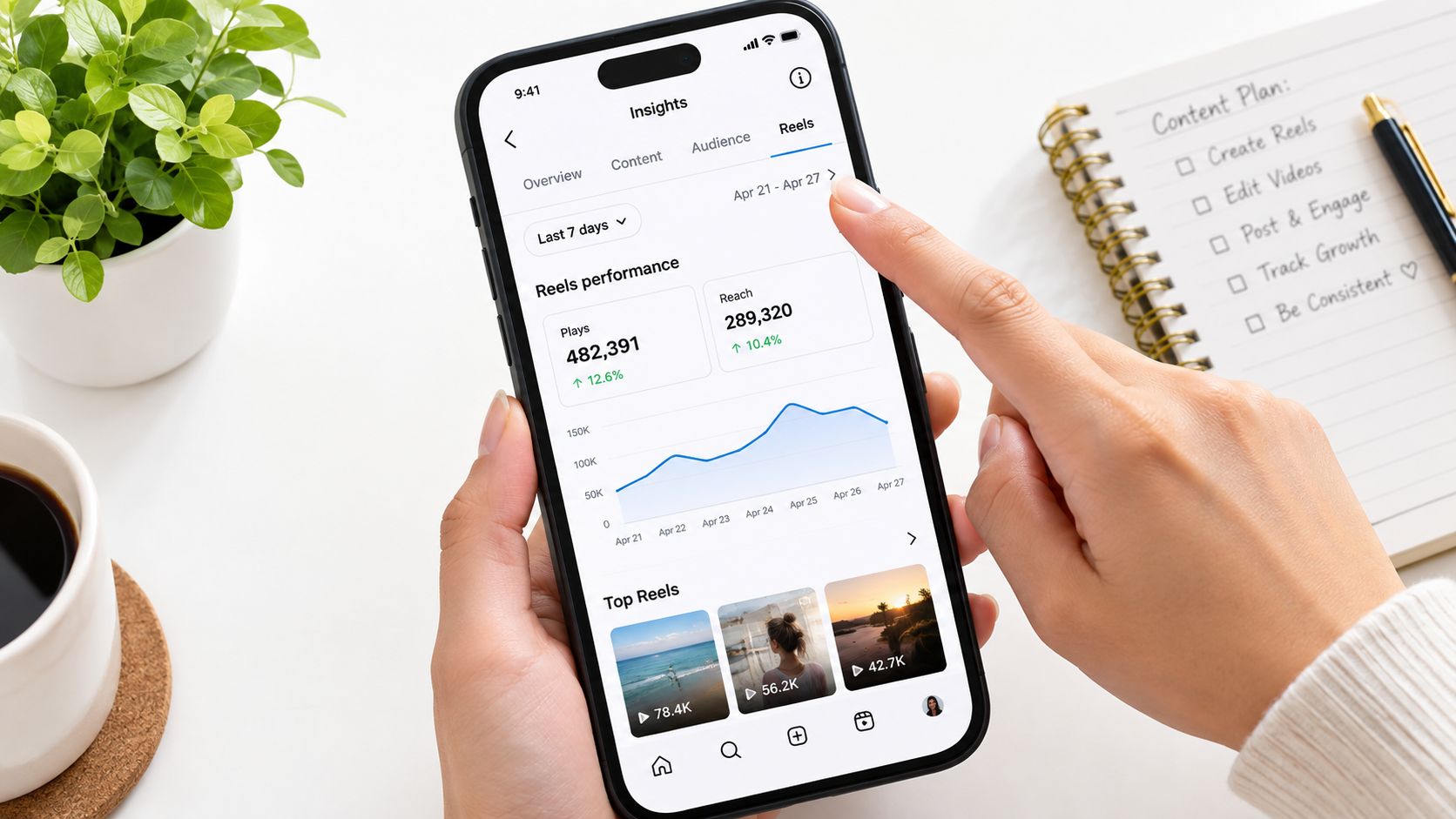
Generic charts stop being useful once your account has enough history to reveal its own patterns. Open Instagram on a professional or creator account, enter the Insights area, and isolate Reels rather than reviewing feed performance as one blended number.
Pull the right view
Select the Reels tab, choose the metric that matches the decision you're making, and review a consistent date range. Plays help you assess viewing volume, while Reach helps you judge how widely Instagram distributed the content. A recent window can show current audience behavior, while a longer window can reduce noise from one unusual post.
Look for three signals:
- Followers: This shows whether your existing audience is seeing and responding to the Reel.
- Non-followers: This indicates whether the content is traveling beyond your current community.
- Most Active Times: This reveals when your audience is available, but it doesn't prove that every content goal will peak at the same hour.
Hourly heatmaps are detailed but noisy. Day-of-week patterns are less granular and usually easier to turn into a reliable schedule. Choose the top two hour blocks that appear across at least three weekdays, then check whether non-follower reach supports the choice.
Record before you test
Create a simple log with publish day, local publish time, Reel topic, format, hook, reach, plays, watch-through behavior, shares, saves, profile visits, and follows from the Reel. Don't compare a product demo with a trend reaction and then blame the clock for the difference.
If you want more context on account analytics and setup, consult this practical guide to viewing Instagram Insights. For broader Instagram account strategy, PurpleCow Digital Marketing Instagram offers a useful resource on business-focused platform management. Use both as supporting references, but keep your own Reels data in charge.
Practical rule: Select a time because your audience is active, then validate it with non-follower reach and saves. Activity alone isn't proof of distribution.
How the Reels Algorithm Treats Your First Hour
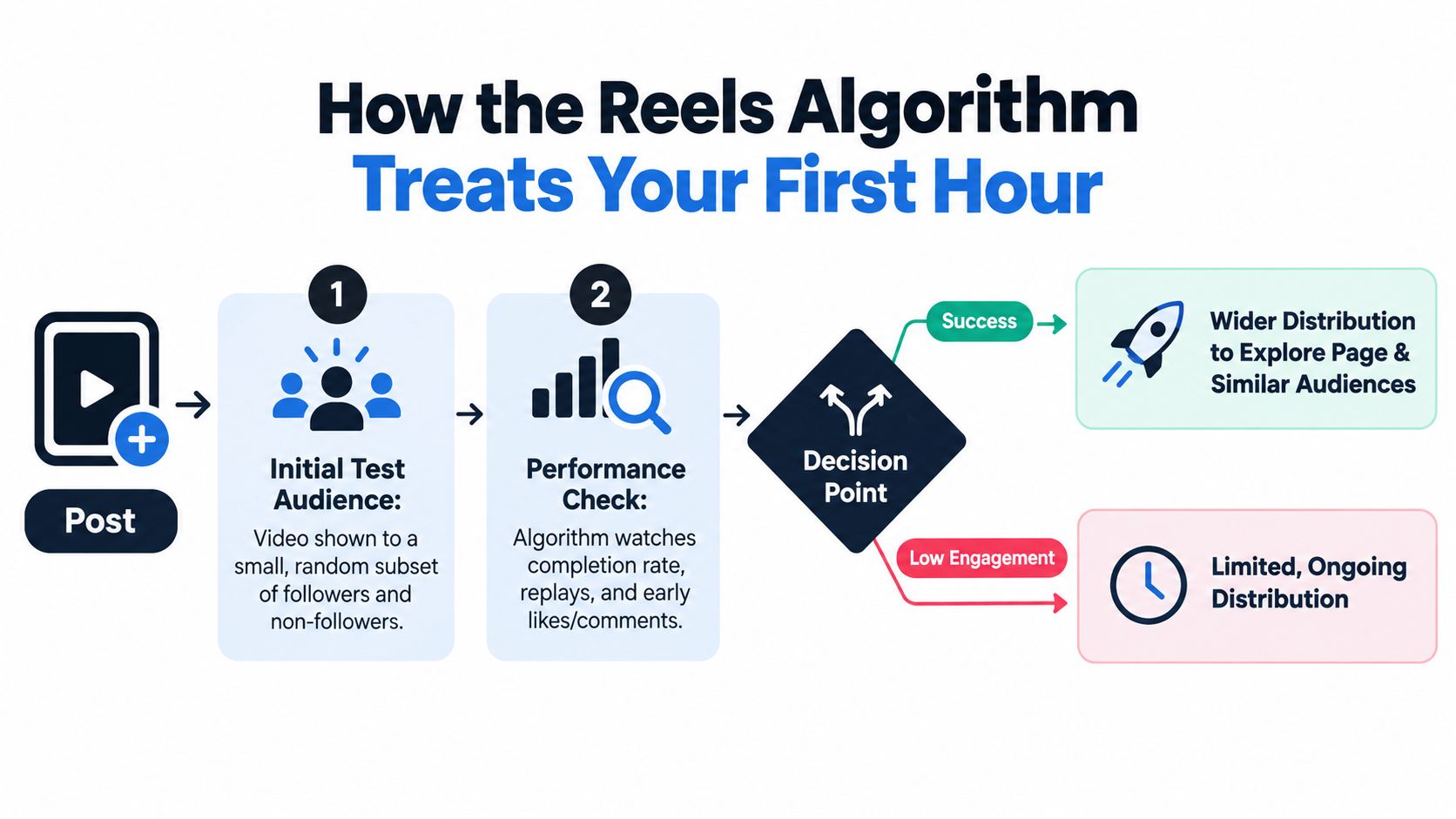
The first hour deserves attention because it gives Instagram early evidence about how people respond. A Reel is shown to an initial sample of followers and non-followers, then the platform watches viewing behavior and interactions. Strong completion, rewatches, shares, saves, profile visits, and follows can support wider distribution, while weak signals can limit momentum.
That doesn't mean a Reel is permanently decided in the first few minutes. Discovery can continue after publishing, and a useful or highly shareable video may gather traction later. But a poorly timed upload can make the first test harder, especially for a small account that needs concentrated audience activity to generate early responses.
The signals that matter
Prioritize watch-through percentage, replays, shares, saves, profile visits, and follows from the Reel. Likes and comments still provide feedback, but a Reel that earns passive likes without holding attention has a weaker foundation than one that keeps viewers watching and gives them a reason to share.
Posting at an off-peak hour doesn't magically game the algorithm. It usually removes people from the first test audience when you need them most. Don't choose a strange hour just because fewer creators are uploading. Choose a lower-competition window only when your own audience is present and your test data supports it.
Never publish when fewer than 25% to 40% of your core audience is active. That threshold is an operating rule for protecting the first test, not a universal Instagram requirement. Your Insights should tell you whether the planned window clears it.
This video is useful if you want a visual explanation of how Reels distribution works:
For a fuller breakdown of ranking signals, read the guide to the Instagram Reel algorithm. The publishing decision remains practical: post when the people most likely to watch, save, and share are online.
Building a Weekly Posting Cadence That Compounds
Timing only helps when your publishing rhythm gives each Reel room to perform. Growth-focused accounts can plan 4 to 7 Reels per week, while maintenance mode can work with 2 to 3 Reels per week. These cadence ranges come from the publishing strategy in this article, not a guaranteed Instagram requirement.
Don't stack multiple Reels into the same hour. Give each upload a clean test window and space posts by at least 6 to 12 hours so one video doesn't compete with another for your audience's immediate attention. You also need enough repetition to separate a genuine timing pattern from one unusually strong hook.
| Account Stage | Reels per Week | Min Hours Between Posts | Primary Goal |
| Growth-focused | 4 to 7 | 6 to 12 | Build learning volume and discovery |
| Maintenance mode | 2 to 3 | 6 to 12 | Stay present without overloading production |
The 14-day test
Start by recording your current reach, retention, saves, and non-follower distribution. Choose two candidate windows from the most active periods in Insights, then alternate between them across two weeks. Keep the formats and topics varied enough to remain useful, but don't change every variable at once.
At the end, compare each window by weekday and content goal. Measure 24-hour reach, retention, shares, saves, profile visits, and follows. Don't declare a winner after one upload. Require at least 10 Reels per window before drawing a conclusion, then keep the stronger slot and retest when your audience, niche, or schedule changes.
Creators who shoot and edit in RAW workflows can also benefit from practical production advice such as these Instagram tips for RAW editors. The production system matters because a perfect posting window is useless if you can't consistently prepare a strong Reel for it.
Matching Post Time to Your Content Goal
The best time depends on what the Reel needs to achieve. A discovery hook needs fast attention and sharing. A community prompt needs enough breathing room for comments. A product demonstration needs viewers who are ready to understand and act.
Reach-driven content
Use peak audience windows for discovery hooks, broad topics, trend reactions, and audio-led formats. A practical starting range is weekday evenings from 6 p.m. to 9 p.m., with Sunday morning as another test candidate. These are starting slots, not promises. Confirm them against your audience's activity and non-follower reach.
Engagement-driven content
Questions, polls, opinion prompts, and save-focused carousels often need a slower browsing moment. Test 11 a.m. to 1 p.m., then compare comments, shares, saves, and meaningful replies rather than relying only on views. A carousel can support a Reel campaign by giving viewers a reference they can save after watching the video.
Conversion-driven content
Tutorials, product demos, service explanations, and link-in-bio prompts need intent, not just traffic. Test weekday mornings from 7 a.m. to 9 a.m., especially if your audience plans its day or researches solutions before work. A short Reel can introduce the problem, while a longer caption, carousel, or profile link handles the detail.
Don't force every post into your favorite slot. A reach-driven entertainment Reel and a conversion-driven product walkthrough have different jobs, so they should earn different tests. Trend discovery, ready-to-shoot video scripts, hooks, scene structures, carousels, and visual post concepts should all connect to the goal you're measuring.
Putting It All Together With Trendy's Planner
A creator named Maya runs a small lifestyle account and starts Monday by reviewing her recent Reels inside Trendy. Instead of copying a global chart, she uses the platform's account context to surface three suggested windows based on her audience activity and content history. She chooses one evening slot for a discovery Reel and keeps a morning slot available for a tutorial.
On Tuesday, Maya batches two ready-to-shoot scripts. One uses a fast hook and a simple scene structure for Instagram Reels. The other becomes a TikTok version with a different opening line and trend angle. She edits the captions, checks the cover frame, and queues both without publishing them at the same time.
Thursday's Reel uses a visual post concept that can also become a carousel. Maya approves the suggested time, pins the strongest hook frame as the cover, tags a collaborator, and turns on an in-app reminder for 10 minutes before publish. That reminder gives her time to check the caption and be available when the video goes live.
By Friday afternoon, she reviews the recap. She checks which Reels reached the first-hour benchmark, where watch time spiked, and whether saves or shares created stronger follow-on distribution. An underperformer receives a suggested repost window rather than an emotional re-upload at a random hour.
Maya then adjusts the next week's queue using Thursday's evidence. She may convert the winning Reel idea into a LinkedIn post, a Threads or X post, or a TikTok script, while keeping the Instagram version native to the platform. This is the value of a cross-format social media co-pilot. It connects Profile Audit, Trends & Ideas, Content Creation, and Performance Analysis instead of treating posting time as an isolated calendar entry.
If you want to understand the scheduling mechanics first, read whether you can schedule Reels on Instagram. Trendy is available through its web app, and creators can also use the Trendy iOS application or Trendy on Android.
Your Reels Posting Checklist Before You Hit Publish
Run this checklist before tonight's upload. It takes the timing decision out of your mood and puts it back into your operating system.
- Open Insights: Pull your top audience-active hours from the latest 30 days of account data.
- Use Reel data: Confirm that the window includes at least one Reels-specific signal, not only general follower activity.
- Write the hook first: Put the core promise in the first 1.5 seconds, then add on-screen text so the idea works without sound.
- Check the format: Reels use a vertical 9:16 format at 1080×1920 pixels, and the minimum duration is 3 seconds, according to this Instagram Reels format guide.
- Choose duration deliberately: Instagram expanded Reels to 3 minutes in January 2025, while the newest camera rollout allows Reels up to 20 minutes. Instagram still recommends shorter Reels for broader recommendation reach, and independent guidance notes that videos longer than 3 minutes are less likely to reach non-followers. See the Reels video specifications for the current format context.
- Schedule the upload: Place it in Trendy at the selected time, queue the thumbnail, and tag collaborators.
- Stay available: Be reachable during the first 30 to 60 minutes so you can answer early comments and continue the conversation.
- Log the result: After 24 hours, record watch time, reach, shares, saves, profile visits, and follows in your performance log.
- Repost intelligently: If the Reel underperforms, use Trendy's suggested repost slot instead of guessing at a new time.
Reels are built for discovery and non-follower reach, while standard feed posts remain more closely tied to your existing audience and feed-based engagement. Choose the format before choosing the time. A Reel can carry a hook, trend, or scene structure into discovery, while a post or carousel can provide the detail people save and revisit.
Your content plan shouldn't stop at Instagram. Build related TikTok content ideas, Live promotion prompts, hashtag and trend research, editing workflows, and ready-to-shoot scripts alongside Instagram Stories, LinkedIn posts, and Threads or X posts. A profile audit identifies the gaps, trends and ideas fill the calendar, content creation turns them into assets, and performance analysis tells you which posting window deserves another test.
Trendy helps you turn your Reels Insights into a working publishing system, with personalized ideas, hooks, trends, ready-to-shoot scripts, scheduling support, and performance analysis across Instagram and TikTok. Visit Trendy to stop guessing your Instagram Reels post time and build your next evidence-based content queue.