Instagram Reels Hashtags That Actually Work in 2026
Learn how Instagram Reels hashtags work in 2026, the new 5-tag cap, and how to pick niche, broad, and branded tags that boost reach and discovery.
You've spent twenty minutes choosing Instagram Reels hashtags, pasted a long block beneath your video, and waited for the reach to climb. Instead, the Reel disappears into the feed while another creator uses a smaller, more focused set and gets in front of the people who care.
In 2026, hashtags still help Instagram classify a Reel, but they aren't the main growth lever anymore. Watch time, replays, saves, shares, and audience relevance have more influence on distribution than a crowded caption. The practical question is no longer “How many tags can I add?” It's “Which few tags help Instagram find the right viewers for this specific video?”
The Hashtag Hangover Most Creators Are Still Recovering From
A small business owner I know used to finish every Reel the same way. She'd paste thirty hashtags into the caption, add a few more she'd copied from a competitor, and publish before lunch. The video would look polished, the caption would be useful, and then the reach would flatten almost immediately.
A friend in the same niche took a different approach. She used fewer tags, wrote a caption that clearly described the video, and focused on a stronger opening. Her Reel didn't explode overnight, but it reached more relevant viewers than the overloaded posts. The difference wasn't that she'd discovered a secret hashtag. She'd stopped treating hashtags as the entire distribution strategy.
Instagram Reels launched globally in August 2020, so the format has moved quickly from a new product feature to one of Instagram's central discovery surfaces. By 2026, the hashtag layer around Reels had become enormous. An index reports potential reach of about 553.7 million for #reelsinstagram, 1.1 billion for #viral, 902.4 million for #trending, and 794 million for #explore in its 2026 data set. It also reports about 121.1 million for #instagramreels and 151.8 million for #reelsvideo. Those figures illustrate the size of the attention pool, not a promise that one Reel will reach every person in it. See the Reels hashtag index
for the underlying figures.
Why the old playbook became bloated
Hashtag culture grew around the idea that every additional tag created another doorway into discovery. Creators copied long lists, swapped a few terms, and hoped one broad tag would carry the post. That habit made sense when hashtags played a larger role in helping Instagram organize the feed, but it encouraged quantity without much attention to audience fit.
The platform's search experience also pushed creators toward an SEO-style approach. Captions, spoken words, on-screen text, audio, and hashtags all help communicate a Reel's subject. A video about beginner home workouts shouldn't rely on a generic fitness label when its actual value is a short, equipment-free routine.
By 2026, Instagram's tighter hashtag limit has forced a reset. Current guidance reports a maximum of five hashtags per post or Reel, while older advice still recommends much larger sets. Social media publishing guidance captures the confusion creators are dealing with.
The 2026 shift: Hashtags can help a good Reel find its first relevant viewers. They can't rescue a video people abandon, skip, or never share.
How Hashtags Actually Work on Reels in 2026
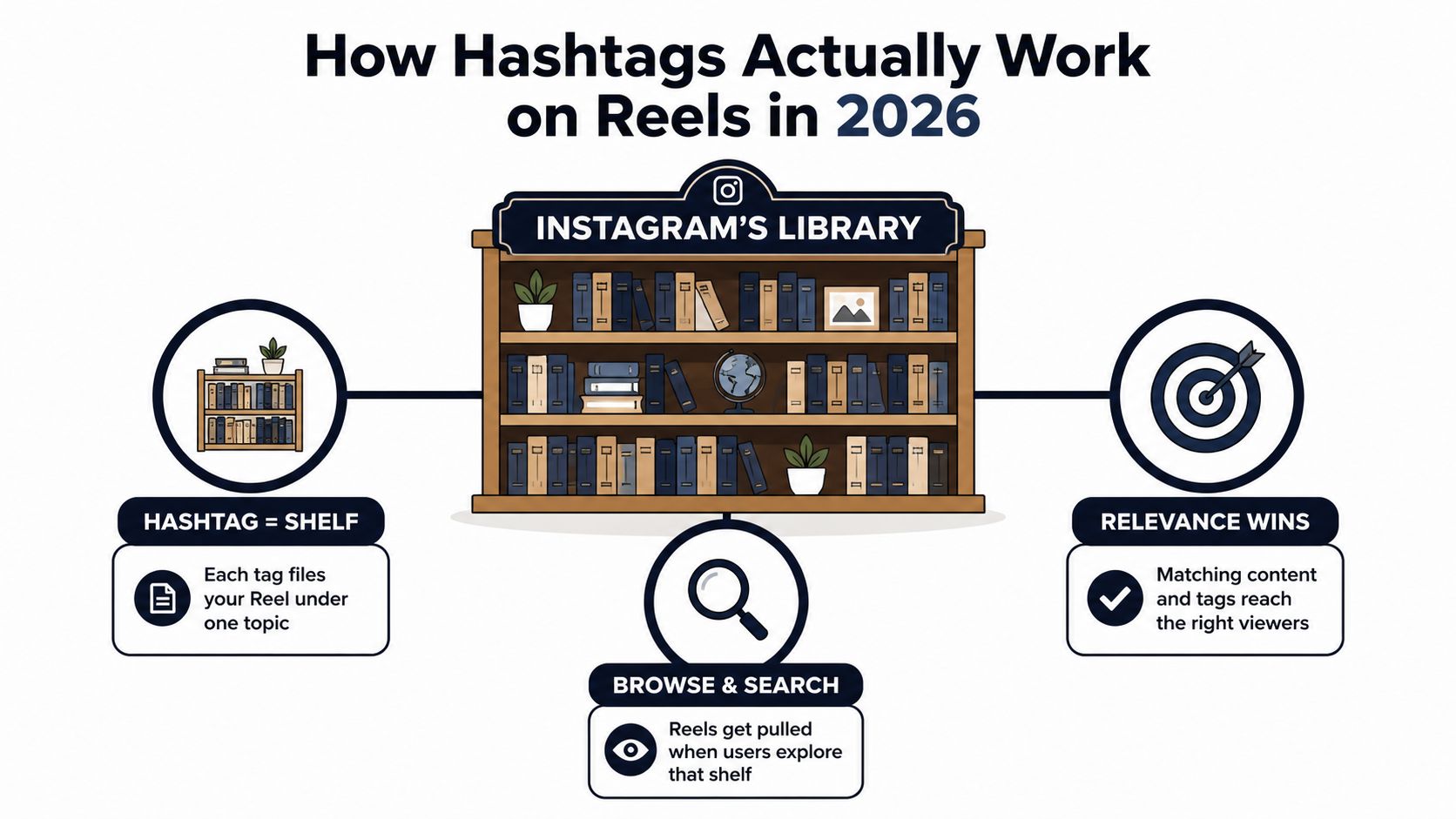
Think of Instagram as a very large library. Your Reel is a book, and each hashtag is a shelf label. A tag such as #beginnerhomeworkouts tells Instagram that the video belongs near other beginner workout content. When someone browses or searches that topic, Instagram has another clue for deciding which Reels might belong on that shelf.
The shelf label helps with filing. It doesn't decide whether the book stays on display.
Three ways to place a tag
You'll commonly see hashtags in three places:
The caption: This is the clearest place to add your selected tags and connect them with a natural keyword-rich description.
The first comment: Creators often use comments to keep captions clean. Treat this placement cautiously because it can behave more like a soft contextual signal than a reliable discovery mechanism.
On-screen text or a sticker: A hashtag displayed inside the Reel can reinforce the topic for viewers and Instagram's content understanding systems. Caption and sticker placement are the safer choices when you want the tag formally associated with the content.
Use the caption for the main set. Add on-screen wording that describes the actual promise of the video, such as “10-minute ab finisher for beginners,” rather than relying on a tag to explain everything.
Hashtags open the shelf, performance keeps the book there
Hashtags sit downstream from the signals that determine whether Instagram continues distributing a Reel. Watch time, completion, replays, saves, and shares tell Instagram that viewers found the video useful or interesting. A tightly matched tag can help the system understand the subject, but the video itself determines whether people stay.
This is why a Reel with five precise tags can underperform a Reel with three, and why a Reel without hashtags can sometimes outperform a tag-heavy post. One 2026 summary cites a 2024 analysis of 18 million posts in which Reels using around 20 hashtags performed best on average for reach. It also cites a 2025 experiment where Reels with 30 hashtags received 70 to 90 times more views than otherwise identical Reels using three. Those findings sit beside newer advice about relevance and the five-tag cap, so they shouldn't be treated as a reason to stuff captions today. Read the 2026 discussion of Reels hashtag testing.
Your tags should match the video's subject, audio context, caption, and on-screen language. A viral dance tag attached to a tax tutorial creates an audience mismatch. Instagram may understand that the video belongs to a dance-related shelf, while the viewers arriving there have no reason to watch a tax explanation.
The New 5-Tag Rule and the 3-Tier Mix That Replaces It
The five-tag ceiling changes hashtag selection from a volume exercise into a small allocation decision. Current 2026 guidance reports that Instagram limits Reels to five hashtags and recommends a focused set of three to five highly relevant tags rather than a broad collection. SocialPilot's Reels hashtag guidance outlines the current approach.
Think of those five places as a budget:
One broad tag gives the Reel a connection to a large topic.
Two or three niche tags describe the exact problem, audience, or format.
One branded tag gives your community a consistent search destination.
You don't need to use all five every time. A tutorial with three strong niche tags may be better categorized than a weaker five-tag set. But if you're running a campaign, the full structure gives each tag a job instead of turning the caption into a storage bin.
Old 30-Tag Block vs New 3-Tier Mix
Approach
Tag Count
Typical Reach
Explore Hit Rate
Effort
Old 30-Tag Block
30
Broad but unfocused, with high audience mismatch risk
Unpredictable
Low after the list is copied
New 3-Tier Mix
Up to 5
More targeted, with clearer topical fit
More useful to test because each tag has a role
Moderate during research, low once organized
The comparison doesn't mean every five-tag Reel will beat every older post. It means the new structure makes your choices explainable. If a Reel reaches the wrong people, you can question the broad tag, the niche terms, or the content itself. A random block gives you no useful diagnosis.
A useful test: If you can't explain why a tag belongs on this particular Reel, remove it.
The right mix also depends on the content format. A local service provider might replace the broad tag with a location-related term. A creator launching a challenge might use a campaign or branded tag. A product tutorial may need a product category tag instead of a general format tag. For more guidance on choosing the number of tags, see how many hashtags to use on Instagram.
Broad, Niche, and Branded Tags Compared
These three tag types don't compete for the same job. Broad tags offer exposure to a large pool, niche tags improve topical matching, and branded tags help people remember or revisit your community.
The simple rating below is a practical planning heuristic, not a platform guarantee. A score of 5 means more of that quality, while a lower score means less. Competition is different from reach. A tag can have a high reach potential and high competition at the same time.
Tag Type
Examples
Reach Potential
Competition
Audience Intent
Recommended Slots
Broad
#fitness, #reels
5/5
5/5
2/5
1 to 2
Niche
#beginnerhomeworkouts, #10minuteabs
3/5
2/5
5/5
2 to 3
Branded
#CoachJulesTribe, #MayasMoveMethod
1/5
1/5
5/5 among your community
1
A broad tag such as #fitness can connect your Reel with a massive subject area, but it tells Instagram very little about the viewer's specific need. A niche tag such as #beginnerhomeworkouts narrows the context and may attract fewer casual browsers, but those viewers have a clearer reason to stay.
Branded tags serve a different purpose. #CoachJulesTribe won't help a new creator reach a huge general audience, but it can collect community posts, make a series easier to browse, and support recall when followers return later.
For an active campaign, try two broad, two niche, and one branded tag. For an evergreen post without a campaign, three niche and two broad tags may create a cleaner balance. Don't treat either ratio as a law. Change it when the Reel's audience, location, or subject demands a different classification.
Before publishing, inspect each tag inside Instagram search. Guidance from Instagram hashtag analytics recommends looking for a usable middle ground rather than choosing only the most popular labels. Another practical recommendation is to test tags with post volumes in a 10,000 to 200,000 post range, then compare reach, hashtag-page impressions, profile visits, and follower growth. Sendible's Reels hashtag research guide explains that middle-band approach.
A Real Reels Hashtag Mix You Can Copy This Week
Maya is a home-workout creator preparing a Reel about a 10-minute ab finisher. Her video shows the exercises, names the audience in the opening, and uses a caption that repeats the topic naturally. She doesn't need five versions of “fitness.” She needs tags that describe the routine and give her existing audience a way to recognize the series.
Slot
Hashtag
Tier
Why It's In the Mix
1
#10minuteabs
Niche
Matches the specific workout duration and body-focus topic
2
#athomeworkouts
Niche to mid-volume
Connects the routine with people looking for home-based exercise
3
#fitnessreels
Broad
Places the video in a wider fitness video category
4
#reelsfitness
Broad
Adds another format and subject pathway for discovery
5
#MayasMoveMethod
Branded
Groups Maya's routines and helps followers find her content
The first tag earns its place through precision. Someone searching for a short ab routine has a closer match than someone browsing a general fitness feed. The second tag adds the setting, while the next two create broader categorization without filling every slot with a generic trend.
The branded tag won't be measured by immediate non-follower reach in the same way as the others. Maya can use it to build a recognizable content library, invite followers to share their progress, and identify posts connected to her method.
For more starting points, use Instagram hashtag ideas for different content themes, then check every suggestion against the actual video. If Maya uses an AI-assisted workflow for captions, music, or visual planning, a guide to tools for AI Instagram videos can help her explore production options without changing the core hashtag principle: the tags must describe the finished Reel.
Maya posts the Reel on Tuesday morning, keeps the five-tag set documented, and checks discovery metrics as the video gathers data through the week. She isn't watching for a magic number. She's looking for evidence that the right viewers are finding, watching, saving, and sharing the routine.
A Simple Testing Loop for Finding Your Best Tags
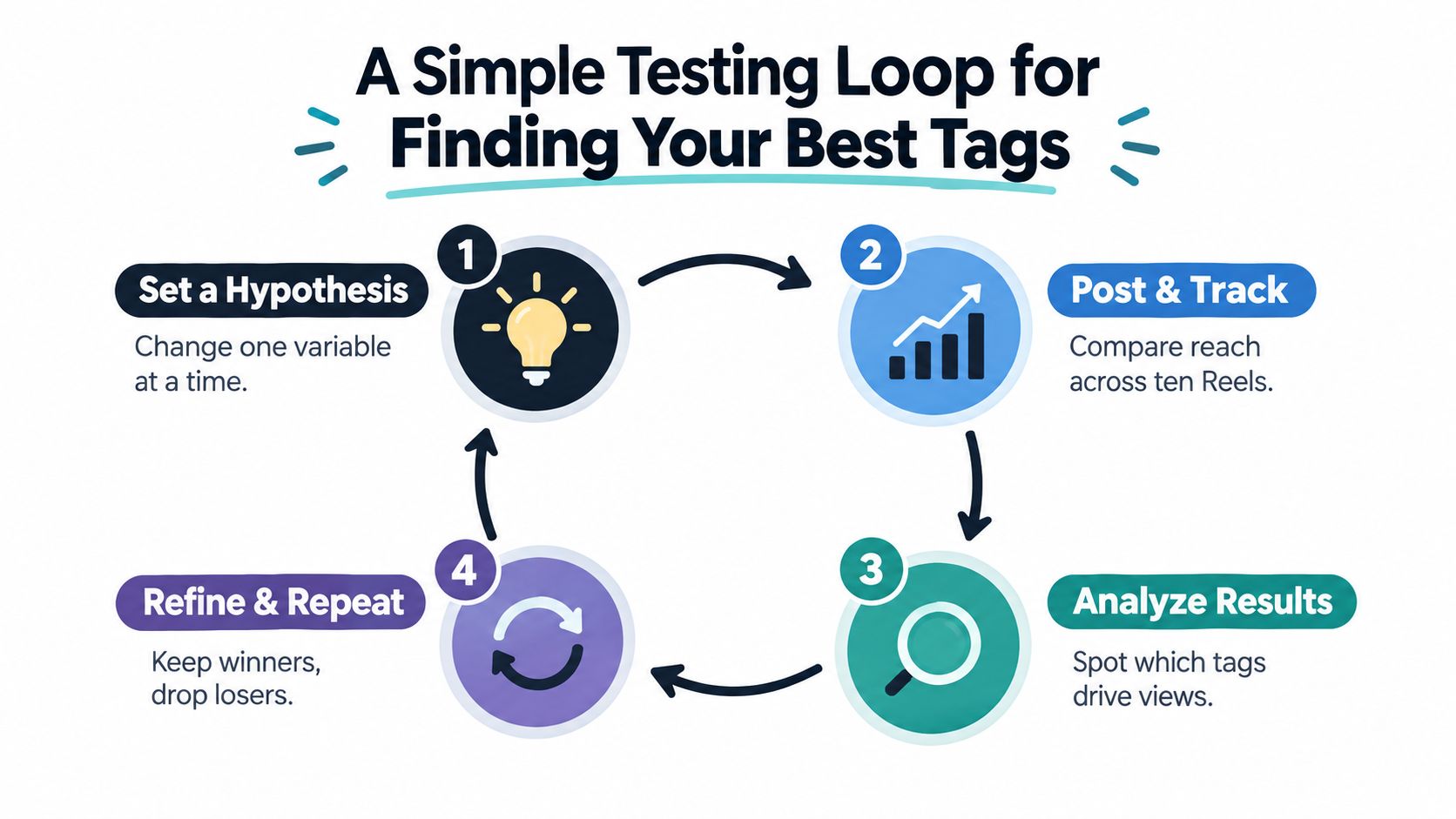
Testing hashtags works better when you isolate variables. If you change the hook, editing style, caption, audio, posting time, and tags at once, you won't know what influenced the result. A calm testing loop gives each set a fairer read.
Set one hypothesis
Choose one question before publishing:
Niche question: Does #10minuteabs attract more relevant discovery than a broader ab-workout term?
Slot question: Does a three-tag set classify this tutorial better than a five-tag set?
Brand question: Does adding the branded tag increase profile visits or community responses?
Write the hypothesis in a simple sheet. Keep the Reel format and subject as similar as practical so you're comparing tag choices rather than completely different creative ideas.
Post and track
Create a small variant set and publish each version over a 7 to 10 day window. The testing plan in this guide uses three Reels per variant, which gives you repeated observations instead of treating one unusual post as a final verdict. Don't copy the same video mechanically. Use comparable topics and a consistent content standard.
Instagram Reels can be created as short as 3 seconds and, depending on the capture method and account experience, uploaded up to 20 minutes long. Clips longer than 3 minutes are less likely to receive Reels-tab distribution and recommendations to new viewers, according to current guidance on Instagram Reel length. Keep that practical breakpoint in mind when your test depends on non-follower discovery.
Measure the signals that matter
Open Instagram Insights and record:
Reach, especially reach from non-followers
Watch time and completion behaviour
Saves, which often indicate useful or repeatable content
Shares, which show that viewers found the Reel worth passing on
Profile visits and follower movement
Impressions attributed to hashtag pages, where available
Likes can be useful context, but they shouldn't be your only decision signal. Hashtag distribution is a discovery problem, so measure whether the tag set brought in the right viewers and whether the video held their attention.
Swap the weakest tag
After the comparison, keep the tags connected to useful discovery and replace the weakest candidate. Change one element, rerun the test, and record what happened. A tag that produced reach but no profile visits may be too broad. A tag that brought fewer accounts but more saves may be better for a tutorial series.
You can also check rising demand before publishing with Google Trends or similar tools. Seasonal interest shifts quickly, so a tag that made sense last month may not describe the audience's current language.
Set aside a few minutes on Sunday evening to review the sheet. Keep the winners, remove the tags that repeatedly fail to match the audience, and choose one hypothesis for the next publishing cycle. For more research ideas, use this guide on how to find trending hashtags on Instagram.
Common Hashtag Mistakes That Still Kill Reach
Most hashtag problems don't look dramatic in the caption. They look like small shortcuts that add up to poor classification and weak audience fit.
Overstuffing past the ceiling
Adding twenty or more tags ignores Instagram's current five-tag limit and makes the old copy-paste habit even less useful. The fix is simple: start with three relevant tags, then add a fourth or fifth only when each one contributes a distinct category.
Copying another creator's block
A competitor's tags reflect that creator's subject, audience, and content history. They may include a branded campaign label, a location you don't serve, or a community term that makes no sense for your Reel.
Build a short candidate library instead. Choose tags from the video's topic, audience problem, format, location, and brand, then select the set that fits this post.
Chasing irrelevant trends
A popular dance tag won't improve a product tutorial just because the tag is active. It can send the video toward viewers who came for something else, creating a weak first impression and poor retention.
Use trend discovery to find ideas, sounds, and formats. Don't use a trend tag unless the finished Reel genuinely belongs in that conversation.
Using banned or spammy tags
Some tags may appear normal in search but still carry restrictions or spam associations. Search each candidate inside Instagram before publishing. If Instagram displays a warning or hides recent posts, remove the tag and choose a more specific alternative.
Generic labels also waste scarce space. #food or #fitness may describe the broad category, but a more exact phrase gives Instagram and viewers better context. Review your set regularly instead of assuming a tag remains safe or useful forever.
Putting the Strategy on Autopilot With Trendy
A Reel goes live, the caption is due, and hashtag research starts with seconds left. A repeatable workflow moves that decision into content planning, where you can choose a focused five-tag set and judge it alongside watch time, shares, saves, and profile visits. Hashtags provide context, but those viewer actions now carry more weight than tag volume.
Trendy supports this process across Instagram, TikTok, Threads, X, and other creator workflows. It connects profile review, content ideas, scripts, hooks, formats, and performance analysis, so hashtags remain part of the content system rather than an isolated generator.
Start with a Profile Audit. Review the Reels that brought useful discovery during the recent 90-day period. Sort the tags from those posts into broad, niche, branded, location, and format groups. Treat the result as a starting library, not proof that one tag caused the outcome.
Build the operating system
Use this sequence:
Audit: Find underperforming topics, repeated tags, strong audience responses, and gaps in the content mix.
Tier: Label each candidate by purpose, then build a three-tier set with broad, niche, and branded tags. Add location or format tags only when they fit the Reel.
Test: Compare three competing five-tag mixes across similar Reels. Track the same Insights metrics, especially watch time, shares, saves, reach, and profile visits.
Schedule: Queue the selected mix with the Reel, caption, hook, and publishing time.
Refresh: Review the library every 30 days. Replace terms that no longer match the audience or content.
Repeat: Revisit the audit when reach, saves, shares, or profile visits weaken.
The workflow also supports ready-to-shoot video scripts, hooks, scene structures, carousels, visual post concepts, Instagram and TikTok content, LinkedIn posts, and Threads or X posts. That matters because the tag set should match the asset carrying it. A short tutorial, carousel, and LinkedIn post need different discovery cues.
Trendy Tool
Hashtag Task
Output For Creator
Profile Audit
Review recent content and identify patterns
A clearer list of topics, formats, and audience signals
Hashtag suggestions
Generate mixed niche, intent, format, and trend candidates
A candidate library for Instagram and TikTok
Testing workflow
Compare focused tag combinations
Documented winners and replacement candidates
Performance analysis
Connect reach, watch time, saves, shares, and profile visits
A reasoned decision about what to keep
Content planning
Pair tags with scripts, hooks, carousels, and posts
A publishable cross-format calendar
Creators who repurpose short-form content may find how to convert a Reel to GIF useful when turning a video moment into a lightweight visual asset. The format changes, while the rule stays the same: the description and surrounding context should match what viewers see.
Trendy's iOS app is available through the Trendy app for iPhone, and Android creators can use the Trendy app for Android. The browser workflow is also available through the web app at heytrendy.app.
Use Trendy to audit your Instagram profile, organize broad, niche, and branded hashtag sets, and test them with stronger hooks and Reel ideas. Choose one Reel topic for this week, then turn the five-tag strategy into a repeatable publishing and measurement routine.