Build a sustainable content calendar Instagram strategy for 2026. Learn format allocation, ranking signals, and workflows to grow without burnout.
The most popular Instagram advice is also the least useful: post every day. A reliable content calendar for Instagram isn't a streak tracker. It's a format-specific operating system that matches Reels, carousels, Stories, and static posts to different audience actions, then leaves enough room for quality and recovery.
Instagram's advertising reach was estimated at at least 1.74 billion people worldwide in January 2025, according to DataReportal's Instagram statistics. That scale makes casual posting harder to justify, not easier. You need a repeatable system that tells you what to create, why it belongs on a particular surface, and which result will determine whether you make it again.
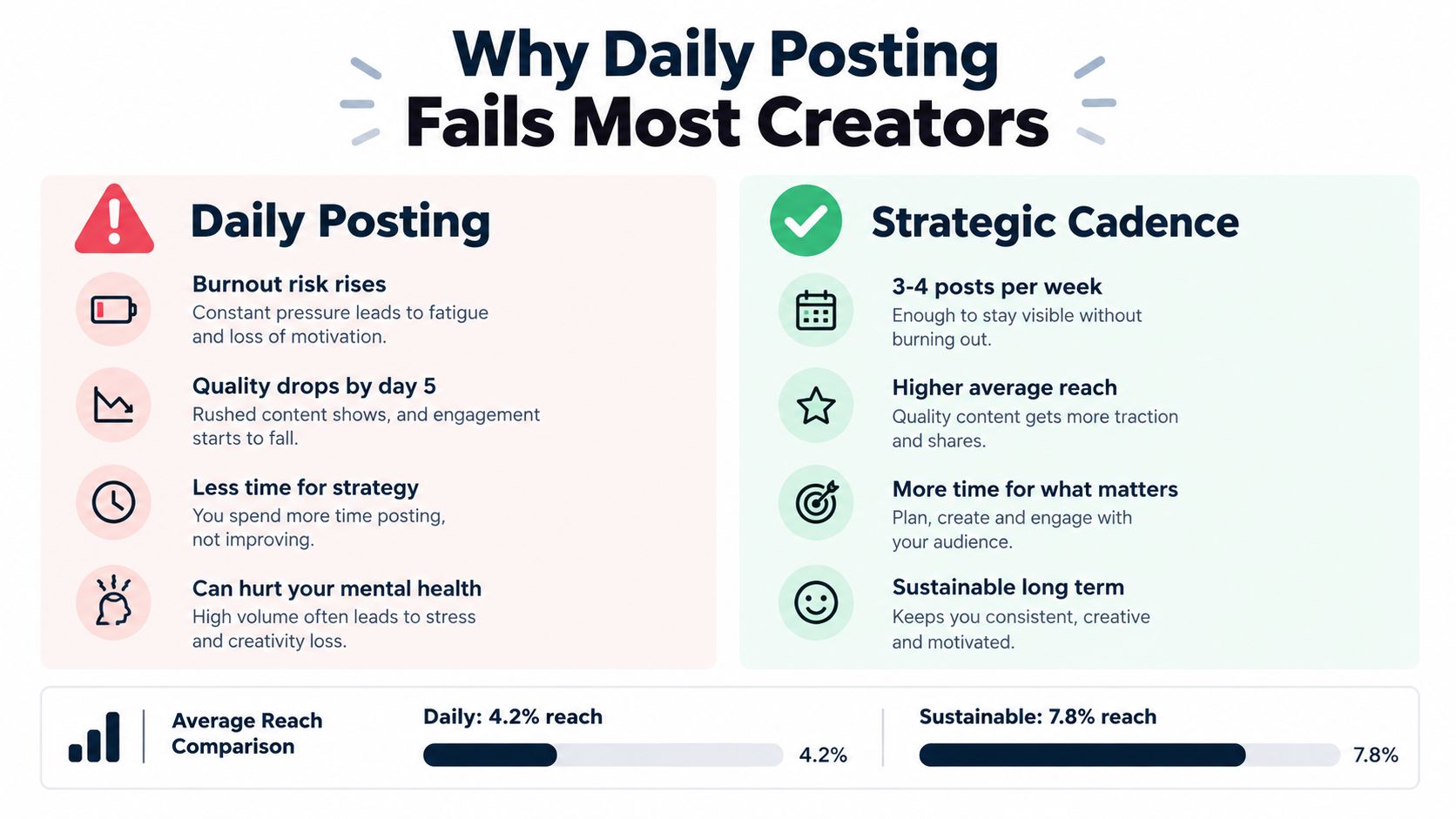
Why Daily Posting Fails Most Creators
Daily posting assumes that more output automatically creates more growth. It doesn't. A content calendar Instagram strategy works better when it allocates formats deliberately and protects the quality threshold that makes people stop, watch, save, share, or reply.
A 2024 study found that Stories made up 71.92% of the Instagram content analyzed, while feed images represented 11.39%. Yet carousels recorded the highest reported engagement rate in that dataset, at 10.15%, compared with 6.27% for Reels. The lesson isn't that every account should publish carousels. It's that format volume and format performance are separate decisions, as shown in the 2024 Instagram study.
Volume creates a quality trap
The same study reported that tiny accounts increased average weekly feed posting from about 2 posts to 3, while small accounts moved from 2 to 4. Reach still declined by 32.34% for tiny accounts and 17.98% for small accounts. More publishing didn't automatically produce wider distribution.
That's the trap. A creator fills Wednesday's slot with a rushed talking-head clip, then uses Thursday for a recycled graphic that doesn't answer a real audience question. The calendar looks healthy, but the audience receives less reason to interact.
Practical rule: Set a minimum quality standard before you set a maximum posting target.
Consistency does matter, but consistency means showing up at a rhythm you can sustain. A panel study of 460 Instagram creators found that posting consistency was positively associated with average monthly likes and comments, while another study found no statistically significant relationship between posting frequency and Instagram engagement. Those findings support a sustainable cadence, not a universal daily quota, as detailed in the creator consistency research.
Start with a realistic baseline, perhaps several strong feed assets supported by lighter Stories, then test from there. For broader planning principles, this social media and content strategy guide is useful context. You can also compare your current rhythm with how often you should post on Instagram, but treat any recommendation as a starting hypothesis rather than a law.
Mapping Formats to Instagram Ranking Signals
Instagram doesn't have one universal ranking system. Feed, Stories, Explore, Reels, and Search use distinct systems, so your calendar should record the intended surface and the signal you expect it to generate.
Instagram says Feed ranking considers whether someone is likely to spend time on a post, comment, like, share it, or tap the profile photo. Recency and previous interactions also influence what people see, according to Instagram's explanation of ranking. That means every calendar entry needs an action, not just a topic.
Format
Primary Signal
Calendar Objective
Reel
Retention, shares, and viewing time
Discovery and new audience reach
Carousel
Saves, shares, and deliberate swiping
Education and consideration
Story
Replies, taps, and direct interaction
Relationship building
Static post
Likes, comments, and profile actions
Brand presence or focused announcement
Match the creative to the expected action
A carousel about choosing the right camera settings should earn saves because people may need the information later. A Reel showing the same process should prioritize a clear opening, quick visual proof, and a reason to share it with another creator. A Story poll or question sticker should be judged by replies and interaction, not by Reel-style watch time.
This changes how you brief a post. Instead of writing “Tuesday, Instagram post, camera tips,” write “Tuesday, carousel, beginner camera settings, objective: saves, CTA: save this before your next shoot.” That entry gives the creator, editor, and analyst a common standard.
For video planning, distinguish the format before production begins. A short tutorial Reel, a behind-the-scenes Story, a visual post concept, and a carousel may cover the same idea, but they need different openings, pacing, and calls to action. Different video formats can help you decide which treatment fits the intended outcome.
Review posts by signal. Rank Reels by completion and shares, carousels by saves and shares, Stories by replies and exits, and discovery posts by profile actions. Then create controlled variations of the strongest creative pattern instead of changing the topic, hook, format, and posting time all at once.
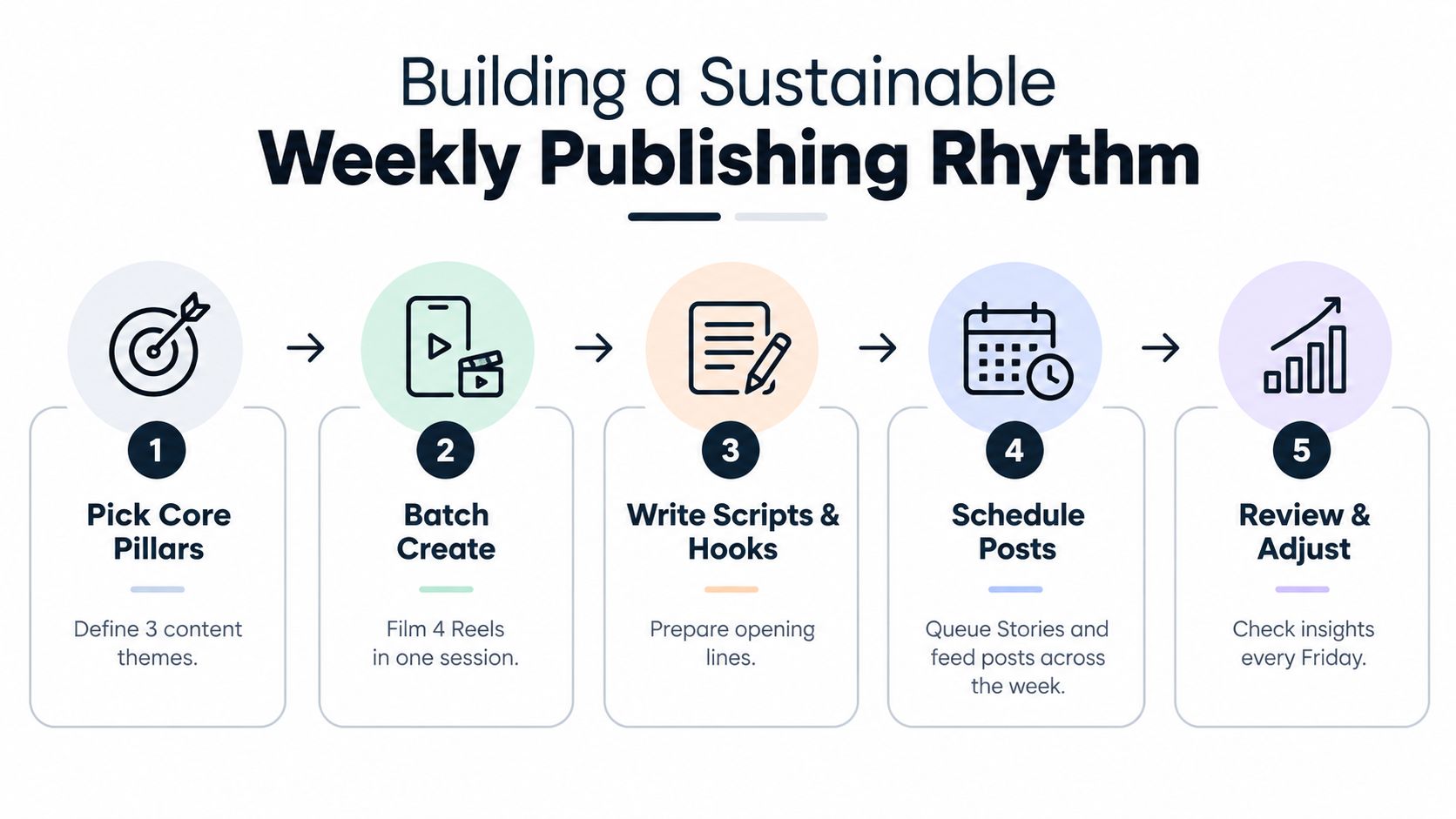
Building a Sustainable Weekly Publishing Rhythm
A workable calendar starts with one decision: what result matters most this month? Choose saves, shares, profile visits, qualified leads, or another meaningful action. If you choose everything, you'll struggle to decide what deserves another slot.
Use a five-part production loop
Choose content pillars. Define recurring themes such as education, behind the scenes, community, product proof, or creator opinion. Pillars reduce blank-page anxiety because you're choosing a topic from a useful menu, not inventing a new identity every morning.
Assign funnel roles. Label each idea as discovery, relationship, consideration, or conversion. A trend-led Reel may attract unfamiliar viewers, while a carousel can explain your method and a Story can answer objections.
Batch the assets. Film related Reels in one session, capture supporting photographs, draft captions, and prepare carousel slides together. Batch production reduces setup costs and makes repurposing practical.
Schedule the repeatable cadence. Build a weekly plan with distinct jobs for each format. For example, use Reels for discovery, carousels for useful depth, Stories for conversation, and a profile-oriented post for conversion. The exact mix should reflect your capacity and audience behavior.
Review with rolling comparisons. Use post-level medians and four-week comparisons rather than celebrating one unusually strong post. Track reach, watch time, shares, saves, comments, profile actions, and conversions per post.
A calendar should make publishing easier tomorrow, not punish you for missing a slot today.
Cadence testing needs control. Compare three weekly posts with five weekly posts over four weeks while keeping content quality, audience, and format mix as similar as possible. Keep the cadence that improves your chosen objective, even if it produces fewer total uploads.
Leave unscheduled capacity for timely trends, customer questions, and creative ideas that need more time. The best social media schedule is the one your workflow can execute without turning every evening into production time.
Structuring Reels for Maximum Retention
A Reel belongs in your calendar as a small production plan, not as a blank cell labeled “video.” Instagram currently lets creators record and edit Reels up to 3 minutes long, using one continuous recording, separate clips, or uploaded footage. You can add music, original audio, text, augmented-reality effects, and other creative effects through the format's native tools, as described in Instagram's Reels features.
Write the edit before you press record
Use a simple three-part storyboard:
Hook: Open with the audience problem, a surprising visual, or the result they want. “Your coffee tastes bitter for one overlooked reason” gives the viewer a clear reason to continue.
Demonstration: Show one process or idea. Keep the scene structure focused instead of packing several unrelated tips into one video.
Closing prompt: Ask for one action. Request a save, share, comment, or profile visit based on the Reel's role.
The first frame should communicate the promise even when the sound is off. Add readable on-screen text, show the relevant object quickly, and cut anything that doesn't move the explanation forward.
Templates can speed up production, but they still require the right raw material. Instagram states that templates require a Reel containing music and at least three clips. Record the clips with the template structure in mind rather than forcing unrelated footage into a preset.
Use Trendy's ready-to-shoot video scripts to prepare opening lines, scene structures, and closing prompts before a batch session. A script can also become a TikTok version, a LinkedIn post, a Threads or X post, or a carousel outline, but adjust the pacing and audience expectation for each platform.
After publishing, inspect retention alongside shares and profile actions. A Reel with reach but weak profile activity may need a sharper connection to your offer. A Reel with strong shares but modest comments may still be doing excellent discovery work. The Instagram Reels best practices guide can help turn those observations into repeatable production choices.
Designing for Creator Sustainability and Recovery
Burnout is a calendar design failure, not a personal character flaw. A rigid plan that requires daily filming, editing, caption writing, and community management will eventually collide with illness, travel, launches, client work, or a simple low-energy week.
Survey reporting cited by Digital Information World found that 73% of surveyed creators in the US, UK, and Germany reported burnout in 2024/2025, compared with 87% in 2022. The same reporting said 78% felt pressure to produce daily or multiple times per day, while more than 60% felt guilt or anxiety about taking time off, as reported in coverage of creator burnout.
Build a fallback calendar
Keep an evergreen folder with tutorials, frequently asked questions, customer stories, process clips, and strong older ideas that can be refreshed. Evergreen content gives you options during a recovery week without pretending that every post must be freshly invented.
Set a minimum viable publishing plan. That might mean one substantial feed asset, a few low-effort Stories, and active replies in the comments. It can also include explicit no-post days. Instagram uses multiple ranking systems and predictions, not one rule that makes a missed upload automatically catastrophic.
Repurposing needs boundaries. Turn one Reel into a carousel summary, a Story question, a TikTok adaptation, a LinkedIn lesson, or a Threads/X observation, but don't copy the caption and aspect ratio blindly. The core idea can travel while the execution changes.
Recovery rule: Preserve the relationship with your audience first. Protecting your ability to create next week matters more than maintaining an artificial streak today.
Schedule community-only days for replies, polls, and direct conversations. During vacations or illness, tell your audience what's changing if that fits your voice, then use your backups without apologizing for the reduced pace. A sustainable calendar should support the person operating it.
Automating Your Strategy with Trendy
A multi-format calendar becomes difficult when ideas, scripts, trend research, scheduling, and reporting live in separate places. Trendy functions as a cross-format social media co-pilot, connecting profile insight, idea generation, content creation, planning, and performance analysis for Instagram and TikTok, with support for Threads, X, and other publishing needs.
Start with the Profile Audit. Use account and performance signals to identify gaps in your current content, then move into Trends & Ideas for personalized concepts, hooks, emerging sounds, hashtags, and video formats. The useful output isn't a pile of generic prompts. It's a shortlist connected to your niche, audience, and current publishing pattern.
From there, build Content Creation assets in the format they need. Trendy can support ready-to-shoot video scripts, hook variations, scene structures, carousels, visual post concepts, Instagram and TikTok content, LinkedIn posts, and Threads/X posts. Use those assets to fill a weekly calendar with clear objectives rather than duplicating one post everywhere.
The scheduler helps organize Instagram posts and Stories around a repeatable plan, while recommended times give you a starting point for testing audience activity. You should still judge timing by your own results, not by an assumed universal best hour.
Finish with Performance Analysis. Review which hooks held attention, which topics earned saves or shares, which posts drove profile actions, and which formats consumed effort without supporting your goal. The Trendy all-features overview shows how those parts fit together.
Trendy is available through the Trendy web app, the Trendy iOS application, and the Trendy Android app. Use it to reduce repetitive planning work while keeping the strategic decisions, creative judgment, and recovery time under your control.
Build your next Instagram calendar around signals, formats, and a cadence you can maintain. Visit Trendy to audit your profile, generate ready-to-shoot ideas across Instagram and TikTok, schedule a sustainable plan, and see which content deserves your next production session.